Additional Service When Replacing Tcm and Transaxle Assembly
When replacing TCM and transaxle assembly simultaneously, perform the following work. For work procedure, refer to Work Procedure.
TCM PROGRAMMING
Since vehicle specifications are not yet written in a new TCM, it is necessary to write them with CONSULT.
WRITING TCM DATA (IP CHARACTERISTICS VALUE)
TCM performs accurate control by retrieving data (inherent characteristic value) of each solenoid. For this reason, after replacing TCM and transaxle assembly, it is necessary to write new data in TCM.
ASIST on the CONSULT has been synchronized to the current date.
All CONSULT software updates (if any) have been installed.
PRINT CURRENT CALIBRATION DATA
 With CONSULT
Turn ignition switch ON.
Connect CONSULT.
Select “CALIB DATA” in “TRANSMISSION”.
Print page 1 of 7.
GO TO 2.
SAVE ‘OPERATION LOG’
With CONSULT
Save Operation Log, according to the procedure of “Programming” in CONSULT Operation Manual.
>>GO TO 3.
CHECK THE SERIAL NUMBER (PART 1)
Write down the serial number of new transaxle assembly.
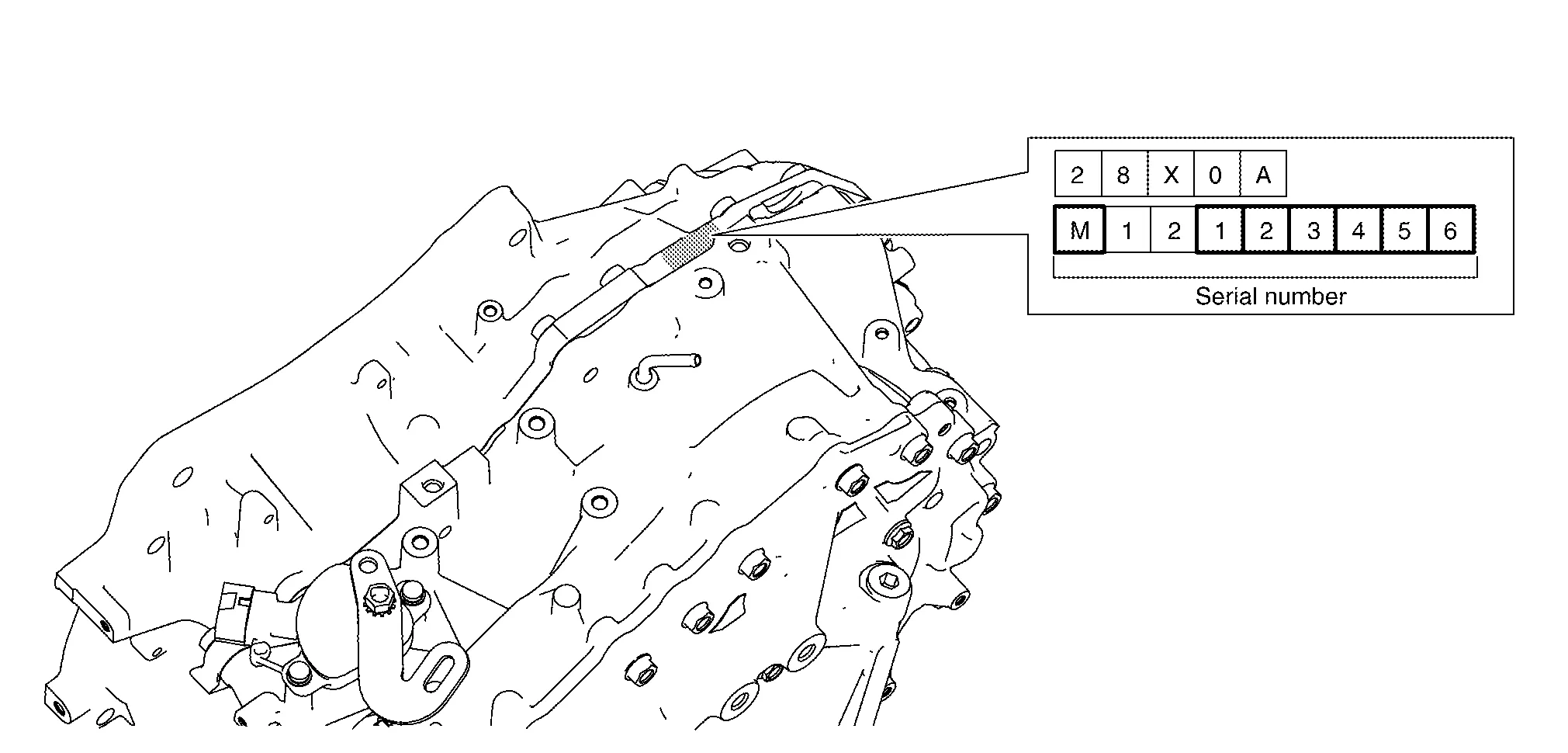
GO TO 4.
REPLACE TCM AND TRANSAXLE ASSEMBLY
Turn ignition switch OFF.
Replace TCM and transaxle assembly. Refer to Removal and Installation and Removal and Installation - FWD (FWD) or Removal and Installation - AWD(AWD).
GO TO 5.
CHECK ‘OPERATION LOG’
With CONSULT
Check Operation Log saved before replacing transaxle assembly, according to the procedure of “Programming” in CONSULT Operation Manual.
Is there an applicable Operation Log in the Saved Data List?
>>GO TO 6.
>>GO TO 7.
PERFORM TCM PROGRAMMING
With CONSULT
Perform TCM programming, according to “Programming” of CONSULT Operation Manual. Refer to CONSULT Operation Manual.
Ignition switch: ON
Electric load: OFF
Brake pedal: Not depressed
Battery voltage: 12 – 13.5 V (Be sure to check the value of battery voltage by selecting “BATTERY VOLT” in “Data monitor” of CONSULT.)
GO TO 9.
READ IN TCM ROM DATA ID BY ‘EPC LINKED’
With CONSULT
Obtain TCM ROM data ID by EPC (service parts catalog), according to the procedure of ‘EPC linked’ in CONSULT Operation Manual. Refer to CONSULT Operation Manual.
>>GO TO 8.
PERFORM TCM PROGRAMMING (EPC LINKED)
With CONSULT
Perform TCM programming according to the procedure of 'EPC linked' in CONSULT Operation Manual. Refer to CONSULT Operation Manual.
Ignition switch: ON
Electric load: OFF
Brake pedal: Not depressed
Battery voltage: 12 – 13.5 V (Be sure to check the value of battery voltage by selecting “BATTERY VOLT” in “Data monitor” of CONSULT.)
GO TO 9.
CHECK THE SERIAL NUMBER (PART 2)
With CONSULT
Turn ignition switch ON.
Insert the supplied CD into CONSULT.
Select “Work Support” in “TRANSMISSION”.
Select “WRITE IP CHARA - REPLACEMENT TCM”.
Select “OK” on the “Select IP characteristics data file” window.
Open the calibration file located on the supplied CD.
Confirm that the serial number (calibration file number) displayed on CONSULT screen matches the serial number (calibration file number) on the transaxle assembly.
Select “Next” on the “WRITE IP CHARA - REPLACEMENT AT/CVT” Work Support screen.
GO TO 10.
WRITE THE TCM DATA (IP CHARACTERISTICS VALUE)
With CONSULT
Turn ignition switch ON, engine OFF.
Press the brake pedal.
Shift the selector lever to the R position.
Depress the accelerator pedal half way and hold, then press “START” on the CONSULT screen.
Write data to the TCM according to the instructions on the CONSULT screen.
Select “END”.
GO TO 11.
PRINT NEW CALIBRATION DATA
With CONSULT
Select “CALIB DATA” in “TRANSMISSION”.
Print page 1 of 7.
GO TO 12.
PERFORM G-SENSOR CALIBRATION
Perform G-Sensor Calibration. Refer to Description.
>>GO TO 13.
PERFORM CLUTCH POINT LEARNING
Perform Clutch Point Learning. Refer to Description.
>>GO TO 14.
PERFORM SELECT LEARNING (DRIVE/REVERSE LEARNING)
Perform Select Learning. Refer to Work Procedure.
Clear any DTCs that may have set and then test drive the Nissan Murano vehicle.
WORK END