Reversing camera
Operation
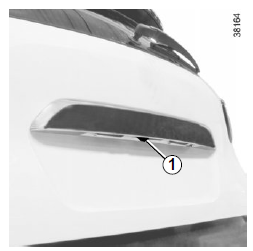
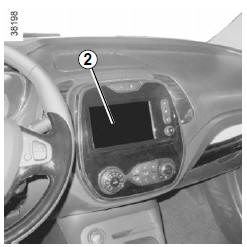
When reverse gear is engaged (and for approximately 5 seconds after shifting into another gear), the camera 1 located near the reversing lights transmits a view of the area behind the vehicle to the touch screen 2, showing a moving guide and a fixed guide.
This system is used first with one or more guides (moving for the trajectory, fixed for the distance).
When the red zone is reached, use the representation of the bumper to stop precisely.
Note:
- make sure the reversing camera is not obstructed (dirt, mud, snow...);
- depending on the vehicle, you can adjust certain settings from the touch screen 2. Refer to the equipment manual.
This feature is an additional aid. It can therefore in no way replace the driver's attention or responsibility.
The driver must always be alert to sudden events that may occur while driving: always make sure there are no moving obstacles (such as a child, an animal, a stroller, a bicycle...) or obstacles that are too small or too thin (medium-sized stone, very thin post...) when maneuvering.
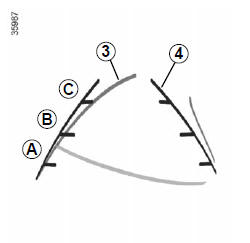
Moving guideline 3 (depending on vehicle)
It is shown in blue on screen 2.
It indicates the path of the vehicle according to the position of the steering wheel.
Fixed guide 4
The fixed guideline consists of coloured markers A, B and C, indicating the distance behind the vehicle:
- A (red) approximately 30 centimetres from the vehicle;
- B (yellow) approximately 70 centimetres from the vehicle;
- C (green) approximately 150 centimetres from the vehicle.
This guideline remains fixed and indicates the path of the vehicle if the wheels are in line with the vehicle.
This feature is an additional aid. It can therefore in no way replace the driver's attention or responsibility.
The driver must always be alert to sudden events that may occur while driving: always make sure there are no moving obstacles (such as a child, an animal, a stroller, a bicycle...) or obstacles that are too small or too thin (medium-sized stone, very thin post...) when maneuvering.
The screen displays a mirror image.
The guides are a projection onto flat ground; ignore this information when it overlaps a vertical object or an object on the ground.
Objects that appear at the edge of the screen may be distorted.
In very bright light (snow, vehicle in sunlight...), the camera's view may be impaired.
When the trunk is open or not properly closed, the message "Trunk open" appears and, depending on the vehicle, the camera display disappears.
Test yourself
A quick Renault Captur quiz: every answer comes with an explanation and a link to the manual page.