Driving correction and assistance systems
Depending on the vehicle, they may consist of:
- Anti-lock braking system (ABS);
- Electronic stability control (ESC) with understeer control and anti-slip system;
- Trailer driving assistance;
- Emergency braking assistance;
- Traction control;
- Hill start assistance.
Anti-lock braking system (ABS)
During heavy braking, ABS prevents the wheels from locking, so you can control the stopping distance and keep control of the vehicle.
In these conditions, you can brake while steering to avoid obstacles.
This system also helps optimise stopping distances, especially on low-grip surfaces (wet roads, etc.).
Each time the system operates, the brake pedal pulsates. ABS does not in any case improve the "physical" performance related to tyre-to-road grip. Safe driving rules must therefore always be followed (distances between vehicles, etc.).
In an emergency, press the brake pedal firmly and continuously. Do not pump the pedal. ABS will modulate the braking force applied in the braking system.
Malfunctions:
 and
 lit on the instrument panel
with the messages "ABS to be checked", "Braking system to be checked" and "ESC to be checked": ABS, ESC and emergency braking assistance are deactivated.Braking is always ensured;
 lights up
on the instrument panel with the message "braking system fault": this indicates a fault in the braking system.
In both cases, consult a Brand Representative.
Your braking is partially assured. However, braking suddenly is dangerous and you must stop immediately and safely, in accordance with traffic conditions. Contact a Brand Representative.
Electronic Stability Control (ESC) with understeer control and traction control system
Electronic stability control ESC
This system helps maintain control of the vehicle in "critical" driving situations (avoiding an obstacle, loss of grip in a bend...).
Operating principle
A steering wheel sensor detects the trajectory the driver intends to follow.
Other sensors located throughout the vehicle measure its actual trajectory.
The system compares the driver's intended path with the vehicle's actual trajectory and, if necessary, corrects the latter by acting on the braking of certain wheels and/or on engine power. When the system activates, the indicator flashes
on the instrument panel.
Understeer control
This system optimises the action of the ESC in the event of pronounced understeer (loss of grip at the front axle).
Traction control system
This system helps limit wheel spin of the driven wheels and helps control the vehicle when starting, accelerating or decelerating.
Operating principle
Using wheel sensors, the system measures and compares the speed of the driven wheels at all times and detects wheel spin. If a wheel tends to spin, the system brakes that wheel until traction is again compatible with the grip available under the wheel.
The system also acts on engine speed according to the grip available under the wheels, independently of the action on the accelerator pedal.
Malfunction
When the system detects a malfunction, the message "ESC check" and the warning lights and
 appear on the instrument panel. In this case, the ESC and the traction control system are deactivated.
Consult a Renault dealer.
These functions are additional aids in critical driving, allowing the vehicle's behaviour to match the driver's intentions.
However, these functions do not take over from the driver.
They do not extend the vehicle’s limits and must not encourage driving faster. They can therefore in no way replace the driver’s vigilance or responsibility during manoeuvres (the driver must always be alert to sudden events that may occur while driving).
Emergency Brake Assist
This is a system complementary to ABS that helps reduce the vehicle's stopping distances.
Operating principle
The system detects an emergency braking situation when the brake pedal is pressed. In this case, brake assistance instantly develops maximum power and may trigger ABS control.
ABS braking is maintained as long as the brake pedal is not released.
Hazard warning lights activation
Depending on the vehicle, these may come on under strong deceleration.
Brake anticipation
Depending on the vehicle, when you release the accelerator pedal quickly, the system anticipates braking in order to reduce stopping distances.
When using the cruise control:
- if you use the accelerator pedal, the system may disengage when you release it;
- if you do not use the accelerator pedal, the system will not disengage.
Malfunction
When the system detects a malfunction, the message "braking system fault" is displayed on the instrument panel together with the warning light .
Consult a Renault dealer.
These functions are additional aids in critical driving, allowing the vehicle's behaviour to match the driver's intentions.
However, these functions do not take over from the driver.
They do not extend the vehicle’s limits and must not encourage driving faster. They can therefore in no way replace the driver’s vigilance or responsibility during manoeuvres (the driver must always be alert to sudden events that may occur while driving).
Grip control
Where fitted, grip control makes it easier to control the vehicle on low-grip surfaces (soft ground...).
Tyres
When tyres need replacing, only fit tyres of the same brand, size, type and construction to your vehicle.
They must either be identical to the original tyres or match those recommended by a Brand Representative.
"Road" mode
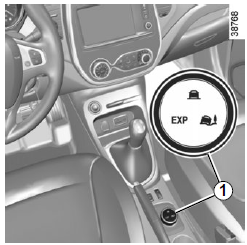
When the vehicle starts, the integrated indicator on button 1 lights up
with the message "road mode activated" on the instrument panel.
This position allows optimum use in normal road conditions (dry, wet, light snow...).
"Road" mode uses the traction control functions.
"Soft ground" mode
Turn button 1: the integrated indicator
lights up with the message "soft ground mode activated" on the instrument panel.
This position allows optimum use on soft ground (mud, sand, dead leaves...). "Soft ground" mode uses the traction control functions. The system automatically switches to "Road" mode above approximately 40 km/h and the integrated indicator on button
1 lights up.
"Expert" mode
Turn button 1: the integrated indicator lights up with the message
on the instrument panel "expert mode activated".
In this position, engine speed remains under the driver's control.
The system automatically switches to "Road" mode above approximately 40 km/h and the integrated indicator on
button 1 lights up.
Hill start assist
This system assists when starting on a slope. It prevents the vehicle from rolling back, depending on the gradient, by automatically applying the brakes when the driver lifts their foot from the brake pedal to press the accelerator.
System operation
It only operates when the gear lever is in a position other than neutral (a position other than N or P for automatic gearboxes) and the vehicle is at a complete standstill (brake pedal pressed).
The system holds the vehicle for approximately 2 seconds. Then the brakes release gradually (the vehicle moves according to the gradient).
The hill start assist cannot completely prevent the vehicle from rolling backwards or forwards in all cases (very steep gradients...).
The driver can in all cases press the brake pedal to prevent the vehicle from rolling backwards or forwards.
Hill start assist must not be used for prolonged stops: use the brake pedal.
This function is not designed to immobilise the vehicle permanently.
If necessary, use the brake pedal to stop the vehicle.
The driver must remain particularly alert on slippery or low-grip surfaces and/or on slopes.
Risk of serious injury.
Test yourself
A quick Renault Captur quiz: every answer comes with an explanation and a link to the manual page.