RENAULT card: general information, use, super-locking
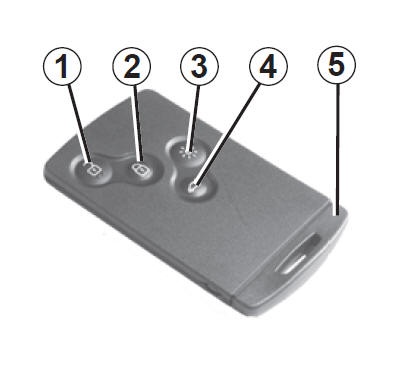
- Unlocking of all openings.
- Locking of all openings.
- Remote activation of the interior lighting.
- Locking/unlocking of the boot.
- Integrated key.
The RENAULT card allows:
- locking/unlocking of the openings (doors, boot) and of the fuel filler flap (refer to the following pages);
- remote switching on of the vehicle interior lighting (refer to the following pages);
- starting the engine: refer to the section “Engine starting” in chapter 2.
Range
Make sure the battery is in good condition, of the correct model and correctly inserted.
Its service life is approximately two years: replace it when the “card battery low” message appears on the instrument panel (refer to the section “RENAULT card: battery” in chapter 5).
RENAULT card operating range
The range varies depending on the environment: take care when handling the RENAULT card, as accidental presses of the buttons may lock or unlock the vehicle.
If the battery is flat, you can still lock/unlock and start the vehicle. Refer to the sections “Locking/unlocking the vehicle” in chapter 1 and “Engine starting” in chapter 2. Driver
responsibility Never leave your vehicle with the RENAULT card inside and a child (or an animal) in it, even for a short time.
Indeed, this person could put themselves or other people at risk by starting the engine, operating equipment such as the window lifters, or locking the doors.
Risk of serious injury.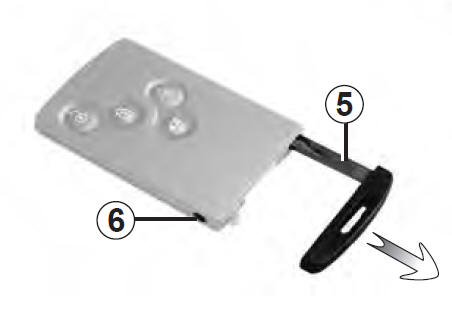 <>
Integrated key 5
The integrated key is used to lock or unlock the front left door when the RENAULT card cannot operate:
- wear of the RENAULT card battery, flat vehicle battery…
- use of devices operating on the same frequency as the card;
- vehicle located in an area with strong electromagnetic radiation;
Accessing the key 5
Press button 6, pull key 5, then release the button.
Using the key
Refer to the section “Locking and unlocking of the openings”.
Once you have entered the vehicle using the integrated key, return it to its housing in the RENAULT card, then insert the RENAULT card into the card reader to be able to start the engine.
AdviceDo not expose the card to a source of heat, cold or humidity.
Do not store the RENAULT card where it could be bent or even accidentally damaged. This is the case, for example, when sitting down on a card stored in a clothing back pocket.
Replacement, need for an additional RENAULT cardIn case of loss, or if you want another RENAULT card, contact only a Brand Representative.
If a RENAULT card is replaced, the vehicle and all of its RENAULT cards must be taken to a Brand Representative to reset the whole set.
You may use up to four RENAULT cards per vehicle.
 Unlocking the doors
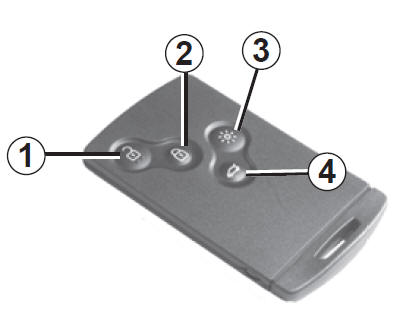
Press button 1.
Unlocking is indicated by the hazard warning lights flashing.
When driver-door-only unlocking is activated (refer to the “vehicle settings personalisation menu” section in chapter 1):
- pressing button 1 once unlocks only the driver's door and the fuel filler flap;
- pressing button 1 twice in succession unlocks all openings.
Locking the doors
Press lock button 2.
Locking is indicated by the hazard warning lights flashing twice.
If an opening (door or boot) is open or not properly closed, or if a RENAULT card has been left in the card reader, the vehicle locks and then immediately unlocks again, with no hazard warning light flashing.
If the vehicle has been unlocked but no opening has been opened, it locks automatically again after two minutes. With the engine running, the buttons on the card are deactivated.The hazard warning light flashes indicate the status of the vehicle:
- one flash indicates that the vehicle is fully unlocked;
- two flashes indicate that the vehicle is fully locked.
Unlocking/locking the boot only
Press button 4 to unlock/lock the boot.
RENAULT card not detected alarm
If you open a door while the engine is running and the card is not in the reader, the message “card not detected” and an audible signal warn you.
The warning goes out when the card is returned to the reader.
“Remote lighting” function
Pressing button 3 switches on the interior lighting for approximately 30 seconds.
This makes it easier to locate the vehicle from a distance, for example in a car park.
Note: pressing button 3 again switches the lighting off.
 Operation
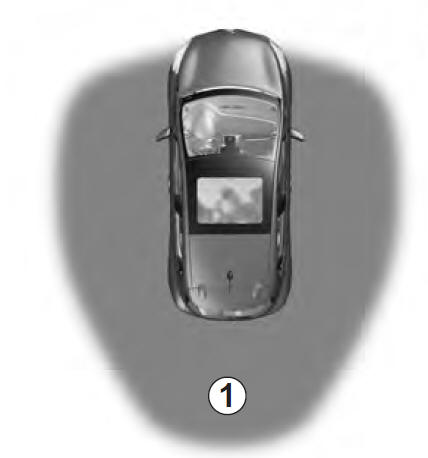
On vehicles so equipped, in addition to the functions of the RENAULT remote-control card, it allows locking/unlocking without any action on the RENAULT card when it is present in access zone 1.
Note: make sure the RENAULT card is not in contact with other electronic devices (computer, PDA, telephone, etc.) that may interfere with operation.
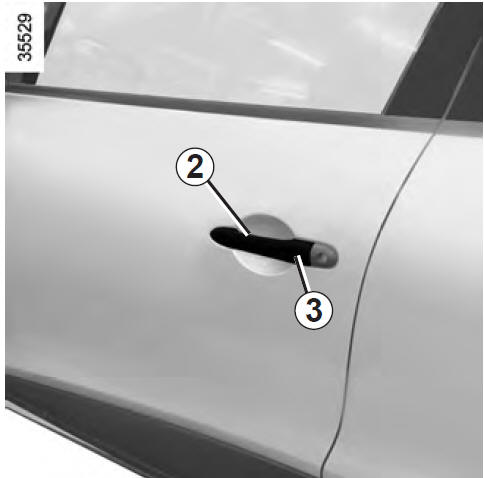 Unlocking the vehicle
With the RENAULT card in zone 1 and the vehicle locked, press button 3 on handle 2 of either front door: the vehicle unlocks.
Pressing button 4 also unlocks the entire vehicle.
Unlocking is indicated by the hazard warning lights flashing.
Note: for three seconds after unlocking by pressing button 3, locking is inhibited.
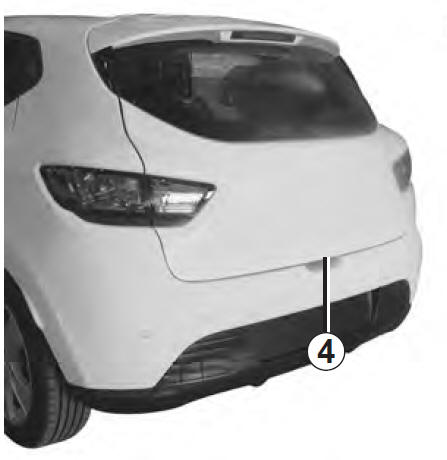
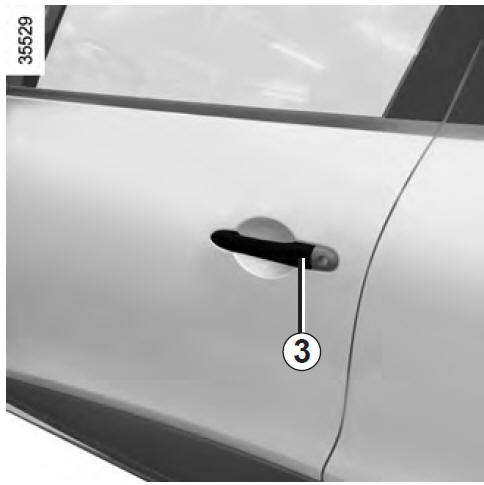 Locking the vehicle
There are three ways to lock the vehicle: automatic locking when walking away, using button 3, and using the RENAULT card.
Locking when walking away
With the RENAULT card on you and the doors and boot closed, walk away from the vehicle: it locks automatically as soon as you leave zone 1.
Note: the distance at which the vehicle locks depends on the environment.

Locking is indicated by two flashes of the hazard warning lights and an audible beep.
This audible beep can be switched off.
Consult a Renault dealer.
If an opening (door or boot) is open or not properly closed, or if a card is in the passenger compartment (or in the card reader), the vehicle does not lock.
In this case, there is neither an audible signal nor hazard warning light flashes.
Locking using button 3
With the doors and boot closed and the vehicle unlocked, press button 3 on the handle of either front door. The vehicle locks. If a door or the boot is open or not properly closed, the vehicle locks and then immediately unlocks.
Note: a RENAULT card must be present in the access zone (zone 1) of the vehicle for locking by button to work.
Note: for three seconds after locking by pressing button 3, unlocking is inhibited.
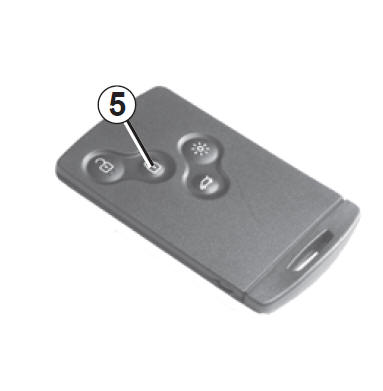
Locking using the RENAULT card
With the doors and boot closed, press button 5: the vehicle locks.
Locking is indicated by the hazard warning lights flashing twice.
Note: the maximum distance at which the vehicle locks depends on the environment.
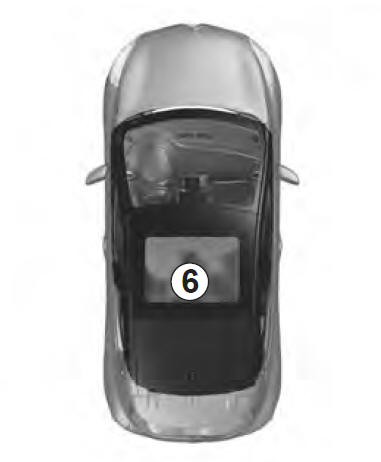
Special features:
The vehicle cannot be locked if:
- an opening (door or boot) is open or not properly closed;
- a card has been left in zone 6 (or in the card reader) and no other card is within the external detection zone.
Engine running: if, after opening and closing a door, the card is no longer in the passenger compartment, the message “card not detected” (accompanied by an audible signal when the speed exceeds a threshold) warns you that the card is no longer in the vehicle. This prevents, for example, driving off after dropping off a passenger who is carrying the card.
The warning goes out when the card is detected again.
 Driver
responsibility
Never leave your vehicle with a RENAULT card inside and a child (or an animal) left in it, even for a short time.
Indeed, this person could put themselves or other people at risk by starting the engine, operating equipment such as the window lifters, or locking the doors.
Risk of serious injury.

When the vehicle is fitted with superlocking, it locks the openings and prevents the doors from being opened using the interior door handles (for example after a window has been broken and someone attempts to open the doors from inside).
 Never use the super-locking of the doors if someone is still inside the vehicle.
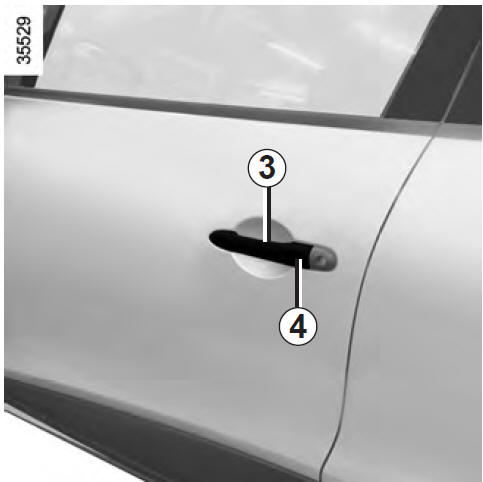
To activate superlocking
You have a choice of two ways to activate superlocking: – press button 2 twice in quick succession; – or, with the vehicle unlocked, press button 4 on handle 3 of the driver's or passenger's door twice in quick succession.
Locking is indicated by five flashes of the hazard warning lights.
To deactivate superlocking
Unlock the vehicle using button 1 on the RENAULT card.
Unlocking is indicated by the hazard warning lights flashing.
After super-locking has been activated using button 2, locking and “hands-free” unlocking are deactivated.To return to “hands-free” operation: restart the vehicle.
Test yourself
A quick Renault Clio quiz: every answer comes with an explanation and a link to the manual page.