Locking and unlocking of openings
Locking/Unlocking doors from the outside
This is done using the RENAULT card: refer to the “RENAULT cards” sections in chapter 1.
In some cases, the RENAULT card may not work:
- wear of the RENAULT card battery, discharged vehicle battery...
- use of devices operating on the same frequency as the card (mobile phone...);
- vehicle located in an area with strong electromagnetic radiation.
In this case, it is possible to:
- use the key built into the card to unlock the front left door;
- lock each of the doors manually;
- use the interior locking/unlocking control (refer to the following pages).
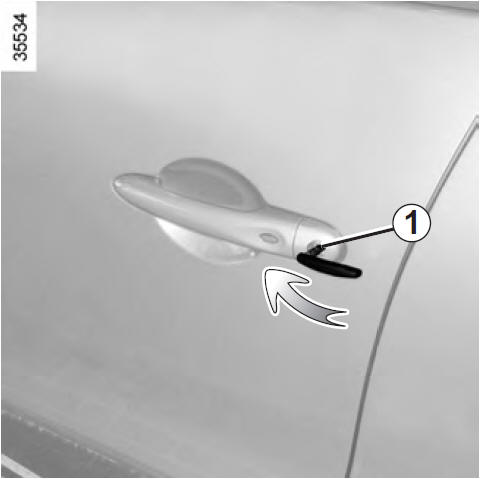
Using the key built into the RENAULT card
Insert key 1 into the lock and lock or unlock the front left door.
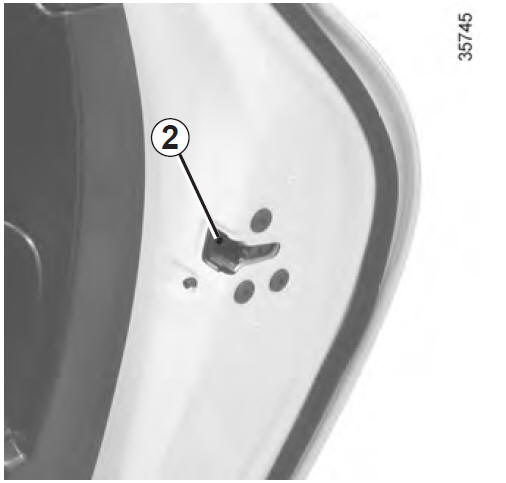
Manual locking of the doors
Door open: turn screw 2 (using the end of the key) and close the door.
It is now locked from the outside.
It can then only be opened from inside the vehicle or with the key for the front left door.
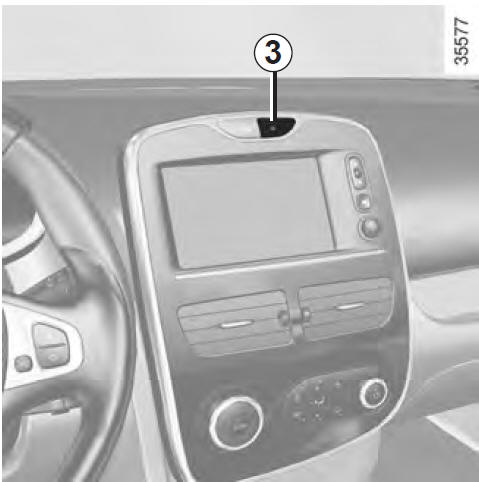
Interior locking/unlocking control
Switch 3 simultaneously controls the doors, the boot and, depending on the vehicle, the fuel filler flap.
If an opening (door or boot) is open or not properly closed, the openings lock/unlock quickly.
When transporting items with the boot open, you can still lock the other openings: engine off, press and hold switch 3 for more than five seconds to lock the other openings.
Locking the openings without the RENAULT card
For example, a discharged battery, temporary malfunction of the RENAULT card...
Engine off, with an opening (door or boot) open: press and hold switch 3 for more than five seconds.
When the door is closed, all openings will be locked.
The vehicle's exterior can only be unlocked with the RENAULT card located in the vehicle access zone or using the key built into the RENAULT card.
After locking/unlocking the vehicle or the boot alone using the buttons on the RENAULT card, locking when moving away and “hands-free” unlocking are deactivated. To return to “hands-free” operation: restart the vehicle.Opening locking status indicator
Ignition on, the indicator built into switch 3 shows the locking status of the openings:
- indicator on: openings locked;
- indicator off: openings unlocked.
When you lock the doors, the indicator stays on and then goes off.
 Never leave
your vehicle with a RENAULT card inside.
Driver's responsibility
If you choose to drive with the doors locked, be aware that this may make it more difficult for rescue services to access the passenger compartment in an emergency.
Test yourself
A quick Renault Clio quiz: every answer comes with an explanation and a link to the manual page.