If a warning message is displayed
The multi-information display shows warnings indicating a system malfunction or improper operation of vehicle functions, and messages indicating that maintenance is required. When a message is displayed, perform the corresponding corrective procedure.
- Master warning light
The master warning light also comes on or flashes to alert you that a message is displayed on the multi-information display*. - Multi-information display
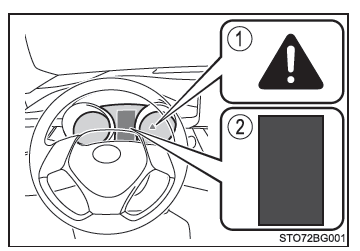
If any warning message is still displayed after you have performed the actions described below, contact a Toyota dealer, a Toyota authorized repairer, or any reliable repairer.
*: The master warning light may not come on or flash when a warning message is displayed.
Messages and Warnings
Warning lights and warning sounds are activated as described below, depending on the content of the message. If a message indicates that the vehicle must be inspected by a dealer, have the vehicle inspected as soon as possible by a Toyota dealer, a Toyota-authorized repairer, or any reliable repairer.
 |
System warning light | Warning sound* | Warning |
| Comes on | - | Sounds | Indicates an emergency, such as a malfunction of a driving-related system or a hazard that may result from failure to perform the corrective procedure |
| - | Comes on or flashes | Sounds | Indicates an emergency, such as when the systems shown on the multi-information display may be malfunctioning |
| Flashes | - | Sounds | Indicates a situation where the vehicle may be damaged or a hazard may exist |
| Comes on | - | Does not sound | Indicates a condition, such as a malfunction of an electrical device, or a need for maintenance |
| Flashes | - | Does not sound | Indicates a situation where an operation has been performed incorrectly, or how to perform an operation correctly |
*: A warning sound sounds the first time a message is displayed on the multi-information display.
■ Warning messages The warning messages explained below may differ from those actually displayed, depending on the operating conditions and specifications of the vehicle.
■ System warning lights The main warning light does not come on or flash in the following cases.
Instead, a separate system warning light comes on along with a message displayed on the multi-information display.
- "ABS malfunction. See dealer.": The ABS warning light comes on.
- Monochrome display models: Indicates that a door is not closed properly while the vehicle is stopped.
The door open warning light comes on.
■ If the message "See dealer." is displayed The system or component indicated on the multi-information display is malfunctioning.
Have the vehicle inspected by a Toyota dealer, an authorized Toyota repairer, or any reliable repairer.
■ If a message is displayed regarding an operation
If a message is displayed regarding operation of the accelerator pedal or brake pedal
A warning message regarding operation of the brake pedal may be displayed while a driving support system, such as the PCS (Pre-Collision System) (on models equipped) or active cruise control (on models equipped), is operating. If a warning message is displayed, be sure to slow the vehicle down or follow the instructions shown on the multi-information display.A warning message is displayed when the priority braking system is operating. Follow the instructions shown on the multi-information display.
If a message is displayed regarding operation of the start switch
The system displays instructions for using the start switch when an incorrect procedure is used to start the engine or when the start switch is not used properly. Follow the instructions shown on the multi-information display to use the start switch again.If a message is displayed regarding operation of the shift lever
To prevent shift lever misoperation or the vehicle from moving unexpectedly, a message may be displayed on the multi-information display asking you to change the shift lever position. In this case, follow the instructions in the message and operate the shift lever.If a message or image is displayed regarding the open/closed status of a component or the replacement of a consumable item
Check the component indicated on the multi-information display or warning light, then take the action requested, such as closing the open door or replacing the consumable item.
■ If the message "Consult the owner's manual." is displayed
- If the message "Braking power low. Stop the vehicle in a safe place.
Consult the owner's manual." is displayed, a malfunction may have occurred.
Immediately stop the vehicle in a safe place and contact a Toyota dealer, a Toyota-authorized repairer, or any reliable repairer. Continuing to drive may be dangerous.
- Color display models: If the message "Smart Entry & Start System malfunction.
Consult the owner's manual." is displayed, the system may be malfunctioning. Have the vehicle inspected as soon as possible by a Toyota dealer, a Toyota-authorized repairer, or any reliable repairer.
■ If the message "Charging system malfunction" is displayed Indicates a malfunction in the vehicle's charging circuit. Immediately stop the vehicle in a safe place and contact a Toyota dealer, a Toyota-authorized repairer, or any reliable repairer. Continuing to drive may be dangerous.
■ If the message "Coolant temperature high" is displayed Indicates that the coolant temperature is too high. Immediately stop the vehicle in a safe place.
■ If the message "Low engine oil pressure." is displayed Indicates that the engine oil pressure is too low. Immediately stop the vehicle in a safe place and contact a Toyota dealer, a Toyota-authorized repairer, or any reliable repairer.
■ If the message "AWD system malfunction. 2WD mode engaged. See dealer." is displayed (4WD models only) Indicates a malfunction in the four-wheel drive system. The 4WD system is deactivated and only the front wheels of the vehicle are driving.
Have the vehicle inspected by a Toyota dealer, an authorized Toyota repairer, or any reliable repairer.
■ If the following messages are displayed (4WD models only) The system may be overheating. Reduce vehicle speed or stop the vehicle in a safe place.
- "AWD system overheated. 2WD mode engaged."
- "AWD system overheated. Switching to 2WD mode."
■ If the message "Engine oil maintenance required soon." is displayed Indicates that it is time to change the engine oil. (The indicator only operates correctly if the message has been reset.) Check the engine oil and replace it if necessary. After changing the engine oil, reset the message.
■ If the message "Engine oil maintenance required. See your dealer." is displayed Indicates that it is time to change the engine oil. (After changing the engine oil and resetting the message.) Have the engine oil and oil filter checked and replaced by a Toyota dealer, a Toyota-authorized repairer, or any reliable repairer. After changing the engine oil, reset the message.
■ If the message "A new key has been registered. Contact your dealer for details." is displayed (vehicles with a smart entry & start system) This message is displayed each time you open the driver's door after unlocking the doors from the outside, for about one week after a new electronic key has been registered.
If this message is displayed when you have not had a new electronic key registered, have a Toyota dealer, a Toyota-authorized repairer, or any reliable repairer check whether an unknown electronic key (other than those in your possession) has been registered.
■ If the message "Front camera not available" or "Front camera view obstructed. Clean and defog windshield." is displayed.
The following systems may not operate until the problem indicated in the message is resolved.
- PCS (Pre-Collision System)*
- LDA (Lane Departure Alert) with steering assist*
- Dynamic radar cruise control with full-speed range*
- Dynamic radar cruise control*
- Automatic high beam*
*: If equipped