AAvtotema Toyota Tundra
EN
  • RU
  • EN
  • FR
  • DE
  • IT
  • ES
  1. Home
  2. Toyota
  3. Toyota Tundra
  4. Toyota Tundra Service Manual
  5. Audio, Visual, Telematics
  6. Navigation / Multi Info Display
  7. Navigation System
  8. System Diagram
Toyota Tundra Service Manual
  • General
  • Audio, Visual, Telematics
    • Audio / Video
    • Garage Door Opener
    • Navigation / Multi Info Display
      • Navigation Antenna
      • Navigation Receiver(for Column Shift Type)
      • Navigation Receiver(for Floor Shift Type)
      • Navigation System
        • AVC-LAN Circuit
        • Stereo Component Amplifier Malfunction (B15A3)
        • Short in GPS Antenna (B15C0,B15C1)
        • Speed Signal Malfunction (B15C2)
        • Speaker Output Short (B15C3)
        • Stereo Component Amplifier Disconnected (B15D3)
        • A/C ECU Vehicle Information Reading/Writing Processor Malfunction (B15F5)
        • Main Body ECU Vehicle Information Reading/Writing Process Malfunction (B15F6)
        • D-Seat ECU Vehicle Information Reading/Writing Process Malfunction (B15F8)
        • XM Tuner Antenna Disconnected (B15FE,B15FF)
        • SD Card Communication Malfunction (B158C)
        • AV Signal Stoppage (Low Battery Voltage) (B158F)
        • Lost Communication with Meter (B1324)
        • LVDS Signal Malfunction (from Extension Module) (B1532,B156C)
        • HD Radio Tuner Malfunction (B1551,B15A0,B15AD,B15B0,B15B3,B15B4,B15B7)
        • Extension Module Malfunction (B1552,B158A,B15BA)
        • Voice Recognition Microphone Disconnected (B1579)
        • USB Device Malfunction (B1585)
        • Black Screen
        • CD Sound Skips
        • Cellular Phone Inspection
        • Cellular Phone Registration Failure
        • Confirm Cellular Phone Functionality
        • Confirm Vehicle Headunit Functionality
        • Cursor or Map Rotates when Vehicle Stopped
        • Data List / Active Test
        • Data Signal Circuit between Navigation Receiver Assembly and Extension Module
        • Data Signal Circuit between Navigation Receiver Assembly and Stereo Jack Adapter
        • Diagnostic Trouble Code Chart
        • Disc cannot be Ejected
        • Disc cannot be Inserted or is Ejected Right After Insertion
        • Display does not Dim when Light Control Switch is Turned ON
        • Does not Play even after Bluetooth Audio Mode is Selected
        • Dtc Check / Clear
        • Freeze Frame Data
        • GPS Mark is not Displayed
        • How To Proceed With Troubleshooting
        • Illumination Circuit
        • Illumination for Panel Switch does not Come on with Tail Switch ON
        • Microphone Circuit between Microphone and Navigation Receiver Assembly
        • Mute Signal Circuit between Navigation Receiver Assembly and Stereo Component Amplifier
        • Navigation Receiver Assembly Power Source Circuit
        • Navigation Voice Circuit
        • No Sound can be Heard from Speakers
        • Noise Occurs or Sound Skips when Portable Player Plays
        • Noise Occurs
        • Operation Check
        • Panel Switches do not Function
        • Parking Brake Switch Circuit
        • Parts Location
        • Poor Sound Quality in All Modes (Low Volume)
        • Portable Player cannot be Connected Manually/Automatically
        • Portable Player cannot be Registered
        • Precaution
        • Problem Symptoms Table
        • Radio Broadcast cannot be Received or Poor Reception
        • Registered Device cannot be Deleted
        • Reverse Signal Circuit
        • Route cannot be Calculated
        • Satellite Radio Broadcast cannot be Received
        • Screen Flicker or Color Distortion
        • Sound of Portable Player cannot be Heard from Speakers or Sound is Low
        • Sound Quality is Bad Only when Disc is Played (Volume is Too Low)
        • Sound Signal Circuit between Navigation Receiver Assembly and Stereo Component Amplifier
        • Sound Signal Circuit between Navigation Receiver Assembly and Stereo Jack Adapter
        • Speaker Circuit
        • Steering Pad Switch Circuit
        • Stereo Component Amplifier Power Source Circuit
        • System Description
        • System Diagram
        • Terminals Of Ecu
        • Touch Panel Switch does not Function
        • Traffic Information is not Displayed
        • Sending Malfunction (Navigation to APGS) (U0073,U0100,U0129,U0140,U0155,U0164)
        • USB Audio System Recognition/Play Error
        • Vehicle Speed Signal Circuit between Navigation Receiver Assembly and Combination Meter
        • Vehicle Speed Signal Circuit between Stereo Component Amplifier and Combination Meter
        • Voice Guidance does not Function
        • Voice is not Recognized
    • Park Assist / Monitoring
  • Brake
  • Engine, Hybrid System
  • Power Source, Network
  • Steering
  • Vehicle Interior
Audio, Visual, Telematics

System Diagram

In this manual: Audio, Visual, Telematics
General — 26Audio, Visual, Telematics — 333Brake — 176Engine, Hybrid System — 816Power Source, Network — 88Steering — 88Vehicle Interior — 1071
~1min read

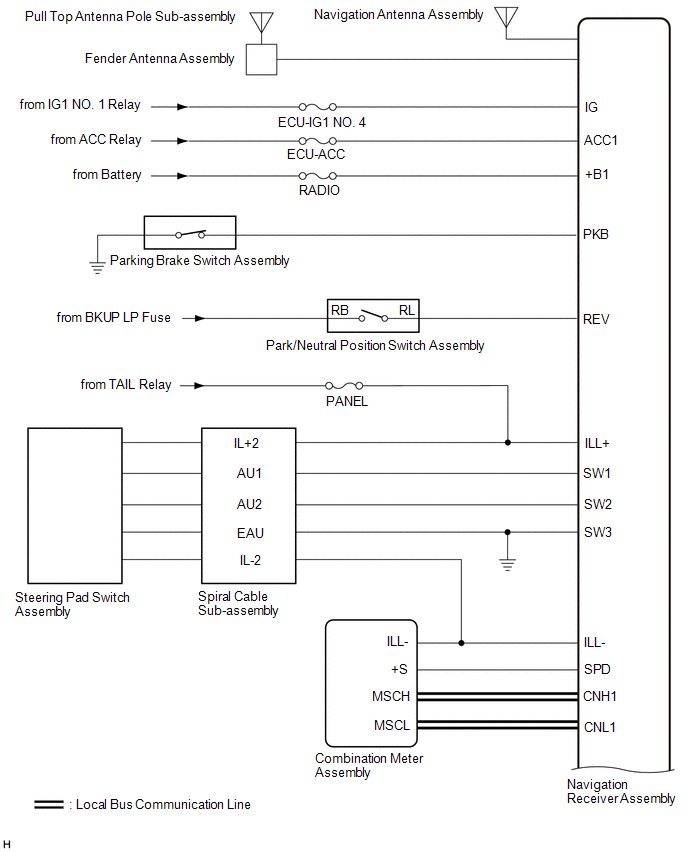
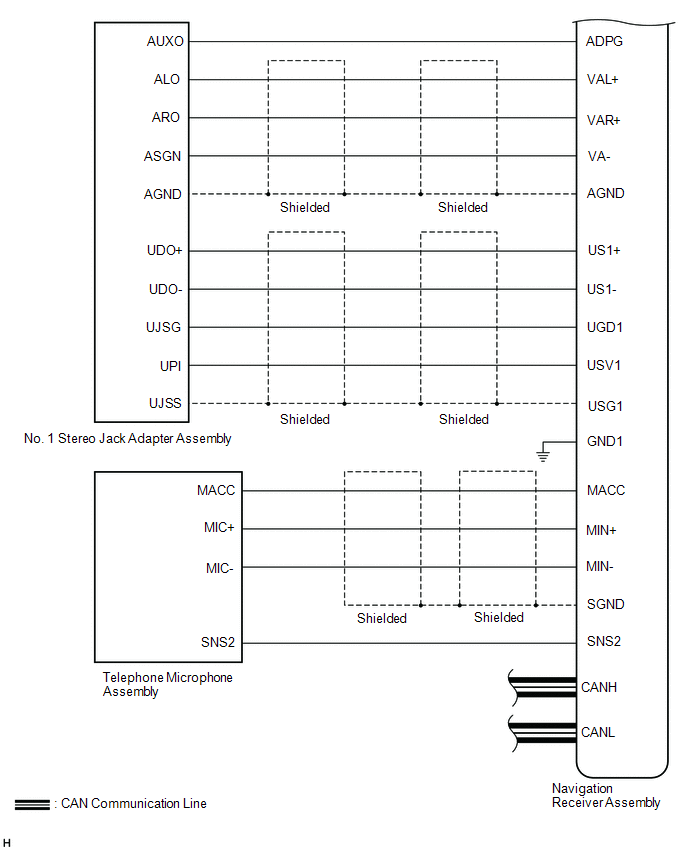
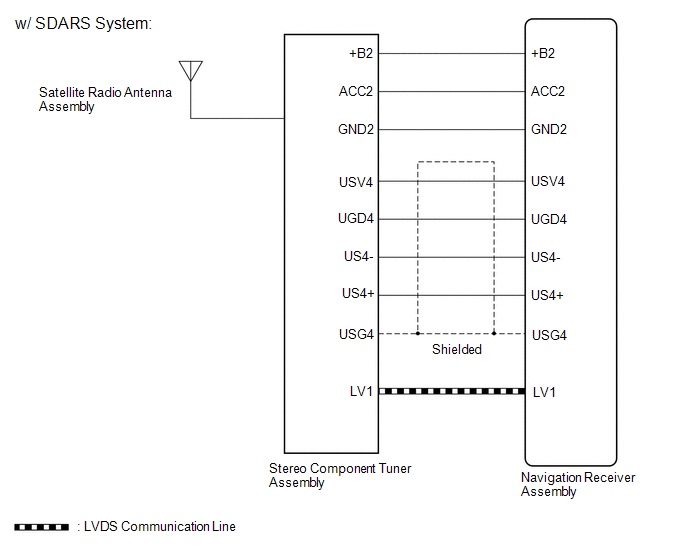
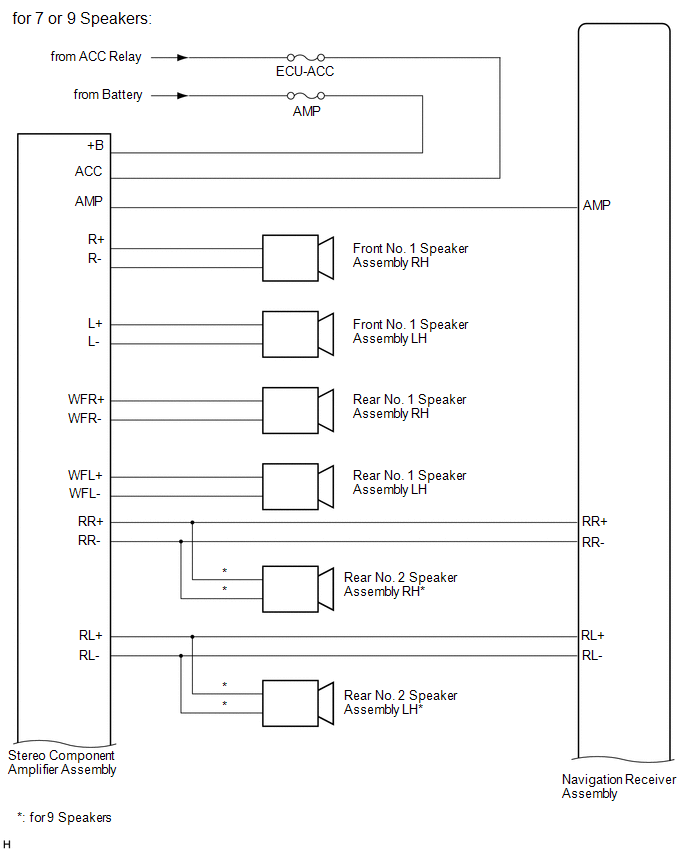
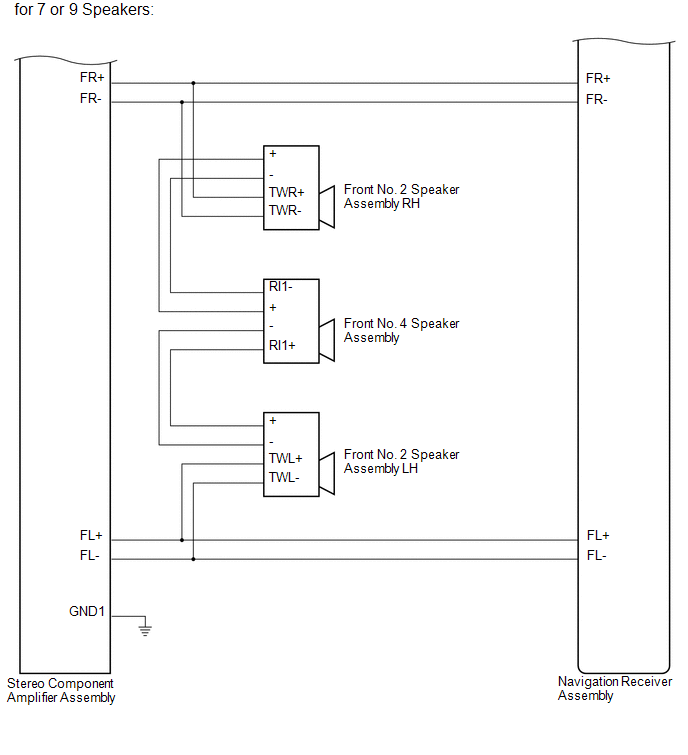
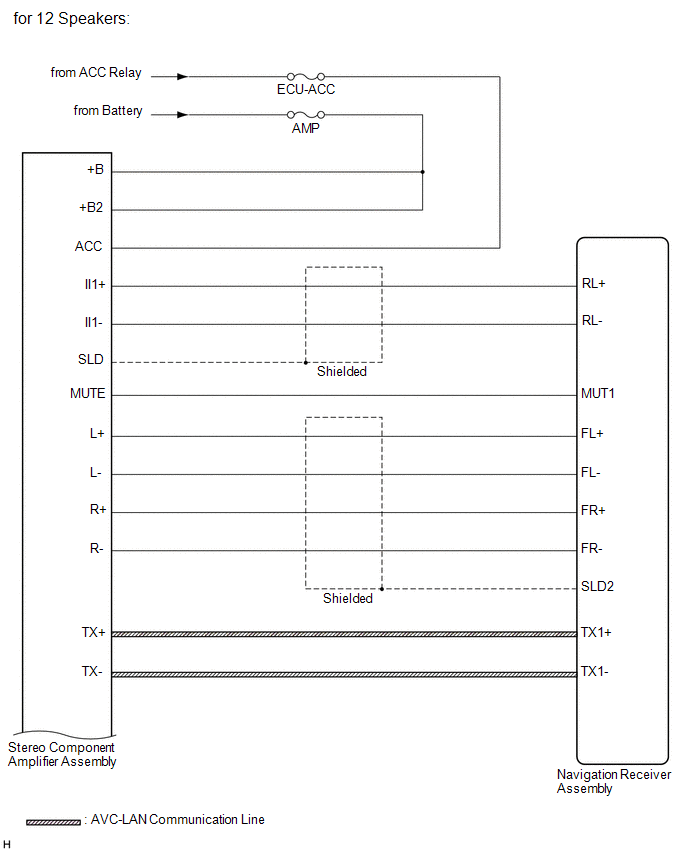
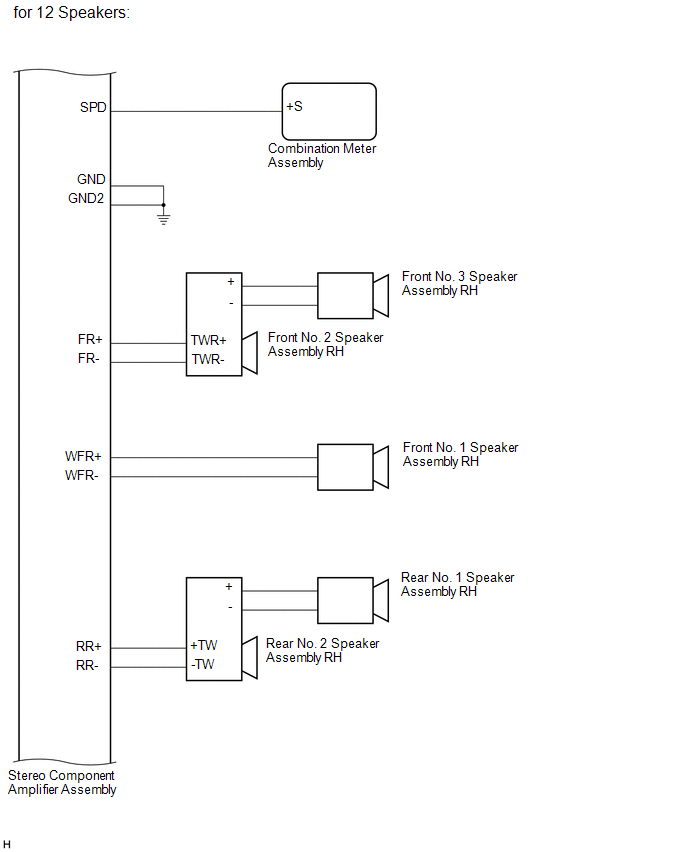
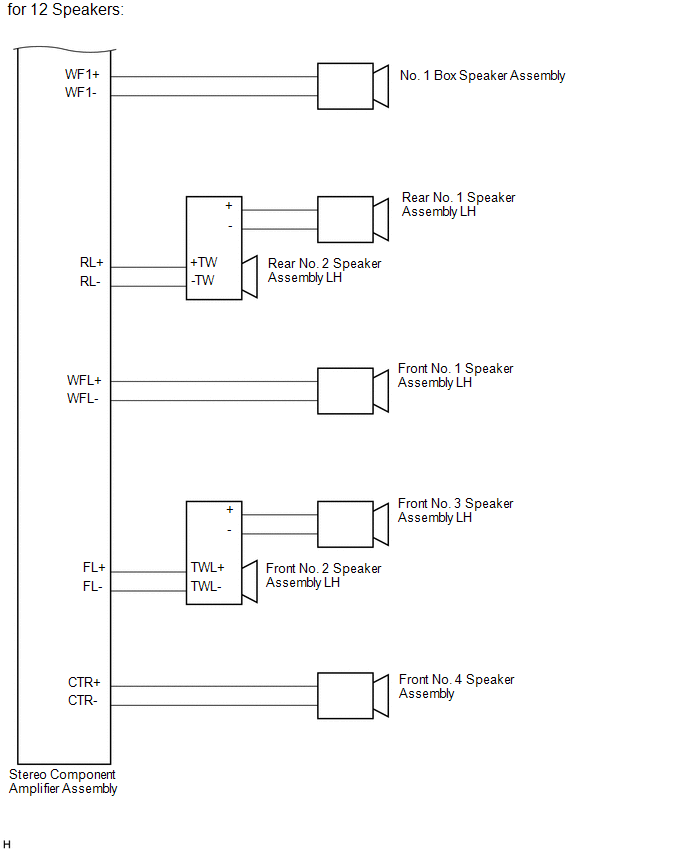
SYSTEM DIAGRAM

← Previous System Description Next → Terminals Of Ecu
Was this page helpful?
© 2026 Avtotema Contact us Privacy policy Cookie settings