Battery Charger -VAS 5095 A-
This chapter describes the basic functions of the Battery Charger -VAS 5095 A-. For more information, see the → Operating Instructions for Battery Charger VAS 5095 A.

Note
- The effective charging current cannot be read on this device. The charging current must be measured externally with a current clamp.
- Observe the → Operating Instructions for Battery Charger VAS 5095 A.
Battery Charger -VAS 5095 A- description
The Battery Charger -VAS 5095- is suitable for charging all 12 V batteries in the Volkswagen Group.
The battery is charged without current or voltage peaks, so the vehicle electronics are not affected. The battery can remain in the vehicle during charging and does not need to be disconnected from the vehicle electrical system.
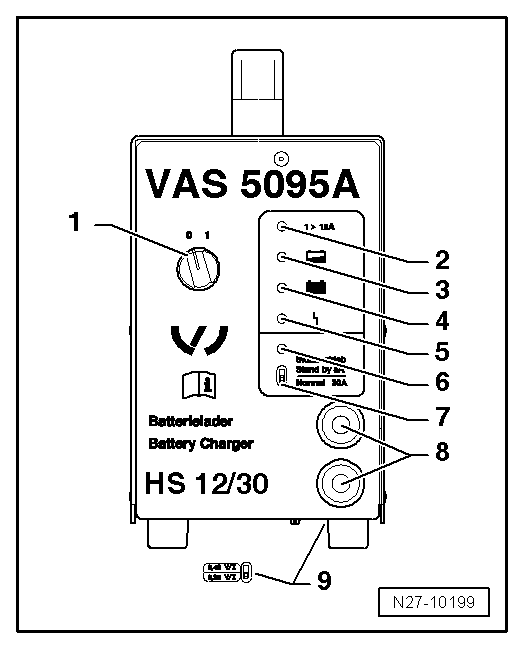
Battery Charger -VAS 5095 A-
- Switch ON / OFF (0 = charger OFF)
- Charge current indicator (I > 12 A)
- Battery partially charged indicator > 90 %
- Maintenance charge indicator lights green when the battery is charged
- Fault indicator
- Support mode indicator
- Support mode / normal mode selector switch
- Charging cable, red charging clamp "+", black charging clamp "-"
- Battery type selector switch (underside of charger)
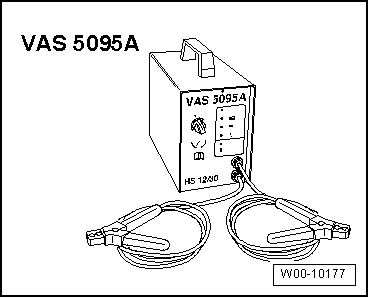
Charging the battery with Battery Charger -VAS 5095 A-

WARNING!
Risk of injury! Observe the warnings and safety regulations!
Required Special Tools, Test and Measuring Equipment and Auxiliary Items
- Battery Charger -VAS 5095 A-

Caution!
Always set the battery type to 2.4 V/cell (volts per battery cell) when charging! This applies to all batteries.

Note
The battery must have a temperature of at least 10 ºC.

WARNING!
Batteries where the magic eye shows light yellow must not be tested or charged. Do not give jump-start!
Risk of explosion when testing, charging or jump starting.
These batteries must be replaced.
- Switch off the ignition and all electrical consumers.
- Check the battery type setting on the battery type selector switch. It must be set to 2.4 V/cell (volts per battery cell).
- Connect the red charging clamp "+" of the charger to the positive battery terminal.

Note
On vehicles with start/stop function and a battery monitoring control module with battery sensor -J367-, connect the black charging clamp "-" to body ground. Connecting it to the negative battery terminal causes start/stop system malfunctions.
- Connect the black charging clamp "-" of the charger to the negative connection point.
- Switch the charger on.
Charge current indicators -2- and -3- light yellow. If only the yellow light-emitting diode (LED) -3- is lit, the battery is partially charged (approx. 90 %).
If the green LED -4- also lights, the charger has switched to maintenance charging. The battery is charged.
- Switch the charger off.
- Disconnect the charging clamps from the battery terminals.
Charging a deeply discharged battery with Battery Charger -VAS 5095 A-

WARNING!
Risk of injury! Observe the warnings and safety regulations!
The charger automatically detects deeply discharged batteries and starts charging gently with a low charging current. The charging current is automatically adjusted to the battery's state of charge.

Note
- Observe the notes in the chapter.
- Deeply discharged batteries in vehicles before registration must be replaced before delivery. Prior damage cannot be ruled out.
- The battery voltage must be at least 0.6 V!

WARNING!
Batteries where the magic eye shows light yellow must not be tested or charged. Do not give jump-start!
Risk of explosion when testing, charging or jump starting.
These batteries must be replaced.
- Charge the battery.
Support mode with Battery Charger -VAS 5095A-
General notes:
Support mode supplies voltage to the vehicle electrical system when the battery is removed or disconnected.
For more information, see the → Operating Instructions VAS 5095A.
Support mode is suitable for the following applications:
- Supplying vehicle electrical systems without an installed battery
- Maintaining voltage during battery replacement
- Component testing without a battery

WARNING!
Risk of injury! Observe the warnings and safety regulations!

WARNING!
Batteries where the magic eye shows light yellow must not be tested or charged. Do not give jump-start!
Risk of explosion when testing, charging or jump starting.
These batteries must be replaced.
- Switch off the ignition and all electrical consumers.

Caution!
- The charging clamp reverse-polarity protection is not active in the "Charging deeply discharged batteries / support mode" operating mode. Connect the charging clamps with the correct polarity to the battery terminals!
- A short circuit may cause sparks.
- This creates a risk of explosion.
- Make sure the charging clamps are securely attached.
- Do not press START / STOP if the charging clamps are connected incorrectly! The charger may be damaged.
- Remove the battery.

Caution!
When the battery is removed, be sure to prevent the charging clamp connected to the positive terminal from contacting body ground. Also make sure the battery terminals cannot contact each other.
- Connect the red charging clamp "+" to the positive terminal of the vehicle.

Note
On vehicles with start/stop function and a battery monitoring control module with battery sensor -J367-, connect the black charging clamp "-" to body ground. Connecting it to the negative battery terminal causes start/stop system malfunctions.
- Connect the black charging clamp "-" to the negative terminal of the vehicle.
- Check the battery type setting on the normal mode / support mode selector switch. It must be set to support mode.
- Check that the charging clamps are connected with the correct polarity.
- Switch the charger on.
The charger starts support mode.
To end battery support mode:
- Switch the charger off.
- Disconnect the black charging clamp "-" of the charger from the negative vehicle terminal.
- Disconnect the red charging clamp "+" of the charger from the positive vehicle terminal.
- Unplug the charger's mains plug.
Maintenance charging with Battery Charger -VAS 5095 A-

WARNING!
Risk of injury! Observe the warnings and safety regulations!

WARNING!
Batteries where the magic eye shows light yellow must not be tested or charged. Do not give jump-start!
Risk of explosion when testing, charging or jump starting.
These batteries must be replaced.
For maintenance charging, Battery Charger -VAS 5095 A- ensures safe charging and keeps the battery topped up.
- Proceed as for charging the battery.

Note
- If the battery is discharged by an electrical consumer during maintenance charging, Battery Charger -VAS 5095 A- automatically recharges it accordingly.
- Maintenance charging can be carried out for an unlimited time.
- The battery is always ready for use.