Battery Charger Midtronics -INC 940- USA/Canada only
General Description Battery Charger Midtronics -INC 940-
Batteries in VW vehicles may only be charged with chargers approved by VW. In the USA/Canada, the Midtronics -INC 940- charger may be used.
The Battery Charger Midtronics -INC 940- combines battery charging with state-of-charge monitoring and a battery test.
The following charging and analysis procedures apply to all batteries, all battery locations (engine compartment or luggage compartment), and all battery uses (starter or auxiliary/comfort battery).
Always observe the safety regulations, the charger setup instructions, the display menu/display buttons, LEDs, and the operating procedures described in the → Operating Instructions INC 940.
Read the → Operating Instructions INC 940 carefully.
For more information, see → No..

WARNING!
Risk of injury! Observe the warnings and safety regulations!
Keep open flames and sparks away from batteries. Do not smoke.
The battery charger must be switched off when connecting or disconnecting cables.
Do not remove the cell caps during charging.
Overcharging sulfated batteries can cause explosions.
Precision tools must not be stored in battery charging areas, as chemical reactions can cause corrosion.

WARNING!
Batteries where the magic eye shows light yellow must not be tested or charged. Do not give jump-start!
Risk of explosion when testing, charging or jump starting.
These batteries must be replaced.
Charging battery
Prerequisites:

WARNING!
Batteries where the magic eye shows light yellow must not be tested or charged. Do not give jump-start!
Risk of explosion when testing, charging or jump starting.
These batteries must be replaced.
INC 940 initial setup completed (operating number, date/time) → Operating Instructions INC 940.
- Check the general information.
- Open bonnet or open cover for other battery installation location.
- Perform a visual inspection of the battery.
- Set the battery type to "Standard" (flooded battery) or "AGM" (absorbent glass mat battery).
- Close all vehicle doors.

Note
- Battery temperature must be at least 10 °C.
- For additional information, see → Operating manual INC 940.
Perform the charging procedure:
- Switch off all electrical consumers.
- Switch off the ignition and remove the ignition key.
- Connect the red charging clamp "+" of the charger to the positive battery terminal.

Note
On vehicles with start/stop function and an installed battery monitor control module with battery sensor -J367-, the black charging clamp - must be connected to the vehicle body ground. Connecting it to the negative terminal of the battery causes start/stop system malfunctions.
- Connect the black charging clamp "-" of the charger to the negative connection point.
- Connect the Midtronics -INC 940- battery charger to an earthed power outlet.
- Set the "ON/OFF" switch of the Midtronics -INC 940- battery charger to "ON".
- Select charging mode "Automatic" or "Manual".
- Select the test "In vehicle" or "Out of vehicle".
- Select the battery type "Standard" or "AGM" (absorbent glass mat).
- Select the test type "Warranty" or "Other". Record additional details (depending on the type of test).

Note
- For additional information, see → Operating manual INC 940.
- If necessary, record the menu items required for the test type "Warranty" → Warranty Service Bulletin.
The Midtronics -INC 940- battery charger tests the battery and starts charging. The display then shows one of three results together with the approximate charging time.
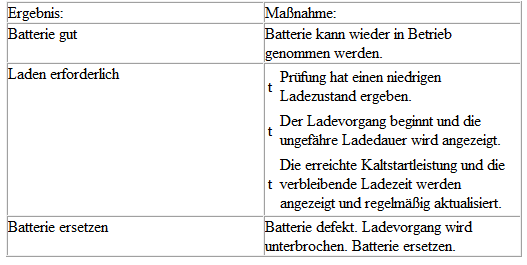

Note
If error messages or other text messages appear on the Midtronics -INC 940- display other than those listed above, refer to the chapter.

WARNING!
If the battery gasses heavily, stop the charging process. Press the "Stop" button on the front.
After the charging and test procedure is complete, the Midtronics -INC 940- battery charger displays "Battery good" or "Replace battery" and the total charging time.
- Depending on the individual case (warranty label, repair order, evaluation and filing), there are three possible messages:
- Generate test code (only possible after automatic charging and testing).
- Print the last test result (for warranty).
- Display the last test results.

Note
For additional information, see → Operating manual INC 940.
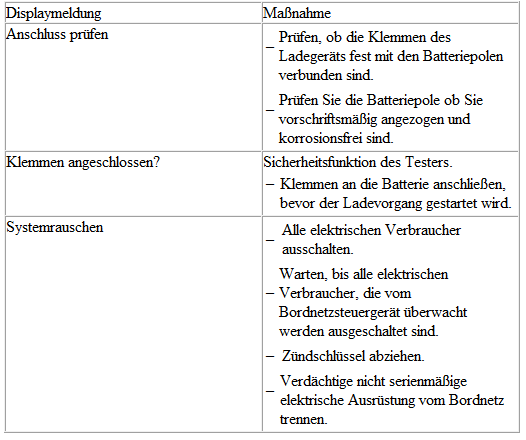
Troubleshooting the Midtronics -INC 940- battery charger
The display may show errors or state-dependent messages.
The most common display messages are listed below together with suggested solutions.

Note
For messages not listed here, refer to the → Operating Instructions INC 940.
Wait a few minutes and repeat the charging procedure.