License plate light
Removing and installing license plate light -X4-/-X5-

Note
When removing and installing components in the visible area (switches, covers, trim, etc.), cover the areas where a lever tool (installation wedge -T10039/1-, screwdriver) is applied with commercially available adhesive tape.
Removing
- Switch off the ignition and all electrical consumers and remove the ignition key.
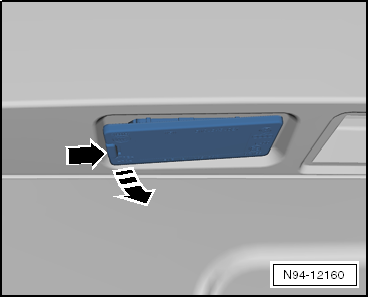
- Pry the license plate light on the left side at -arrow- out of the bumper cover with a screwdriver.
- Swing the license plate light out of the bumper cover, taking into account the lengths of the connected wiring.
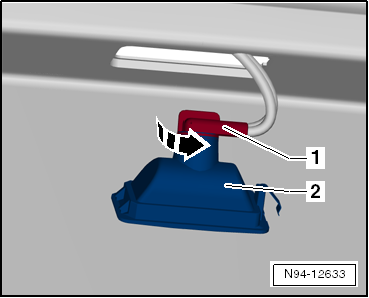
- Turn bulb holder -1- in -arrow direction- and pull it out.
- Remove the license plate light.
Installing
Installation is performed in the reverse order of removal, observing the following:
- Insert the license plate light into the bumper cover starting on the right side, and make sure it locks securely on the left side.
- Check the function of the license plate light.
Removing and installing bulb for license plate light -X4-/-X5-
Removing
- Switch off the ignition and all electrical consumers and remove the ignition key.
- Remove license plate light -X-.
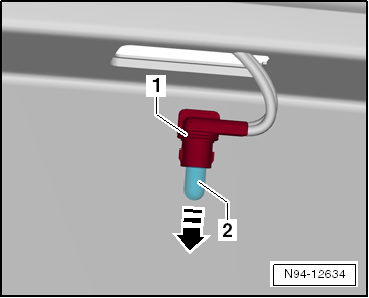
- Pull glass-base bulb -2- straight out of bulb holder -1- in -arrow direction-.
Bulb for license plate light -X-: glass-base bulb 12 V, 5 W.
Installing
Installation is carried out in the reverse order of removal.
- Check the function of the license plate light.