Digital owner's manual in the vehicle
The digital owner's manual of the Volvo S80 (2nd generation, model years 2013–2016) provides modern, user-friendly navigation through important vehicle information. This section explains the search and navigation functions that make it easier to quickly find answers.
The owner's manual can be read on the screen in the vehicle2. You can easily navigate between the different sections and search the content.
To open the digital owner's manual, first press the MY CAR button in the center console, then press OK/MENU and finally select Owner's manual.
For basic navigation, see Operating the system. A detailed description follows below.
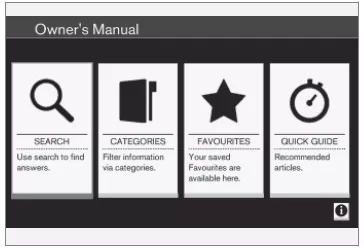
Owner's manual home page.
You can search for information in the digital owner's manual in four ways:
- Search - Search function for finding an article.
- Categories - All articles sorted by category.
- Favorites - Quick access to articles marked as favorites.
- Quick Guide - Selected articles on frequently used functions.
The info symbol in the lower right corner provides information about the digital owner's manual.
CAUTIONAccess to the digital owner's manual is not possible while driving.
Search
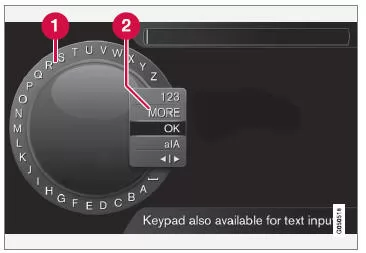
Searching using the TUNE knob.
1. Character list.
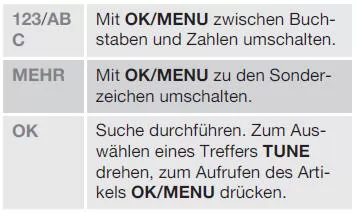
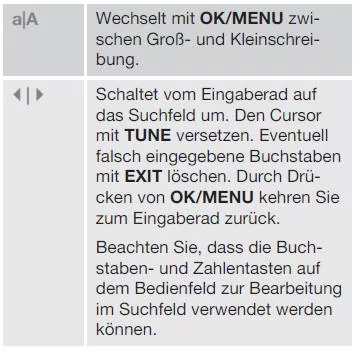
2. Change input mode (see table below).
Enter the search term, e.g. "Seat belt", using the TUNE knob.
- Turn TUNE until the desired letter appears, then press OK/MENU to confirm. The number and letter buttons on the control panel in the center console can also be used.
- Continue with the next letter, and so on.
- To switch to number or special character input mode or to search, turn TUNE to one of the options (see table below) in the input mode switch list (2), then press OK/MENU.
2 Applies to certain vehicle models.
Entering text using the number keypad
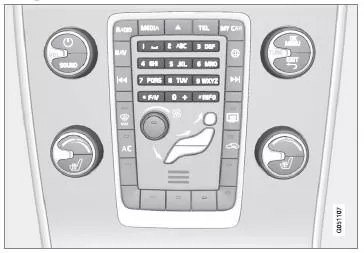
Number keypad.
You can also enter characters using keys 0-9, * and # on the center console.
Pressing 9 displays all characters3 assigned to that key (e.g. w, x, y, z and 9). Briefly press the key to move the cursor through these characters.
- Leave the cursor on the desired character to select it. The character appears in the input line.
- Press EXIT to delete/undo.
To enter a digit, press and hold the corresponding number key.
3 The characters assigned to a key may vary depending on market/country/language.
Categories
The manual topics are divided into main and subcategories. To make a topic easier to find, it may be assigned to several relevant categories.
To navigate the directory structure, turn TUNE. To open a category, press OK/MENU - highlighted - or topic -
 highlighted. Press EXIT to return to the previous view.
Favorites
Here you will find the topics saved as favorites. To mark a topic as a favorite, see the section "Navigating within a topic" below.
To navigate the favorites list, turn TUNE. To open a topic, press OK/MENU. Press EXIT to return to the previous view.
Quick Guide
Here you will find selected topics on the most frequently used vehicle functions.
Topics can also be accessed via categories, but are grouped here for quick access.
To navigate the Quick Guide, turn TUNE. To open a topic, press OK/MENU. Press EXIT to return to the previous view.
Navigating within a topic
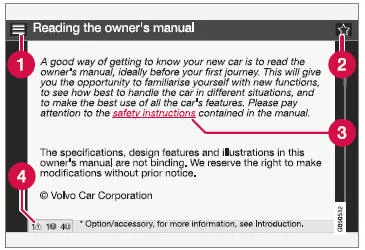
1. Home - takes you to the start page of the owner's manual.
2. Favorite - saves/removes a favorite.
You can also save a topic as a favorite or remove it from the favorites list by pressing the FAV button on the center console.
3. Highlighted link - takes you to the topic linked to it.
4. Special texts - if the topic contains texts marked Warning, Important or Caution, the corresponding symbols and the number of such texts in the topic are shown here.
To navigate between links or scroll through a topic, turn TUNE. When the start or end of the topic is displayed, you reach the Home and Favorite options by scrolling one more step up or down, respectively. To confirm your selection or open the highlighted link, press OK/MENU.
Press EXIT to return to the previous view.
The digital owner's manual for the Volvo S80 (2nd generation, model years 2013–2016) makes it easy to access all relevant vehicle information. The display lets you quickly switch between topics, use search functions and create favorites. This makes operating the vehicle especially convenient.
A particularly useful feature is the ability to save frequently used topics in the favorites list so they are always at hand. The Quick Guide also provides fast access to the functions you need most often. The digital manual is a prime example of the user-friendliness of the Volvo S80.
FAQ
What search options does the digital owner's manual offer?
You can find information by category, through direct search, using the favorites function or via the Quick Guide.
Can all drivers use the digital manual?
Yes, the digital owner's manual is intended for all users of the Volvo S80. However, for safety reasons, it cannot be accessed while driving.
Test yourself
A quick Volvo S80 quiz: every answer comes with an explanation and a link to the manual page.