Troubleshooting
Removing and installing a wheel
In this manual: Troubleshooting
~1min read
To remove and install a wheel, carry out the following steps.

Fig. 246 Changing a wheel: hex socket for loosening and tightening the bolts
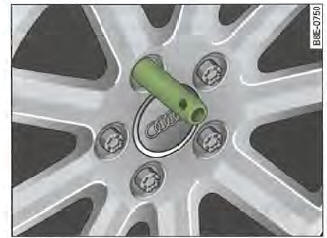
Fig. 247 Changing a wheel: mounting pin in the upper hole
After loosening the wheel bolts and raising the vehicle with the jack, change the wheel as follows:
Removing a wheel
- Fully unscrew the upper wheel bolt using the hex socket on the screwdriver handle (vehicle tool kit) and place it on a clean surface, Fig. 246.
- Screw the mounting pin (vehicle tool kit) into the cleared hole by hand, Fig. 247.
- Loosen the other wheel bolts as described above.
- Remove the wheel. The mounting pin remains in the hole.
Installing a wheel
- Slide the spare wheel over the mounting pin.
- Screw in the wheel bolts and tighten them lightly using the hex socket on the screwdriver handle.
- Remove the mounting pin and lightly screw in the remaining wheel bolt.
The wheel bolts must be clean and easy to tighten. Check the condition of the contact surfaces of the wheel and hub. Clean them if necessary before fitting the wheel.
The hex socket on the screwdriver handle makes it easier to remove and install the wheel bolts. To do so, remove the reversible blade.
When fitting directional tyres, observe their direction of rotation.

Do not use the hex socket in the screwdriver handle to loosen or tighten the wheel bolts.
Test yourself
A quick Audi A4 quiz: every answer comes with an explanation and a link to the manual page.
Was this page helpful?