Speed warning system
Introduction
The speed warning system helps you not to exceed a specified maximum speed.
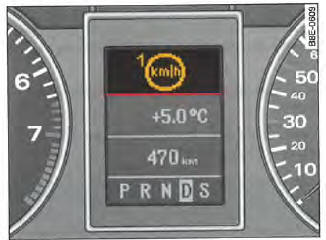
Fig. 18 Display: speed warning
The speed warning system alerts the driver if the maximum programmed speed is exceeded. As soon as the vehicle speed exceeds the programmed speed by approx. 10 km/h, a warning tone sounds. At the same time, a warning symbol Fig. 18 appears in the display.
The speed warning system has two independent warning thresholds* with somewhat different functions:
- Warning threshold 1
 and

- Warning threshold 2
 and

Note
Regardless of the speed warning system, you must always check on the speedometer whether you are keeping to the legally permitted maximum speed.
Warning threshold 1: operation
Warning threshold 1 can be changed while driving.
For warning threshold 1, the maximum speed can be stored while driving. It remains programmed until the ignition is switched off, provided it has not been changed or erased beforehand.
The speed warning symbol of warning threshold 1, Fig. 18, appears
in the display when the vehicle speed exceeds the stored maximum speed. It disappears when the vehicle speed is again below the stored maximum speed.
The warning symbol also disappears if the vehicle speed exceeds the stored maximum speed by approx. 40 km/h for at least 10 seconds. The stored maximum speed is not, however, erased.
Warning threshold 1: storing
The (CHECK) button allows you to store warning threshold 1.
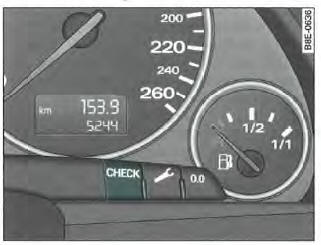
Fig. 19 Partial view of instrument cluster: CHECK control button
Storing the maximum speed
- Drive at the desired maximum speed.
- Briefly press the button

Erasing the maximum speed
- Drive at at least 5 km/h.
- Press and hold the (CHECK) button for more than one second.
If the maximum speed has been stored, the speed warning symbol lights up briefly in the display
when you release the button. The maximum speed remains stored until you briefly press the button again to change it, or press and hold the button to erase the programmed speed.
Applies to vehicles: with driver information system and on-board computer
Warning threshold 2: operation
Speed warning 2 can only be changed when the ignition is switched off.
The maximum speed for speed warning 2 can only be stored or erased when the ignition is switched off. It is recommended to store speed warning 2 when you want the system to consistently alert you to a specific maximum speed. This warning can be useful, for example, if you are driving in a country where speed limits differ from those in your country, or if using your winter tyres requires you not to exceed a specific speed.
The speed warning 2 overspeed symbol appears in the display when the vehicle speed
exceeds the stored maximum speed. Unlike speed warning 1, the symbol only goes out when the speed drops back below the programmed maximum speed.
Applies to vehicles: with driver information system and on-board computer
Speed warning 2: storing
Storing and erasing speed warning 2 is done using the controls on the wiper lever.
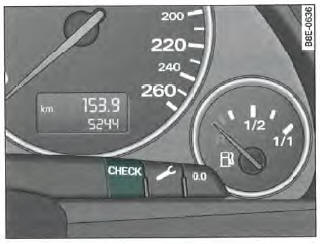
Fig. 20 Partial view of instrument cluster: CHECK control button
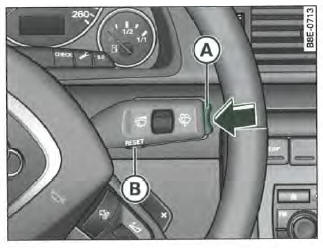
Fig. 21 Wiper lever: function selector
Storing the maximum speed
- Switch off the ignition.
- Briefly press the button
 located on the instrument cluster =>
, fig. 20. The odometer and digital clock are now illuminated. - Press the buttonfor at least
two seconds. The display shows the currently stored maximum speed or the crossed-out speed warning 2 symbol if no maximum speed was stored previously. - Press the upper or lower side of the function selector located on the wiper lever (A) =>, fig. 21 to change the programmed value. The values increase or decrease at a rate of 10 km/h.
Erasing the maximum speed
- Switch off the ignition.
- Briefly press the button
 located on the instrument cluster =>,
fig. 20. The odometer and digital clock are now illuminated. - Press the button
 for at least
two seconds. The maximum speed currently stored appears in the display. - Press the button
 located on
the wiper lever => , fig.
21 until the crossed-out speed warning 2 symbol appears in the display.
A few seconds after the adjustment, the lighting of the odometer and digital clock goes out again.
Test yourself
A quick Audi A4 quiz: every answer comes with an explanation and a link to the manual page.