Introduction
General information
The driver information system in the instrument cluster is the vehicle's display and information centre.

Fig. 9 Driver's position: instrument cluster display
Driver information system messages appear in the display in the centre of the driver's position => fig. 9.
The driver information system is the information centre of your vehicle. It conveniently informs you of the current operating status of the vehicle. For example, it shows the distance remaining to the next service, so that you can have the necessary maintenance carried out on time. It also informs you of the operating status of the radio, telephone and navigation system, if the vehicle is equipped with them.
On certain vehicle models, the information shown in the instrument cluster may appear in colour and with higher resolution. The symbol is replaced, for example, by the symbol
 for tyre pressure monitoring.
The use of Audi* navigation systems is described in a separate manual.
Note
On vehicles with automatic transmission, messages only appear in the display when a gear has been selected.
Applies to vehicles: standard version
Standard version in the instrument cluster
Current information on the operating status of the vehicle appears in the display in the centre of the driver's position.
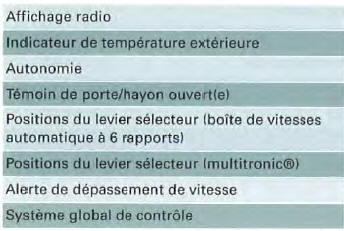
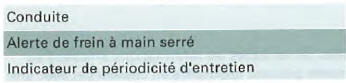
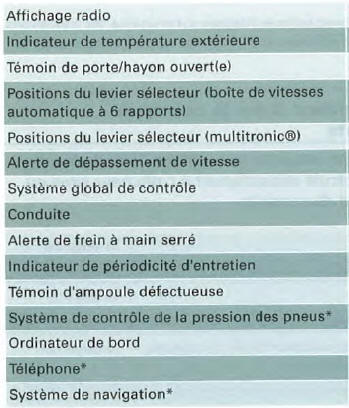
Applies to vehicles: with driver information system and on-board computer
Driver information system with on-board computer
Radio display

Fig. 10 Display: additional information about the radio
If the overall control system does not show priority 2 faults and the radio is switched on (depending on the radio type fitted to the vehicle), the station name or selected frequency appears with additional information as soon as the "OK" symbol is cleared.
This information is shown in addition to that on the radio display.
Outside temperature display
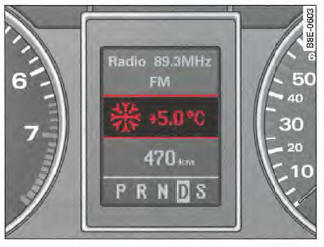
Fig. 11 Display: outside temperature indicator
The outside temperature is displayed when the ignition is switched on => fig. 11. On vehicles with automatic transmission, it is only displayed when a gear is selected.
If temperatures are between +5 °C and -5 °C, the displayed temperature is preceded by an ice crystal symbol. This symbol warns you to drive more carefully, as the road may be icy.
When the vehicle is stationary or travelling at very low speed, the displayed temperature may be slightly higher than the actual outside temperature due to heat from the engine.
If you set the display to °F on a vehicle with air conditioning, the outside temperature is automatically displayed in °F.
CAUTION!
Never use the outside temperature indicator to check whether the road is icy. Note that the road may be icy even at temperatures around +5 °C - Beware of ice!
Note
When navigation data (guidance) is displayed, the outside temperature is shown on the second line of the radio display.
Applies to vehicles: with manual transmission and most economical gear indicator
Most economical gear indicator
This indicator helps you save fuel.
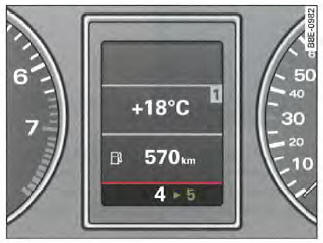
Fig. 12 Most economical gear indicator
The gear indicator helps you save fuel. When the gear indicator appears in the instrument cluster display => fig. 12, it is recommended that you shift into the gear indicated by the arrow. You may also skip a gear, for example shifting from 4th gear directly to 6th gear.
Note
- In some cases, during acceleration, no recommendation is displayed.
- To deactivate the most economical gear indicator, visit an Audi dealership.
Range
The range display helps you plan your trip.

Fig. 13 Display: range
The estimated range is shown in km => fig. 13. The range indicates the distance your vehicle can travel with the fuel currently in the tank if you do not change your driving style. The display is shown in 10 km increments.
The range calculation is based on fuel consumption over the last 30 km. If you drive more economically, the range increases.
Door/tailgate open indicator
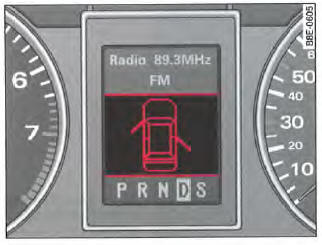
Fig. 14 Display: door/tailgate open indicator
The door/tailgate open indicator lights up when one or more doors, the engine hood or the tailgate is not closed while the ignition is switched on. The symbol also shows which door(s) is (are) not closed. In the illustration => fig. 14, the driver's door and the rear right door are open.
When the engine hood or tailgate is not closed, the corresponding area of the figure flashes in the display. The door/tailgate open indicator goes out as soon as all doors, the engine hood and the tailgate are properly closed.
On vehicles equipped with a driver information system and an on-board computer*, you can turn off the door/tailgate open indicator by briefly pressing the on-board computer controls. However, the door/tailgate open indicator will light up again when a change occurs at the doors, engine hood or tailgate.
Test yourself
A quick Audi A4 quiz: every answer comes with an explanation and a link to the manual page.