Trip computer
Applies to vehicles: with driver information system and on-board computer
Introduction
The on-board computer displays information on average fuel consumption and speed, instantaneous fuel consumption, range, trip duration and distance.
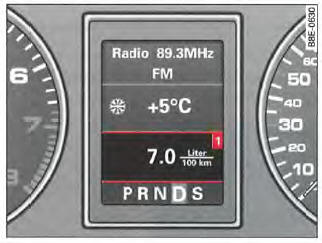
Fig. 22 On-board computer display: instantaneous fuel consumption
The following road information is analysed by the on-board computer and shown on the driver information system display:

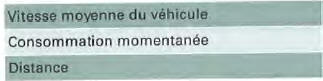
The 6 items of road information "range, trip duration, average fuel consumption, average speed, instantaneous fuel consumption and distance" are shown in the driver information system display in the order indicated => fig. 22.
Fuel consumption values (average and instantaneous fuel consumption), range, distance and speed are shown in metric units. On certain models (depending on country), the display is in imperial units.
Applies to vehicles: with driver information system and on-board computer
Memory
The on-board computer has two memories that operate automatically.
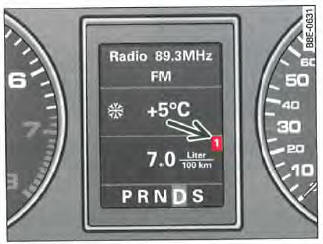
Fig. 23 On-board computer display: memory level 1
Press the button

=> , fig. 24 to switch from the memory level 1 functions to the memory level 2 functions.
You can identify the memory level shown by the number displayed => fig. 23. Single trip memory data (memory level 1) is shown when the number 1 appears in the display. If the number 2 is displayed, the data is from the total trip memory (memory level 2).
Single trip memory
The single trip memory collects driving information stored between switching the ignition on and switching it off.
If you resume driving within 2 hours of switching off the ignition, the new data is included in the calculation of the current driving data. If you do not drive for more than 2 hours, the memory is erased automatically.
Total trip memory
Unlike the single trip memory, the total trip memory is not erased automatically. You can therefore determine the period over which trip information or driving data is analysed yourself.
Applies to vehicles: with driver information system and on-board computer
Operation
Both on-board computer controls are located on the wiper lever.
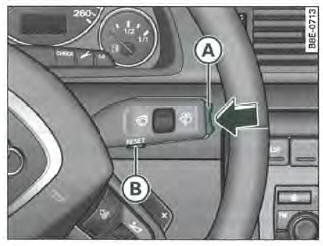
Fig. 24 Wiper lever: on-board computer controls
Selecting functions
Press the upper or lower side of the function selector =>
fig. 24. The on-board computer functions in the different memory levels are shown in turn.
Resetting functions
- Select the desired function.
- Press and hold the button for at least one second.
 .
The following values can be reset using the button :
- Trip duration
- Average fuel consumption
- Average vehicle speed
- Distance
You can only use the on-board computer when the ignition is switched on. When you switch the ignition on, the function selected before the ignition was switched off is shown. You can also switch off the driving time alarm by briefly pressing the function selector (A) or the button .

If you disconnect the battery, all stored data is erased.
Applies to vehicles: with driver information system and on-board computer
Range
The range display helps you plan your trip.
The range estimate is expressed in km. Range shows how far your vehicle can travel with the fuel currently in the tank if you do not change your driving style. The display is shown in increments of 10 km.
The range calculation is based on fuel consumption over the last 30 km. If you drive more economically, the range increases.
Applies to vehicles: with driver information system and on-board computer
Trip duration
This display reminds you to take a break.
The display shows the trip duration since the memory was last erased. If you want to calculate the duration of your
To measure a trip from a specific point, reset the memory from that point by pressing the button
Single trip memory
If you do not drive for more than 2 hours, the trip duration value is automatically reset.
Total trip memory
The trip duration value remains in memory even when the ignition is switched off. When you continue your journey, the duration of the new trip is added to the stored value.
Trip duration alarm
After 2 hours of driving, the display automatically shows 2:00. The trip duration indicator flashes at the same time.
This alarm reminds you to take a break.
Briefly press the function selector or the button , fig. 24 to switch off the trip duration alarm.
If you continue driving or take a break of less than 10 minutes, a new alarm signal is given after 4:00, 6:00, etc. If you take a break of more than 10 minutes, the trip duration alarm counter is reset.
Applies to vehicles: with driver information system and on-board computer
Average fuel consumption
The average fuel consumption display helps you plan your trip.
The display shows the average fuel consumption in 1/100 km since the memory was last reset. This information lets you adapt your driving to the consumption you want. To check your average fuel consumption for a new trip, reset the memory using the button => , fig. 24. After the memory has been reset,
the display shows zero for the first 30 meters driven.
Single trip memory
If you do not drive for more than 2 hours, the average fuel consumption value is automatically reset.
Total trip memory
The average fuel consumption value remains in memory even when the ignition is switched off. When you continue your journey, the new measured values are also taken into account.
Applies to vehicles: with driver information system and on-board computer
Average vehicle speed
The average speed display helps you plan your trip.
The display shows the average speed in km/h since the memory was last reset. If you want to check your average speed for a new trip, reset the memory using the button .
Single trip memory
If you do not drive for more than 2 hours, the average speed value is automatically reset.
Total trip memory
The average speed value remains in memory even when the ignition is switched off. When you continue your journey, the new measured values are also taken into account.
Instantaneous fuel consumption
The instantaneous fuel consumption display helps you save fuel.
The instantaneous fuel consumption in 1/100 km is shown on the display. This information lets you adapt your driving to the consumption you want.
Fuel consumption is calculated every 30 meters.
When the vehicle is stopped, the last displayed value remains in memory.
If you select instantaneous fuel consumption immediately after starting the engine, the system shows the average fuel consumption for the first 30-40 meters driven.
Applies to vehicles: with driver information system and on-board computer
Distance
The distance driven is displayed.
The display shows the distance driven since the memory was last reset. If you want to measure the distance from a specific point, reset the memory from that point by pressing the button
:=>, fig. 24 .
Single trip memory
If you do not drive for more than 2 hours, the distance is automatically reset.
Total trip memory
The distance remains in memory even when the ignition is switched off. When you continue your journey, the distance of the new trip is added to the stored value.
The maximum distance that can be displayed is 9999 km.
Test yourself
A quick Audi A4 quiz: every answer comes with an explanation and a link to the manual page.