About this Owner's Manual
Digital clock with date display
In this manual: About this Owner's Manual
~1min read
The vehicle is equipped with a quartz clock or a radio-controlled clock
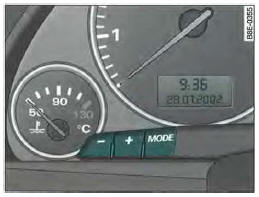
Fig. 3 Partial view of instrument cluster: digital clock
The Q and Q buttons are used to set the time and date.
Setting the hours
- Press the button
 . The hours display
flashes. - The buttons
 are used to set
the hours.
Setting the minutes
- Press the button
 until
the minutes digits flash. - The buttons
 are used to set
the minutes.
Setting the date
- Press the button
 until
the day display flashes. - The buttons
 are used to set
the day. - Press the button
 until the
month display flashes. - The buttons
 are used to set
the month. - Press the button
 until
the year display flashes. - The buttons
 are used to set
the year.
Showing or hiding the date
- Press the button
 until the
date display flashes. - Press the button
 to hide
the date display.
Date display
Press the buttonuntil the
date display flashes.
Press the button to show
the date.
When the display stops flashing, the setting process is complete and the time or date is stored.
When the ignition is switched off, simply press the check button , Fig. 2 (8) to illuminate
the digital clock with date display and the odometer for a few seconds.
Test yourself
A quick Audi A4 quiz: every answer comes with an explanation and a link to the manual page.
Was this page helpful?