Automatic climate control
The parking safety functions in the BMW 5 G30 provide comprehensive protection against collisions and mishaps. These include emergency braking functions, side collision avoidance, automatic distance warnings and visual indicators in the display. In critical situations, systems such as PDC or active braking assistance intervene to prevent damage. These functions are essential especially when reversing and in tight areas. The sensors and cameras work precisely but require a clear view and clean surfaces for optimal performance. The chapter emphasizes that despite assistance systems, responsibility remains with the driver, because technology can help but cannot think.
Overview
Buttons in center console
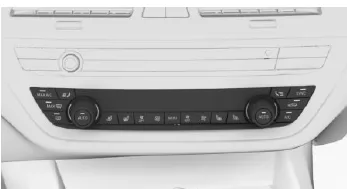
Climate control functions
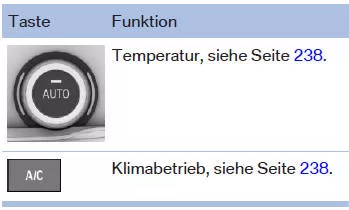
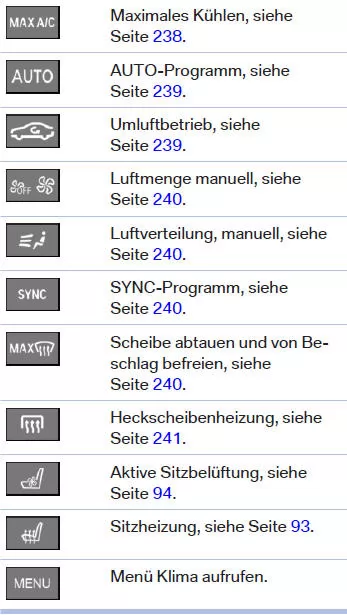
Climate control functions in detail
Switching on/off
Switching on
Press any button, with the following exceptions:
- Rear window defroster.
- Left side of button: air volume.
- SYNC program.
- Seat heating.
- Seat ventilation.
Switching off
For vehicles with automatic air conditioning with extended scope:
- Complete system:
 Press and hold the left button on the driver's side until the system switches off.
- Passenger side:
 Press and hold the left button on the passenger side.
Temperature
Principle
The automatic climate control adjusts the set temperature as quickly as possible, with maximum cooling or heating output if required, and then keeps it constant.
Settings
 Turn the wheel to set the desired temperature.
Avoid changing between different temperature settings in quick succession. Otherwise the automatic climate control does not have sufficient time to regulate the set temperature.
Display
Symbol is permanently shown on the automatic climate control display.
Cooling function
Principle
The interior air is cooled, dehumidified and, depending on the temperature setting, reheated.
Interior cooling is only possible when ready mode is switched on.
Switching on/off
 Press the button.
LED lights up when the cooling function is switched on.
The cooling function is switched on when the engine is running.
After switching on ready mode, the windshield and side windows may briefly fog up depending on the weather.
The cooling function is switched on automatically with the AUTO program.
The automatic climate control produces condensation water, which drips out from under the vehicle.
Maximum cooling
Principle
With ready mode switched on, the system sets the lowest temperature, optimum air volume and recirculation mode.
General: The function is available at an outside temperature above approx. 0 ℃ and with ready mode switched on.
Switching on/off
 Press the button.
LED lights up when the system is switched on.
Air flows from the vents for the upper body area. Therefore open the vents.
The air volume can be adjusted on the driver's side when the program is active.
AUTO program
Principle
Depending on the selected temperature, AUTO program intensity and external influences, air is directed to the windshield, the side windows, the upper body area and the footwell.
Switching on/off
 Press the button.
LED lights up when the AUTO program is switched on.
Air volume, air distribution and temperature are controlled automatically.
In the AUTO program, the cooling function is also switched on automatically.
A humidity sensor simultaneously controls the program to prevent windshield fogging as far as possible.
The AUTO program switches off automatically when the air distribution is set manually.
Intensity
With the AUTO program switched on, the automatic control of the intensity can be changed.
 Press the left or right side of the button: decrease or increase the intensity.
The selected intensity is shown on the automatic climate control display.
Automatic Recirculation Control AUC Principle. Automatic Recirculation Control AUC detects pollutants in the outside air. The supply of outside air is shut off and the interior air is recirculated.
General
When the system is activated, a sensor detects pollutants in the outside air and controls the shut-off automatically.
When the system is deactivated, outside air flows into the interior continuously.
With continuous recirculation mode, the interior air quality deteriorates and fogging of the windows increases.
Switching on/off
Press the button.
LED lights up when the system has been switched on with the button.
If the windows fog up, press the button on the driver's side or switch off recirculation mode to benefit from the humidity sensor. Make sure that air can flow to the windshield.
Via iDrive:
- "My Vehicle"
- "Vehicle settings"
- "Climate comfort"
- "Air quality"
- "Automatic recirculation"
Recirculation mode
Principle
If there are odors or pollutants in the outside air, the supply of outside air can be shut off. The interior air is then recirculated.
Operation
 Press the button repeatedly to select an operating mode:
- LED off: outside air flows in continuously.
- LED on: the supply of outside air is permanently shut off.
With continuous recirculation mode, the interior air quality deteriorates and fogging of the windows increases.
 If the windows fog up, press the button on the driver's side or switch off recirculation mode to benefit from the humidity sensor. Make sure that air can flow to the windshield.
Adjusting the air volume manually
Principle
The air volume for climate control can be set manually.
General
To adjust the air volume manually, first switch off the AUTO program.
Operation
 Press the left or right side of the button: decrease or increase the air volume.
The selected air volume is shown on the automatic climate control display.
The air volume of the automatic climate control is reduced if necessary
to protect the battery.
Adjusting the air distribution manually
Principle
The air distribution for climate control can be set manually.
Operation
 Press the button repeatedly to select a program:
- Windshield, upper body area and footwell.
- Upper body area and footwell.
- Footwell.
- Windshield and footwell.
- Windshield.
- Windshield and upper body.
- Upper body area.
The selected air distribution is shown on the automatic climate control display.
 If the windows fog up, press the button on the driver's side to benefit from the humidity sensor.
SYNC program
Principle
Depending on equipment, the following driver-side settings can be transferred to the front passenger side and the rear:
- Temperature.
- Air volume.
- Air distribution.
- AUTO program.
Switching on/off
 Press the button.
LED lights up when the SYNC program is switched on.
The program switches off automatically when settings on the front passenger side or in the rear are changed.
Defrosting windows and removing fog
Principle
Ice and fog are removed quickly from the windshield and the front side windows.
Switching on/off
 Press the button.
LED lights up when the system is switched on.
If necessary, align the side vents toward the side windows.
The air volume can be adjusted manually while the system is switched on.
 If the windows fog up, press the button on the driver's side or switch on the cooling function to benefit from the humidity sensor.
Rear window heating
 Press the button. LED lights up.
This function is available when the engine is running.
The rear window heating switches off automatically after a certain time.
Micro/activated charcoal filter
The micro filter retains dust and pollen in the incoming outside air.
The activated charcoal filter cleans the incoming outside air of gaseous pollutants.
Have this combined filter replaced during maintenance of the vehicle, see page 326.
The automatic climate control in the BMW 5 G30/G31 provides precisely controlled climate comfort for all occupants. Thanks to numerous individual setting options, the temperature, air volume and air distribution can be precisely matched to the needs of the driver and passengers. Functions such as recirculation control, seat ventilation or window heating also contribute to a pleasant interior climate.
A particular highlight is the automatic adaptation to external conditions, such as switching on the cooling function when required or using the humidity sensor to ensure clear visibility. Control is intuitive via the control panel in the centre console or via iDrive, and all selected settings are stored in the driver profile.
In this way, the BMW 5 G30/G31 combines state-of-the-art climate technology with maximum operating comfort and ensures a pleasant ambience in all weather conditions.
Test yourself
A quick BMW 5 quiz: every answer comes with an explanation and a link to the manual page.