Getting to know your vehicle
Setting the time
In this manual: Getting to know your vehicle
~1min read
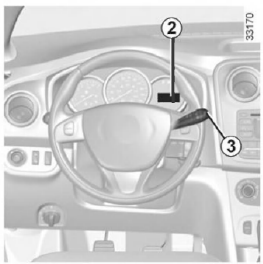
Setting the time 2
Select the "Time" display on the instrument panel by pressing button 3.
For safety reasons, we advise against making adjustments while driving.Press and hold button 3 to enter time setting mode.
When only the hours start flashing, briefly press button 3 to set them.
Press and hold button 3 to enter minute setting mode.
When only the minutes start flashing, briefly press button 3 to set them.
Confirm the setting by pressing and holding button 3.
After any interruption in the power supply (disconnected battery, disconnected power cable, etc.), the clock must be set again.Test yourself
A quick Dacia Sandero / Logan quiz: every answer comes with an explanation and a link to the manual page.
Was this page helpful?