Electrochromic Mirror (ECM) with HomeLink® System
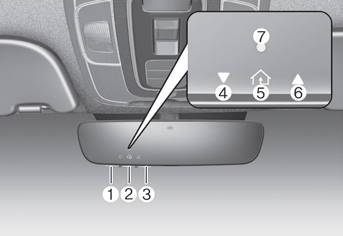
Your vehicle may be equipped with a Gentex auto-dimming mirror with a built-in HomeLink® wireless control system.
When driving at night, this feature automatically detects and helps reduce glare from the rearview mirror. The HomeLink® Universal Transceiver allows you to operate garage door(s), electric gates, home lighting, etc.
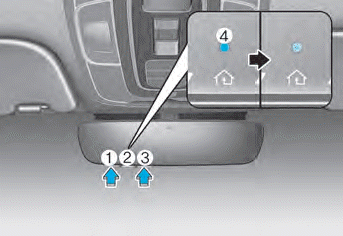
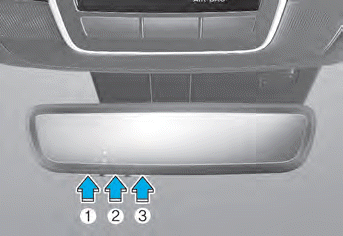
(1) HomeLink Channel 1
(2) HomeLink Channel 2
(3) HomeLink Channel 3
(4) Garage Door Opener Status Indicator: Closing or Closed
(5) HomeLink Activity Indicator
(6) Garage Door Opener Status Indicator: Opening or Open
(7) HomeLink User Interface Indicator
Night Vision Security Auto-Dimming (NVS®) Mirror (if equipped)
The NVS® mirror automatically helps reduce glare by monitoring light levels at the front and rear of the vehicle. Any object that blocks any of the light sensors will degrade the auto-dimming control feature.
Your mirror automatically dims when glare from vehicles traveling behind you is detected.
The mirror is in the ON position by default each time the vehicle is started.
Built-in HomeLink® Wireless Control System
The HomeLink® Wireless Control System can replace up to three hand-held radio frequency (RF) transmitters with one built-in device. This innovative feature learns the radio frequency codes of most current transmitters to operate devices such as gate operators, garage door openers, entry door locks, security systems, and even home lighting. Both standard and rolling code transmitters can be programmed by following the prescribed procedures.
Additional HomeLink® information can be found at www.homelink.com, www.youtube.com/HomeLinkGentex, or by calling 1-800-355-3515.
Keep the original hand-held RF transmitter that you programmed for use in other vehicles, and for future HomeLink® programming. It is also recommended that when selling the vehicle, HomeLink® buttons be erased for security purposes.
WARNING
Before programming HomeLink® to a garage door opener or gate operator, make sure people and objects are not in the path of the device to prevent potential injury or damage. Do not use HomeLink® with any garage door opener that lacks the safety stop and reverse features required by U.S. federal safety standards (this includes any garage door opener model manufactured before April 1, 1982). A garage door that cannot detect an object and signal the door to stop and reverse does not comply with the current U.S. federal safety standard. Using a garage door opener without these features increases the risk of serious injury or death.
Programming HomeLink®
Note the following:
- When programming a garage door opener, it is recommended that you park the vehicle outside the garage.
- It is recommended that a new battery be placed in the handheld transmitter of the device being programmed to HomeLink® for faster training and accurate transmission of the radio frequency signal.
- On some vehicles, the Engine Start/Stop button may need to be in the ACC (or "Accessory") position for programming and/or operation of HomeLink®.
- If you still have difficulty programming or have questions after performing the programming steps listed below, contact HomeLink® at: www.homelink.com, www.youtube.com/HomeLinkGentex, or call 1-800-355-3515.
Programming
To program most devices, follow these instructions:
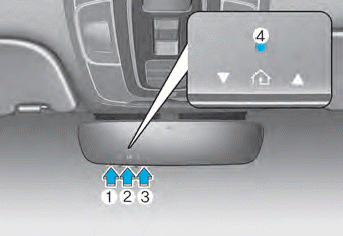
1. Press and release button (1), (2), or (3).
- If indicator (4) is lit Orange, go to step 3), as this is a new programming.
- If indicator (4) is steadily on or rapidly flashing Green several times, go to step 2), as this is a programmed button.
2. Press and hold the desired button to be programmed for approximately 15-25 seconds, until the indicator begins flashing Orange several times.
3. Hold the original garage door opener transmitter near the HomeLink mirror.
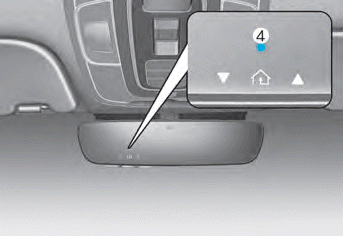
4. Press and hold the original transmitter button until indicator (4) stays steadily on or flashes Green for approximately 10 seconds. This indicates that programming is complete.
5. If indicator (4) flashes or stays steadily Green, but the garage door opener does not operate, continue with steps 6 and 7 ("Rolling Code Programming" procedure).
6. Firmly press and release the "Learn", "Smart", or "Program" button while indicator (4) is flashing Green. After pressing the button, you have approximately 30 seconds to begin the next step.
Information
On the garage door opener motor unit (safety motor unit, etc.), locate the "Learn", "Smart", or "Program" button. This is usually located where the antenna wire is attached to the motor unit head (see the opener manual to identify this button). The name and color of the button may vary depending on the manufacturer. A ladder and/or a second person may simplify the following steps.
7. Return to the vehicle and firmly press, hold for two seconds, and release the HomeLink button up to three times. Do not press the HomeLink button rapidly. Programming is now complete, and your device should operate when the HomeLink button is pressed and released.
Information
- Some garage door openers require pressing the programmed mirror button up to three times immediately after programming is completed in order to operate the garage door.
- Indicator (4) lights Orange and flashes for approximately 60 seconds in programming mode. If programming is not completed within 60 seconds, programming mode will be cancelled.
HomeLink® should now activate your rolling code device.
Gate Operator and Canadian Programming
During programming, your handheld transmitter may stop transmitting automatically. Continue pressing the HomeLink® wireless control system button while pressing and releasing ("cycling") your handheld transmitter every two seconds until the radio frequency signal is learned. The indicator light will flash slowly, then rapidly a few seconds after successful learning.
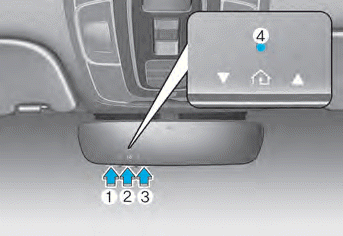
Operating HomeLink
1. Press and release one of the programmed HomeLink buttons (1, 2, or 3).
2. The HomeLink indicator (4) will operate as shown below:
- Indicates Green and steadily ON (fixed code garage door opener)
- Rapidly flashes Green (rolling code garage door opener)
Erasing HomeLink® Buttons
1. Press and hold buttons (1) and (3) simultaneously.
2. Indicator (4) will turn steadily Orange for approximately 10 seconds.
3. The indicator (4) color will then change to Green and flash rapidly. Release the buttons as soon as the Green indicator begins flashing rapidly.
4. All HomeLink buttons (1), (2), and (3) memories are now erased.
NVS® is a registered trademark and Z-Nav™ is a trademark of Gentex Corporation, Zeeland, Michigan. HomeLink® is a registered trademark of Johnson Controls, Inc., Milwaukee, Wisconsin.
Information
This device complies with Part 15 of the FCC Rules.
Operation is subject to the following two conditions:
1. This device may not cause harmful interference, and
2. This device must accept any interference received, including interference that may cause undesired operation.
3. This transceiver complies with FCC and Industry Canada rules. Changes or modifications not expressly approved by the party responsible for compliance could void the user's authority to operate the equipment.
Two-Way Communication Programming
1. Complete the HomeLink programming first.
2. Until the first 10 times the HomeLink button is pressed after programming, the following steps MUST be performed to program two-way communication. (Only for some older garage doors)
3. Press and release the programmed HomeLink button to activate the garage door.
4. Once the garage door stops, press and release the "Learn" or "Smart" button on the garage door opener within 1 minute of pressing the programmed HomeLink button on the mirror.
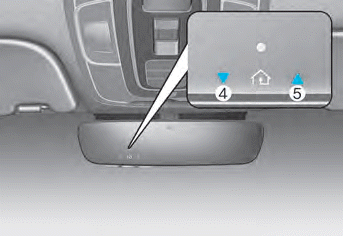
5. If both indicators (4) and (5) flash rapidly for approximately 5 seconds, two-way synchronization is complete.
Information
Some newer garage door openers provide two-way communication synchronization when programming the original transmitter.
Two-Way Communication
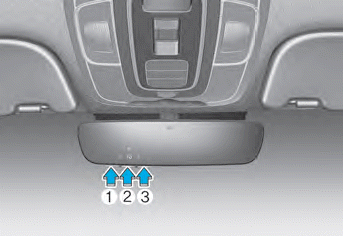
1. Press and release button (1), (2), or (3).
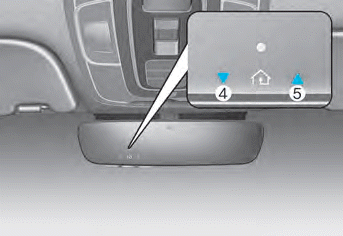
2. Indicators (4) and (5) operate as follows:
- If indicator (4) flashes orange, this indicates that the garage door is closing.
- If indicator (4) remains steady green, this means that the garage door is closed.
- If indicator (5) flashes orange, this indicates that the garage door is opening.
- If indicator (5) remains steady green, this indicates that the garage door is open.
- If indicator (4) or (5) does not turn green, this means that the last state of the garage door was not received properly. The HomeLink mirror attempts to obtain the last known state of the garage door for several seconds.
Retrieving the Garage Door Status
The two-way HomeLink mirror allows you to view the last status message from the garage door opener. To retrieve the last known status of the last activated device, press the "1 and 2" OR "2 and 3" buttons at the same time.
- If indicator (4) remains steady green, this means that the last activated device was "closed" properly.
- If indicator (5) remains steady green, this means that the last activated device was "opened" properly.
Information
The two-way communication range between the vehicle and the garage door opener is 100 m.
The range may be reduced or increased slightly due to obstacles around the garage door opener, such as houses or trees.
Test yourself
A quick Hyundai Elantra CN7 quiz: every answer comes with an explanation and a link to the manual page.