Engine Control System/Fuel System
Fuel Pressure Sensor (FPS) Repair Procedures
In this manual: Engine Control System/Fuel System
8steps
~48min
2/5difficulty
Done 0 of 8
Inspection
- Connect the GDS to the Data Link Connector (DLC).
- Check the output voltage of the Fuel Pressure Sensor (FPS).
Specification: Refer to "Specifications"
Removal
- Turn the ignition switch OFF and disconnect the negative (-) battery cable.
- Fold down the rear seat cushion.
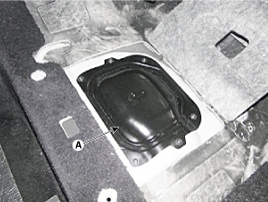
- Remove the fuel pump service cover (A) after loosening the screws.
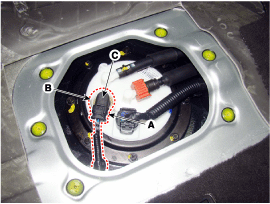
- Disconnect the fuel pressure sensor connector (A).
- Remove the fuel pressure sensor lock pin (B).
- Remove the fuel pressure sensor (C) from the fuel pump.
Installation
- To install, reverse the removal procedure.
Test yourself
A quick Hyundai Genesis DH quiz: every answer comes with an explanation and a link to the manual page.
Was this page helpful?