Basic mode in use: Audio CD / MP3 CD / USB / iPod / My Music
Press the button to change the mode in the order CD
 USB (iPod)AUXMy MusicBT Audio.
The folder/file name is shown on the display.
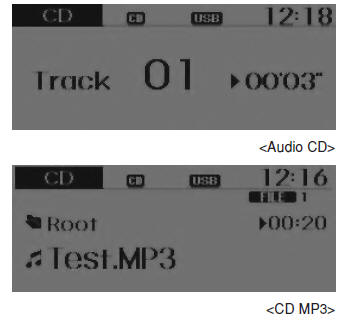
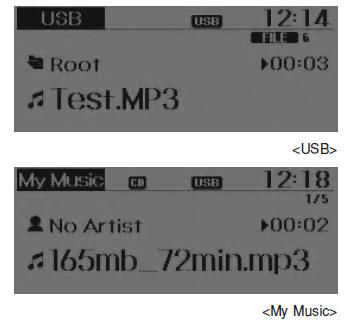
The CD plays automatically when a CD is inserted.
Music on a USB device plays automatically when a USB device is connected.
Repeat
While the track (file) is playing, press the
 (RPT) key.
Audio CD, MP3 CD, USB, iPod, My Music modes: RPT is shown on the display.
- To repeat a track (briefly press (less than 0.8 seconds) the key): Repeats the current track.
MP3 CD, USB modes: FLD.RPT is shown on the display.
- To repeat a folder (press twice): Repeats all files inside the current folder.
Press thekey again to cancel repeat.
Random
While the track (file) is playing, press the (RDM).
Audio CD, My Music modes: RDM is shown on the display.
- Random (briefly press the key): Plays all tracks in random order.
MP3 CD, USB modes: FLD.RDM is shown on the display.
- Random in folder (briefly press the key): Plays all files inside the current folder in random order.
MP3 CD, USB modes: RDM is shown on the display.
- Random (press twice): Plays all files in random order.
iPod mode: RDM is shown on the display.
- Random (press the key): Plays all files in random order.
Press theto cancel random play.
Track/file change
While the track (file) is playing, press the .
- Briefly press the key: Plays the current track from the beginning.
If theis pressed again within 1 second, the previous track is played.
- Press and hold (more than 0.8 seconds) the key: Rewinds the track.
While a track (file) is playingkey .
- Briefly press the key: Plays the next track.
- Press and hold (more than 0.8 seconds) the key: Fast-forwards the track.
Scan (for RDS model)
While a track (file) is playingkey .
- Press and hold (more than 0.8 seconds) the key: Scans all tracks for 10 seconds, starting from the next track.
Press and hold thekey again to cancel.
Scan
While a track (file) is playingkey key.
- Briefly press (less than 0.8 seconds) the key: Scans all tracks for 10 seconds, starting from the next track.
Press thekey again to cancel.
The SCAN function is not supported in iPod mode.
Folder Search: MP3 CD, USB mode
While a file is playing  key (upper folder).
- Searches for the next folder.
While a file is playing  key (lower folder).
- Searches for the root folder.
If a folder is selected by pressing the TUNE knob , the first file in the folder is played.
Track (File) Search
- Turning the TUNE knobsearches for tracks (files).
- Pressing the TUNE knobplays the selected track (file).
MENU: Audio CD
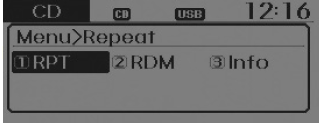
Press the CD MP3 mode key to set the Repeat, Random and Information functions.
Repeat
Press the button . Set [1 RPT] using theTUNE knob or the key to repeat the current track.
Press RPT again to cancel.
Random
Press the button. Set [2 RDM] using theTUNE knob or the key to play the tracks of the current folder in random order.
Press RDM again to cancel.
Information
Press the button . Set [3 Info] using theTUNE knob or the key to display information about the current track.
Press the buttonkey to turn off the information display.
MENU: MP3 CD / USB
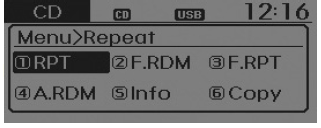
Press the CD MP3 mode keykey to set the Repeat, Folder Random, Folder Repeat, All Random, Information and Copy functions.
Repeat
Press the button . Set [1 RPT] using theTUNE knob or thekey to repeat the current track.
Press RPT again to cancel.
Folder Random
Press the button. Set [2 F.RDM] using theTUNE knob or thekey to play the tracks of the current folder in random order.
Press F.RDM again to cancel.
MENU: MP3 CD / USB
Press the CD MP3 mode keykey to set the Repeat, Folder Random, Folder Repeat, All Random, Information and Copy functions.
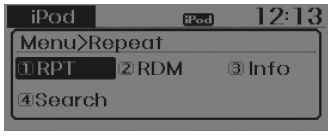
Repeat
Press the button. Set [1 RPT] using theTUNE knob or thekey to repeat the current track.
Press RPT again to cancel.
Folder Random
Press the button. Set [2 F.RDM] using theTUNE knob or thekey to play the tracks of the current folder in random order.
Press F.RDM again to cancel.
Folder Repeat
Press the button. Set [3 F.RPT] using theTUNE knob or thekey to repeat the tracks of the current folder.
Press F.RPT again to cancel.
All Random
Press the button. Set [4 A.RDM] using theTUNE knob or the key to play all tracks of the CD in random order.
Press A.RDM again to cancel.
Information
Press the button. Set [5 Info] using theTUNE knob or the key to display information about the current track.
Press the buttonkey to turn off the information display.
Copy
Press the button. Set [6 Copy] using theTUNE knob or the .
This is used to copy the current track to My Music. The copied music can be played in My Music mode.
If another key is pressed during the copy process, a pop-up appears asking whether you want to cancel the copy.
If another device is connected or inserted (USB, CD, iPod, AUX) during the copy process, the copy is cancelled.
Music is not played during the copy process.
MENU: iPod
In iPod mode, press thekey to set the Repeat, Random, Information and Search functions.
Repeat
Press the button. Set [1 RPT] using theTUNE knob or thekey to repeat the current track.
Press RPT again to cancel repeat.
Random
Press the button. Set [2 RDM] using theTUNE knob or the.
Plays all tracks included in the currently playing category in random order.
Press RDM again to cancel.
Information
Press the button. Set [3 Info] using theTUNE knob or the.
Displays information about the current track.
Press the buttonkey to turn off the information display.
Search
Press the button. Set [4 Search] using theTUNE knob or the.
Displays the list of categories on the iPod.
Press the buttonTo search for a category on the iPod, go to the main category.
MENU: My Music mode (if equipped)
In My Music mode, press thekey to set the Repeat, Random, Information, Delete, Delete All and Select Delete functions.
Repeat
Press the button. Set [1 RPT] using theTUNE knob or the.
Repeats the track currently playing.
Press RPT again to cancel repeat.
Random
Press the button. Set [2 RDM] using theTUNE knob or the
Plays all tracks in random order.
Press A.RDM again to cancel random play.
Information
Press the button. Set [3 Info] using theTUNE knob or the.
Displays information about the current track.
Press the buttonkey to turn off the information display.
Delete
Press the button. Set [4 Delete] using theTUNE knob or the .
Deletes the file currently playing. On the playback screen, pressing Delete deletes the track currently playing.
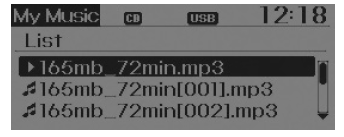
Delete file from list
- Select the file to delete using the TUNE knob .
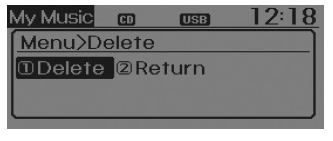
- Press the buttonand select Delete from the menu to delete the selected file.
Delete All
Press the button. Set [5 Del.All] through theTUNE knob or the.
Delete all tracks in My Music.
Select Delete
Press the button. Set [6 Del.Sel] through theTUNE knob or the.
Tracks in My Music are selected and deleted.
1. Select the tracks to delete from the list.
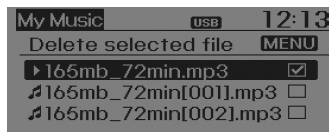
2. After selecting, press theand select Delete from the menu
NOTE - About using My Music
- Even if memory is available, up to 6,000 tracks can be stored.
- The same track can be copied up to 1,000 times.
- Memory information can be checked in the System Setup menu.
Test yourself
A quick Hyundai i10 quiz: every answer comes with an explanation and a link to the manual page.