SETUP (for RDS model)
- AC100B9EE, AC110B9EE
Display Settings
Press the button
 . Select [Display] using the
 TUNE knob or
 button. Select from the menu using theTUNE knob.
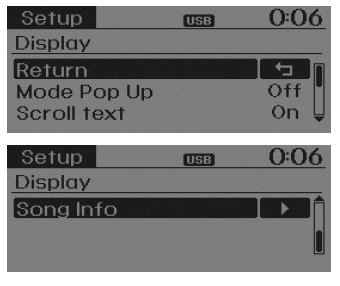
Pop-up Mode
[Pop-up Mode]Changing .
Mode selection.
- With the system on, press the button or to display the mode change pop-up screen.
- When the pop-up screen appears, use the TUNE knobor the buttons to select the desired mode.
Scroll Text
[Scroll text]Set/ .
- : Keep scrolling
- : Scrolls only once.
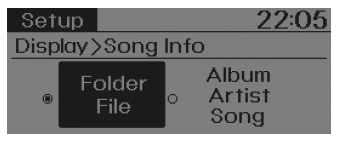
Track Info
When playing an MP3 file, select the information to display from 'Folder/File' or 'Album/Artist/Track'.
Sound Settings
Press the button . Select [Sound] using theTUNE knob or
 button. Select from the menu using theTUNE knob.
Sound Settings
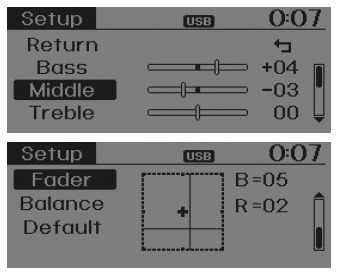
This menu lets you set the 'Bass, Mid, Treble' as well as the fader and balance.
Select [Sound Settings]. Select from the menu using theTUNE knob. Turn theTUNE knob left/right to adjust.
- Bass, Mid, Treble: Adjusts the audio tone.
- Fader, Balance: Adjusts the front/rear fader and left/right balance.
- Default: Restores the default settings.
Return: While adjusting values, press theTUNE knob again to return to the main menu.
Virtual Sound
PowerTreble and Surround can be set.
Select [Virtual Sound]. Select from the menu using theTUNE knob. Set using the/toTUNE knob.
- PowerTreble: An audio system feature that provides a live concert-like vibration.
- Surround: An audio system feature that provides surround sound.
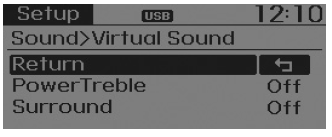
May vary depending on the selected audio source.
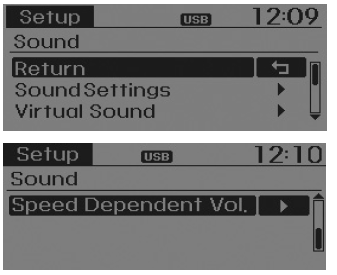
Speed-Dependent Volume Control
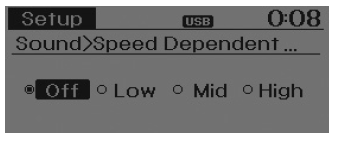
This function is used to automatically adjust the volume according to the vehicle speed.
Select [Speed Dependent Vol.].
Set to 4 levels [Off/Low/Mid/High] ofTUNE knob.
Clock Settings
Press the button . Select [Clock] usingTUNE knob or
 button. Select from the menu using theTUNE knob.

Clock Settings
This menu is used to set the time.
Select [Clock Settings]. Set from the menu usingTUNE knob. Press theTUNE knob.
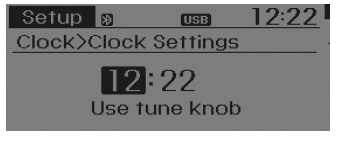
Adjust the currently selected number to set the [hour], and press the TUNE knob to set the [minutes].
Day Settings
This menu is used to set the date.
Select [Day Settings]. Set from the menu usingTUNE knob. Press theTUNE knob.
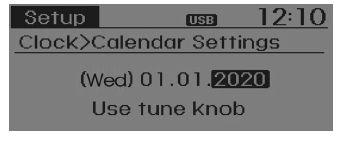
Adjust the currently selected number to make the setting, and press the TUNE knob to move to the next setting (Set in the order year/month/day.).
Time Format
This function is used to set the 12/24-hour time format of the audio system.
Select [Time Format]. Set 12Hr/24Hr usingTUNE knob.
Clock Display When Power Is Off
Select [Clock Disp.(Pwr Off).
Set/toTUNE knob.
- : Displays the time/date on the screen.
- : Turn off.
Automatic Time with RDS
This option is used to set the time automatically by synchronizing with RDS.
Select [Automatic RDS Time] .
Set/toTUNE knob.
- : Activates automatic time.
- : Turn off.
System Settings
Press the button. Select [System] using button. Select from the menu using theTUNE knob.
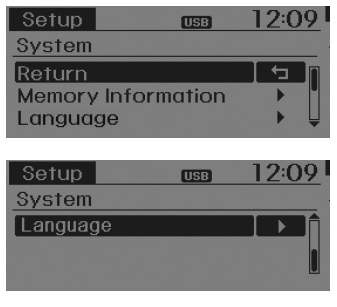
Memory Information (if equipped)
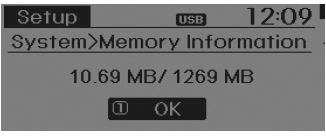
Displays the currently used memory and the total system memory.
Select [Memory Information]OK.
The currently used memory is shown on the left side, while the total system memory is shown on the right side.
VRS Mode
This function is used to change the voice command responses between Normal and Expert modes.
Select [VRS Mode]. Set usingTUNE knob.
- Normal: This mode is for beginner users and provides detailed instructions during voice command operations.
- Expert: This mode is for experienced users and omits some information during voice command operation. (When using Expert mode, driving instructions can be heard through [Help] or [MENU] commands.)
May vary depending on the selected audio source.
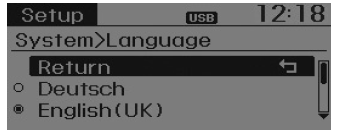
Language
This menu is used to set the display and voice recognition language.
Select [Language]. Set usingTUNE knob.
Test yourself
A quick Hyundai i10 quiz: every answer comes with an explanation and a link to the manual page.