Radio (for RDS model)
Changing the RADIO Mode
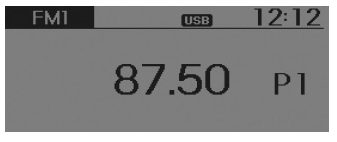
SEEK
Press the button .
- Briefly press (less than 0.8 seconds) the key: Changes the frequency.
- Press and hold (more than 0.8 seconds) the key: Automatically seeks the next frequency.
Preset SEEK
Press the button .
- Briefly press (less than 0.8 seconds) the key: Plays the frequency stored in the corresponding key.
- Press and hold (more than 0.8 seconds) the key: Press and hold the desired key fromIt is possible to store the station currently being received to the selected key and an acoustic signal (BEEP) sounds.
SCAN
Press the button .
- Press and hold (more than 0.8 seconds) the key: The broadcast frequency increases and each station is scanned for 5 seconds.
After all frequencies have been scanned, it returns to the current broadcast frequency and plays it.
Manual tuning selection
Turn the left/right tuning knob to adjust the frequency.
- AC100B9EE, AC110B9EE
- FM: Changes in 50 kHz steps
- AM: Changes in 9 kHz steps
Traffic announcements (TA)
Briefly press (less than 0.8 seconds) the key: Set the /
 Traffic announcements (TA) mode.
PTY up/down
- Press the button to search for a station by RDS programme type (PTY)
MENU
Inside the key there are A.Store (Auto Store) and the info functions.
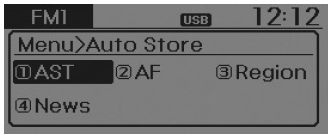
AST (Auto Store)
Press the button . Set [1 AST] using theTUNE knob or the
 .
Select AST (Auto Store) to save the frequencies with reception stronger than the presets. If no frequency is received, the last received frequency will be broadcast.
On some models, it only stores the preset positionsof FMA or AMA mode.
AF (Alternative Frequency)
Press the button. Set [2 AF] using theTUNE knob or the .
The alternative frequency option can be turned on/off.
Region
Press the button. Set [3 Region] using theTUNE knob or the .
The Region option can be turned on/off.
News
Press the button. Set [4 News] using theTUNE knob or the .
The News option can be turned on/off.
Information volume
Information volume refers to the sound volume when receiving news or traffic information.
The information volume can be adjusted by turning the VOL knobleft/right while news or traffic information is being heard.
AF, Region and News are RDS radio menus.
Test yourself
A quick Hyundai i10 quiz: every answer comes with an explanation and a link to the manual page.