System Settings and Operation
System Settings
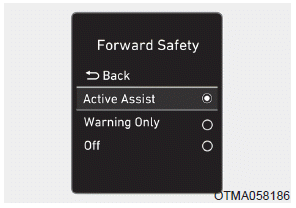
• Forward Safety Setting
The driver can activate FCA by turning the ignition switch to the ON position and selecting:
'User Settings → Driver Assistance → Forward Safety'
- If you select "Active Assist", the FCA system is activated. FCA provides warning messages and warning sounds according to collision risk levels. Braking assistance will be applied in accordance with the collision risk.
- If you select "Warning Only", the FCA system activates and provides only warning sounds according to the collision risk levels. Braking assistance will not be applied in this setting.
- If you select "Off", the FCA system is deactivated.
•  The indicator light illuminates on the LCD display when you deactivate the FCA system. The driver can check the FCA ON/OFF status on the LCD display. The indicator light also illuminates when the ESC (Electronic Stability Control) is turned off. If the warning indicator remains on when FCA is activated, have the system checked by an authorized HYUNDAI dealer.
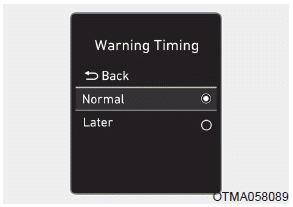
• Warning timing setting
The driver can select the initial warning timing on the LCD display.
Go to "User Settings → Driver Assistance → Warning Timing → Normal/Late".
The Forward Collision Warning timing options include the following:
- Normal:
When this option is selected, the initial forward collision warning is activated sensitively. If you feel the warning activates too early, set the Forward Collision Warning to "Late".
Even though "Normal" is selected, if the vehicle ahead suddenly stops, the initial warning timing may not seem quick.
- Late:
When this option is selected, the initial forward collision warning is activated later than usual. This setting reduces the distance between your vehicle and a pedestrian or vehicle ahead before the initial warning occurs.
Select "Late" when there is little traffic and when the driving speed is low.
Information
If you change the warning timing, the warning timing of other systems may change. Always be aware of this before changing the warning timing.
Activation Conditions
The FCA system is enabled and ready when "Active Assist" or "Warning Only" under "Forward Safety" is selected on the LCD display and the following conditions are met:
- ESC (Electronic Stability Control) is on.
- Vehicle speed is above 5 mph (8 km/h) (FCA is activated only within a specific speed range).
- The system detects a pedestrian or a vehicle ahead that may collide with your vehicle. However, FCA may not be activated or may only sound a warning depending on driving or vehicle conditions.
WARNING
- To avoid driver distraction, do not attempt to set or cancel the FCA while driving the vehicle. Always stop the vehicle completely in a safe place before setting or canceling the system.
- FCA is automatically activated when the ignition switch is turned to the ON position. The driver can deactivate FCA by canceling the system setting on the cluster LCD display.
- FCA is automatically deactivated when ESC is turned off. When ESC is turned off, FCA cannot be activated on the cluster LCD display. In this situation, the FCA indicator light will illuminate, which is normal.
Test yourself
A quick Hyundai Palisade quiz: every answer comes with an explanation and a link to the manual page.