Using the iPod®
iPod® is a registered trademark of Apple Inc.
1. Buttons (iPod)
If an iPod is connected, the mode switches from the previous mode to play files stored on the iPod.
If the iPod player is not connected, the message "No Media" is displayed for 3 seconds and the system returns to the previous mode.
2.  (RANDOM) Button
• Press this button for less than 0.8 s to play all tracks in the current category in random order. (Song random)
• Press and hold this button for 0.8 s or longer to play all albums in the current category in random order. (Album random)
• To cancel random play, press this button again.
3.  (REPEAT) Button
Repeats the currently playing track.
4. Buttons
• Press briefly (less than 0.8 s) to restart the currently playing song from the beginning.
If this button is pressed again within 1 second, the previous track starts playing.
For high-speed reverse playback, press and hold the button for at least 0.8 s.
• Briefly pressing the (TRACK) button (less than 0.8 s) starts playback of the next track.
For high-speed forward playback, press and hold the button for at least 0.8 s.
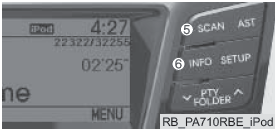
5. Buttons
Plays each song on the USB device for 10 seconds.
To cancel SCAN Play, press this button again.
6. Button
Press this button to display information about the file being played, in the following order: TITLE - ARTIST - ALBUM - NORMAL DISPLAY MODE - TITLE... (This information is displayed only if it is contained in the file.)
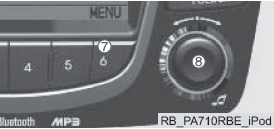
7.  (MENU) Button
Moves up to the category above the currently playing iPod category.
To move to (play) the displayed category (track):
press the button .
A lower-level category can be searched from the selected category.
Standard iPod category order: SONGS - ALBUMS - ARTISTS - GENRES - iPod.
8. Buttons  and
 Turning the knob clockwise displays the songs (categories) before the currently playing song (category at the same level).
Turning the knob counterclockwise displays the songs (categories) after the currently playing song (category at the same level).
To listen to a song shown in a category: press the SEEK button to skip, and press the button to play the selected song.
Press this button to select the BASS, MIDDLE, TREBLE, FADER, and BALANCE TUNE modes. The selected mode is displayed on the screen.
After selecting a mode, turn the AUDIO knob clockwise or counterclockwise.
Warnings for Using Mobile Phones with BLUETOOTH® Function
• Do not use a mobile phone or make Bluetooth® settings (for example, pairing with a phone) while driving.
• Some phones with Bluetooth® function may not be recognized by the system or may have limited compatibility with it.
• Before using the Bluetooth® functions of the audio system, read the phone's owner's manual for the operations that must be performed on the phone in connection with this.
• For Bluetooth® functions to become available, the phone and system must be paired.
• If the phone (vehicle) is outside the service area (for example, in a tunnel, underground, in mountainous terrain, etc.), headset functions will be unavailable.
• With weak signal reception or high noise levels inside the cabin, the caller's voice may be hard to hear.
• Do not place the phone near metal objects (or inside them).
This may disrupt communication with the system via Bluetooth® or cellular signal reception.
• When connected via Bluetooth®, the phone battery may drain faster than usual.
• Some mobile phones or other devices may cause interference and lead to a malfunction of the audio system.
One possible action in this situation is to move the device to another location.
Test yourself
A quick Hyundai Solaris quiz: every answer comes with an explanation and a link to the manual page.