Automatic Heating and Air Conditioning
The automatic climate control system is operated by setting the desired temperature.
1. Press the AUTO button. The modes, fan speed, air intake and air conditioning are controlled automatically according to the temperature setting.
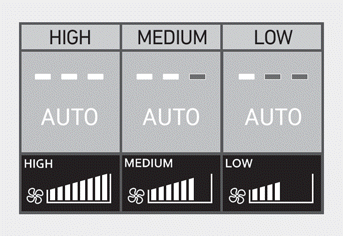
You can control the fan speed in three stages by pressing the AUTO button during automatic operation.
- HIGH: Provides rapid cooling or heating with the fan set to maximum speed.
- MEDIUM: Provides cooling or heating with the fan set to medium speed.
- LOW: The fan speed is set to the lowest setting range (range from 1 to 3 steps).
2. Turn the temperature control knob/button to set the desired temperature. If the lowest temperature setting (Lo) is selected, the air conditioning system operates continuously. Once the cabin has cooled sufficiently, set the knob/button to a higher temperature setting whenever possible.
To turn off automatic operation, select any of the following buttons:
- Mode selection button
- Front windshield defrost button (Press the button again to cancel the front windshield defrost function. The "AUTO" indicator illuminates on the information screen again.)
- Fan speed control button
The selected function is controlled manually, while the other functions operate automatically.
For your comfort and to improve climate control efficiency, use the AUTO button and set the temperature to 72 °F (22 °C).
Information
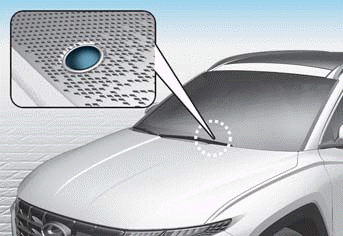
Never place anything near the sensor, to ensure the best control of the heating and cooling system.
Test yourself
A quick Hyundai Tucson LM quiz: every answer comes with an explanation and a link to the manual page.