Turn Signals and Lane Change Signals
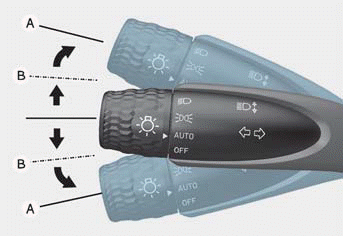
To signal a turn, push the lever down for a left turn or up for a right turn to position A.
If the indicator continues to illuminate without flashing, or if it flashes abnormally, one of the turn signal bulbs may have burned out and need to be replaced. Contact an authorized HYUNDAI dealer.
One Touch Turn Signal
To use the one touch turn signal, push the turn signal lever up or down to position B and then release it.
The lane change signals flash 3, 5, or 7 times.
You can enable the One Touch Turn Signal function or select the number of flashes from the settings menu on the instrument panel or the infotainment system.
Select:
- User Settings > Lighting > One Touch Turn Signal > Off / 3 Flashes / 5 Flashes / 7 Flashes (for cluster type)
- Settings > Vehicle > Lighting > One Touch Turn Signal > 3 Flashes / 5 Flashes / 7 Flashes / Off (for infotainment system type)
Information
- For more information on the cluster settings menu, refer to the "Cluster Display" section in Chapter 4.
- The infotainment system may change after a software update. For more information, refer to the infotainment system user's manual and quick reference guide.
Battery Saver Feature
To prevent battery discharge, the system automatically turns off the parking lights when the driver turns off the engine and opens the driver's door.
To keep the headlights on when the vehicle is off:
(1) Open the driver's door.
(2) Turn the headlight switch off and on again.
Headlight Delay Function
If the ignition key is in the ACC or OFF position with the headlights on, the headlights (and/or parking lights) remain on for approximately 5 minutes. If the driver's door is opened and closed, the headlights turn off after 15 seconds. Also, when the vehicle is off, if the driver's door is opened and closed, the headlights (and/or parking lights) turn off after 15 seconds.
The headlights (and/or parking lights) can be turned off by pressing the lock button on the remote key or Smart Key twice, or by turning the headlight switch to the OFF or AUTO position.
You can enable the headlight delay function from the settings menu on the instrument panel or the infotainment system.
Select:
Test yourself
A quick Hyundai Tucson LM quiz: every answer comes with an explanation and a link to the manual page.