Driving Your Vehicle
Cancel
In this manual: Driving Your Vehicle
~1min read
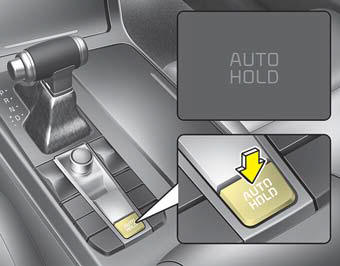
To cancel the Auto Hold operation, press the Auto Hold switch. The AUTO HOLD indicator will turn off.
To cancel the Auto Hold operation while the vehicle is stopped, press the Auto Hold switch while depressing the brake pedal.
✽ NOTICE
- Auto Hold does not operate when:
- The driver's door is open
- The engine hood is open
- The shift lever is in P (Park) or R (Reverse)
- EPB is applied - For your safety, the Auto Hold function automatically switches to EPB in the following cases:
- The driver's door is open
- The engine hood is open
- The vehicle has been stopped for more than 10 minutes
- The vehicle is stopped on a steep slope
- The vehicle has been driven several times. In these cases, the brake warning light illuminates, the AUTO HOLD indicator changes from green to white, a warning chime sounds, and a message appears informing you that EPB has been automatically applied. Before driving off again, depress the brake pedal, check the area around your vehicle, and release the parking brake manually using the EPB switch. - If the AUTO HOLD indicator is illuminated in yellow, the Auto Hold system is not operating correctly. Take your vehicle to an authorized Kia dealer and have the system checked.
- During Auto Hold operation, you may hear a mechanical noise. This noise is normal operation.
WARNING
- Depress the accelerator pedal slowly when starting the vehicle.
- For safety, cancel Auto Hold while driving downhill or backing up, or when parking the vehicle.
CAUTION
If there is a malfunction in the driver's door or engine hood open detection system, Auto Hold may not operate properly.
Take your vehicle to an authorized Kia dealer and have the system checked.
Test yourself
A quick Kia Cadenza VG Owner's Manual quiz: every answer comes with an explanation and a link to the manual page.
Was this page helpful?