Driving Your Vehicle
To turn off Smart Cruise Control
In this manual: Driving Your Vehicle
~2min read
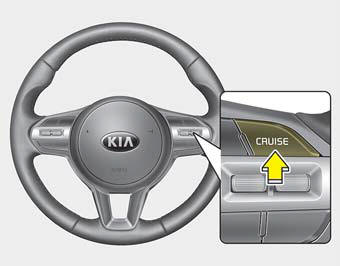
Press the CRUISE button. (The CRUISE indicator in the instrument cluster will turn off.)
When Smart Cruise Control is not needed, press the [CRUISE] switch to deactivate the system.
✽ NOTICE
Observe the following precautions:
- If Smart Cruise Control is left on (the cruise indicator in the instrument cluster is illuminated), Smart Cruise Control may be activated unintentionally. Keep Smart Cruise Control turned off (the cruise indicator is off) when it is not being used.
- Do not leave the vehicle when it is stopped on a slope. If you need to exit the vehicle, turn off SCC, shift the transmission lever to P (Park), apply the parking brake, and turn off the engine while depressing the brake pedal.
- Use SCC only on roads with good driving conditions. Do not use SCC in the following situations, because of a high risk of accident.
- Highway interchanges and toll gates
- Road surrounded by many steel structures (subway construction, steel tunnel, etc.)
- Parking lots
- Lanes adjacent to guardrails on the road
- Slippery roads with rain, ice, or snow
- Sharp curved roads
- Steep hills
- Windy roads
- Off-road
- Roads under construction
- Rumble strip lane
- When driving next to protective barriers
- When the vehicle detection capability is reduced due to vehicle modification that causes a difference in height between the front and rear of the vehicle
- When driving with limited visibility (possibly due to bad weather such as fog, snow, rain, or sandstorms) - Pay special attention to driving conditions when using Smart Cruise Control.
- Smart Cruise Control does not replace safe driving. It is the driver's responsibility to always check the speed and distance from the vehicle ahead.
- Be careful when driving downhill with SCC.
- Smart Cruise Control must not be used when the vehicle is towing.
- Always set the vehicle speed below the applicable speed limit.
- Unexpected situations can lead to accidents. Always pay attention to road conditions and your surroundings, even when Smart Cruise Control is operating.
To adjust the Smart Cruise Control sensitivity
The vehicle speed sensitivity when following a vehicle ahead to maintain the set distance can be adjusted.
Go to "User Settings > Driver Assistance > SCC Response > Fast/Normal/Slow" on the LCD display.
You can select one of three steps that you prefer.
Test yourself
A quick Kia Cadenza VG Owner's Manual quiz: every answer comes with an explanation and a link to the manual page.
Was this page helpful?