Lighting
The lighting control in the Kia Opirus features automatic operation and power-saving safety functions. When the key is removed and the driver's door is opened, the parking lights switch off automatically to prevent battery discharge. This chapter explains all lighting functions, from high beam to parking lights and rear fog light. The AUTO function is especially convenient, as it adapts to the ambient brightness, increasing driving comfort and safety.
Power-saving function
- The purpose of this feature is to prevent the battery from discharging. The system automatically switches off the parking lights when the driver removes the ignition key and opens the driver's door.
- With this feature, the parking lights are automatically switched off when the driver parks the vehicle at the roadside at night.
If the parking lights should remain on after the ignition key has been removed, perform the following steps:
1. Open the driver's door.
2. Switch the parking lights off and on again using the light switch on the steering column.
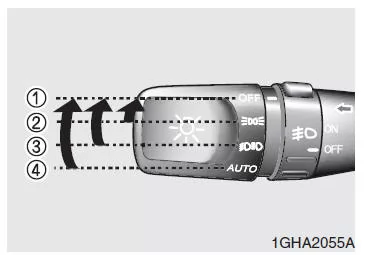
Light switch
The light switch controls both the parking lights and the headlights.
To turn on the lights, turn the knob on the outside of the light switch to one of the following positions:
- OFF
- Parking lights
- Headlights
- AUTO (automatic light control)
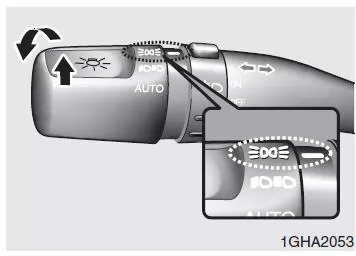
Parking lights ( )
In the "Parking lights" position (first stage), the parking lights, tail lights, license plate lights, and instrument panel lighting are switched on.
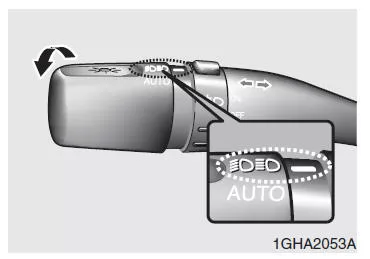
Headlights (  )
In the "Headlights" position (second stage), the headlights, parking lights, tail lights, license plate lights, and instrument panel lighting are switched on.
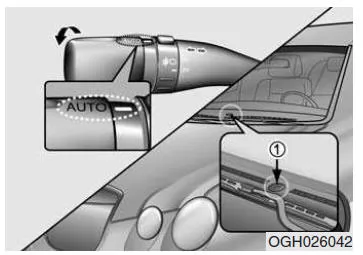
Automatic light control (AUTO)*
In the "AUTO" position, the parking lights and then the headlights are switched on and off automatically according to the outside light conditions.
WARNINGAutomatic light control is only a supplementary system that increases driving comfort. It does not relieve the driver of the responsibility to switch on the appropriate vehicle lighting manually in the relevant situations.
NOTE
- Do not place objects over the light sensor (1) on the instrument panel, as this may interfere with the automatic light control.
- If your windshield is tinted or otherwise colored, this may impair the proper function of the light sensor.
Do not clean the light sensor with glass cleaner.
Glass cleaner may leave a film on the sensor, which may impair its function.
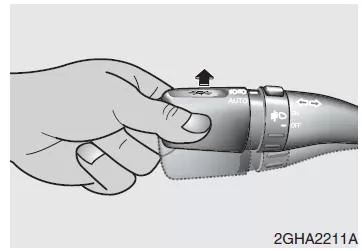
High beam
To turn on the high beam, push the light switch lever forward. Pull the lever back to return to low beam.
The high beam indicator illuminates when the high beams are on.
To prevent the battery from discharging, do not leave the headlights on for an extended period when the engine is off.

Headlight Flash
To activate the headlight flasher, pull the light switch lever toward you. When you release the lever, it returns to its original position (low beam). The headlight flasher can also be operated when the lights are switched off.

Turn indicators
The turn signals can only be activated when the ignition is switched on.
Push the lever up or down to activate the turn signals.
Green arrow-shaped indicator lamps in the instrument cluster show the direction in which the turn signal is being given. After completing a turn, the turn signal switches off automatically. If the turn signal does not cancel automatically after a turn, return it manually to the OFF position.
Lane change signal
To signal a lane change, move the turn signal lever only lightly so that it does not lock in place, and hold the lever. When you release it, the turn signal lever returns to its neutral position.
If a turn signal indicator lamp lights up but does not flash, or flashes too quickly, this indicates a faulty bulb in a turn signal light. In this case, have the bulb replaced.
NOTE
If the turn signal indicator lamp flashes too quickly or too slowly, either a bulb has burned out or there is a faulty electrical connection in the circuit.
Automatic headlight levelling*
To help the driver with even road illumination and to reduce eye strain, the headlights are adjusted automatically.
This depends on the vehicle load and the vehicle inclination (passengers in the rear seats, cargo loaded in the rear, or towing a trailer can change the correct headlight alignment).
Automatic headlight levelling ensures constant, automatically adjusted and correct illumination under various driving conditions and body inclinations.
NOTE
If the automatic headlight levelling does not operate, if the front of the vehicle has risen due to passengers in the rear seats, or if headlight levelling is not performed correctly, have your vehicle checked and repaired as necessary by an authorized KIA dealer.
Do not try to adjust the headlights manually. The automatic headlight levelling system could be damaged.
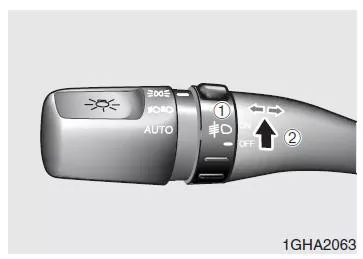
Fog lights*
Fog lights make it possible to, in fog, rain, snow, etc.
improve visibility and reduce the risk of accidents.
The fog lights are switched on by turning the fog light switch (1) to the ON position (2) while the headlights or parking lights are on.
To switch off the fog lights, turn the switch to the OFF position.
NOTE
Fog lights consume a lot of power when switched on.
Therefore, switch the fog lights on only in poor visibility to avoid unnecessary battery drain and an unnecessary load on the alternator.
Daytime running lights (DRL)*
The daytime running lights (DRL) make it easier for other road users to see your vehicle from the front during the day. The DRL can be very helpful in many different driving conditions.
They are especially beneficial in the periods before sunrise and before sunset.
The DRL system turns the headlights OFF when:
1. The headlight switch is turned on.
2. The parking lights are turned on.
3. The engine is switched off.
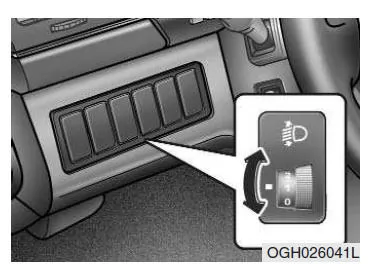
Headlight levelling*
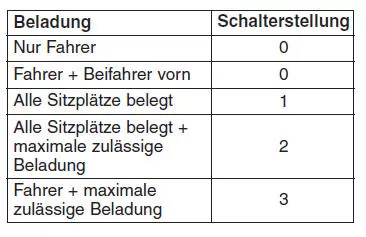
Manual headlight levelling allows you to adjust the beam range of your headlights so that oncoming road users are not dazzled. The headlights are adjusted using a thumbwheel according to the following table.
Switch position
Rear fog light*
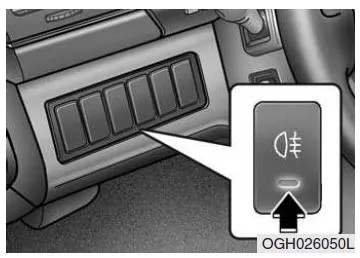
To switch on the rear fog lights, first switch on the headlights, then press the rear fog light button.
To switch on the rear fog light, first switch on the fog lights, turn the light switch to the parking light position, and then press the rear fog light switch.
(depending on equipment) To switch off the rear fog light, press the rear fog light button again or switch off the headlights.
The lighting of the Kia Opirus 2003–2011 combines state-of-the-art technology with high ease of use. From the parking lights to the automatic light control, the system ensures that the vehicle is always optimally visible.
The power-saving function prevents unintended battery discharge, further enhancing the everyday usability of the Kia Opirus. This keeps the vehicle safe and reliable even with frequent use.
FAQWhat is the advantage of the automatic light control in the Kia Opirus 2003–2011?
It switches the lights on or off according to the outside light conditions, increasing driving comfort.
Why should the light sensor not be covered?
Because this could impair the function of the automatic light control.
Test yourself
A quick Kia Opirus quiz: every answer comes with an explanation and a link to the manual page.