Traction Control System (TCS)
The Traction Control System (TCS) in the Kia Opirus improves driving stability on slippery surfaces by automatically preventing wheel spin. It improves control of the vehicle especially when starting off or accelerating. This section describes actively supporting systems, warning lights, and situations in which switching off TCS may be useful. Ideal for driving on ice, snow, or gravel roads.
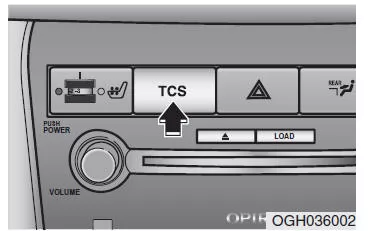
The Traction Control System (TCS) assists starting off on slippery surfaces by largely preventing the drive wheels from spinning. The TCS also improves driving and steering characteristics.
WARNINGTraction control is only an additional driving aid. Observe the safety instructions for safe driving when braking in corners or on snowy or icy roads. Drive slowly and do not try to accelerate while the TCS indicator light is flashing or when the road surface is slippery.
TCS operation
Activation conditions

- After switching the ignition on, the TCS and TCS OFF indicator lights come on for approx. 3 seconds. The TCS system is then switched on.
- To switch off the TCS system, press and hold the TCS button for at least half a second after switching the ignition on. The TCS OFF indicator light then comes on. To switch the TCS system back on, press the TCS button. The TCS OFF indicator light then goes out.
- A slight ticking noise may be audible when starting the engine.
This noise occurs during the automatic self-diagnosis of the TCS system and does not indicate a malfunction.
During TCS operation
 When the traction control is active to prevent the drive wheels from spinning, the TCS indicator light flashes.
- When the traction control is functioning properly, you may feel a slight pulsation in the vehicle. This is an effect of the TCS brake control and does not indicate a malfunction.
- When driving out of mud or on slippery surfaces, the TCS control may prevent the engine speed from increasing further even with the accelerator pedal depressed.
Switching off the TCS system
Traction control switched off

- To switch off the traction control, press the TCS button. The TCS OFF indicator light then comes on.
- When the engine is started, traction control is automatically switched on, even if it was switched off in the previous driving cycle.
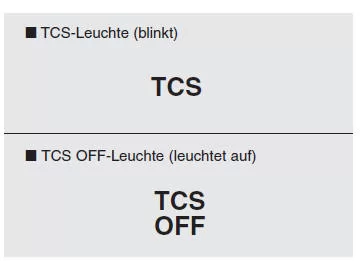
Indicator lamp
After the ignition is switched on, the indicator light comes on briefly and then goes out. This indicates that the TCS system is in proper working condition.
Whenever traction control is active, the TCS indicator light flashes.
The TCS OFF indicator light stays on continuously if either the TCS system has been switched off or a malfunction in the TCS system has been detected.
WARNINGTraction control is only an additional driving aid. Observe the safety instructions for safe driving when braking in corners or on snowy or icy roads. Drive slowly and do not try to accelerate while the TCS indicator light is flashing or when the road surface is slippery.
Notes on switching off the TCS system
While driving
- It is recommended to leave traction control switched on at all times during everyday driving.
- If you want to switch off the TCS system while driving, press the TCS button while driving on a level road surface.
Never press the TCS button while the system is active (TCS indicator light flashing).
If the TCS system is switched off during an active control phase (TCS indicator light flashing), the vehicle may lose control and skid.
NOTE
- Make sure the TCS system is switched off (TCS OFF indicator light on) when vehicle speed is to be measured on a dynamometer. If the TCS system is switched on during measurement, the measurement result may be distorted because the TCS system can prevent the engine from accelerating.
- If the TCS system is switched off, this has no effect on the functions of the ABS system and the brake system.
Never press the TCS button while the system is active (TCS indicator light flashing).
If the TCS system is switched off during an active control phase (TCS indicator light flashing), the vehicle may lose control and skid.
If you want to switch off the TCS system while driving, press the TCS button while driving on a level road surface.
The traction control system (TCS) in the Kia Opirus 2003–2011 provides additional safety when pulling away on slippery surfaces. The system largely prevents the drive wheels from spinning and thus improves driving stability.
Simple operation via a single button allows the system to be switched on and off as needed. The Kia Opirus combines modern technology with a high level of comfort and safety.
The warning lights inform the driver of the system status at all times and help the driver to stay in control of the vehicle.
Test yourself
A quick Kia Opirus quiz: every answer comes with an explanation and a link to the manual page.