Smart key functions
When you carry the smart key with you, you can lock and unlock the doors (and the tailgate).
You can also start the engine. For more details, refer to the following.
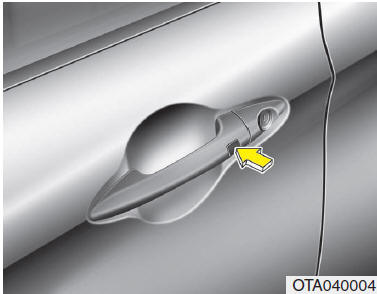
Locking Press one of the buttons built into the outside handles of the front doors while all doors (including the tailgate) are closed but not all are locked; the doors (including the tailgate) will lock. If all doors (including the tailgate) and the hood are closed, locking is confirmed by a single flash of the hazard warning lights.
The button only works when the smart key is within 0.7 to 1 m (28 to 40 in.) of the outside door handle. To check whether a door is locked, check the position of the lock button inside the vehicle or pull the outside door handle.
If any of the conditions below apply, the doors will not lock even if the buttons on the outside handles are pressed, and the buzzer sounds for 3 seconds:
- The smart key is inside the vehicle.
- The ENGINE START/STOP button is in ACC or ON position.
- Any door other than the tailgate is open.
Unlocking Press one of the buttons built into the outside handles of the front doors while all doors (including the tailgate) are closed and locked; the doors (including the tailgate) will unlock.
The hazard warning lights will flash twice to indicate that all doors (including the tailgate) are unlocked. The button only works when the smart key is within 0.7 to 1 m (28 to 40 in.) of the outside door handle.
When the smart key is detected within 0.7 to 1 m (28 to 40 in.) of the outside front door handle, the doors can then be opened by other people as well.
After pressing this button, the doors will lock automatically if none of them is opened within 30 seconds.
Unlocking the tailgate If you are within 0.7 ~ 1 m (28 ~ 40 in.) of the outside tailgate handle and have the smart key with you, press the switch built into the outside tailgate handle to unlock and open the tailgate.
The hazard warning lights will flash twice to indicate that the tailgate is unlocked. Also, if the tailgate is opened and closed again, it will lock automatically.
❈ The word "HOLD" printed on the button indicates that the button must be held down for 1 second.
Starting The engine can be started without inserting the key. For detailed information, see "Starting the engine with the smart key" in section 5.
Test yourself
A quick Kia Picanto JA quiz: every answer comes with an explanation and a link to the manual page.