Vehicle Recognition
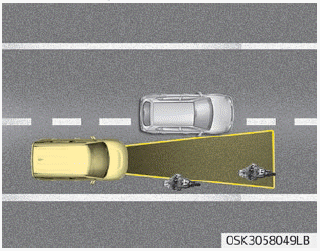
Some vehicles ahead in your lane may not be detected by the sensor as follows:
- Narrow vehicles, such as motorcycles or bicycles
- Vehicles offset to one side
- Slow-moving vehicles or vehicles braking suddenly
- Stopped vehicles
- Vehicles with a small rear profile, such as unloaded trailers
The vehicle ahead may not be correctly detected by the sensor if one of the following conditions exists:
- When the vehicle is tilted upward due to heavy cargo in the luggage area (tailgate)
- When steering the wheel during turns
- When driving on one side of the lane
- When driving on narrow lanes or in curves
Adjust your vehicle speed by pressing the brake pedal according to the road conditions ahead and the driving conditions.
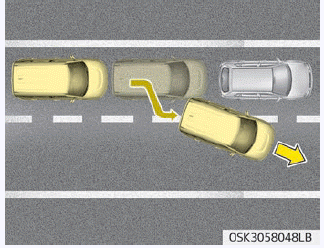
• When your vehicle is stopped and the vehicle ahead moves to another lane, be careful when your vehicle starts moving, as it may not detect the stopped vehicle ahead.
In this case, maintain a safe braking distance and depress the brake pedal if necessary to reduce speed and keep a safe distance.
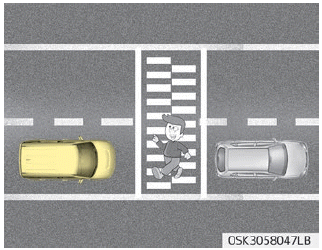
• Always watch for pedestrians when your vehicle is following a vehicle ahead.
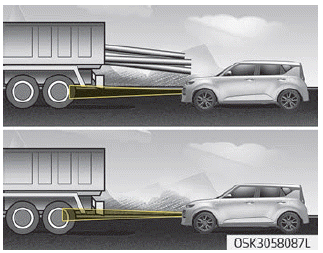
• Always be careful with taller vehicles or vehicles carrying cargo that protrudes from the rear of the vehicle.
WARNING
- The Smart Cruise Control system cannot guarantee stopping in every emergency situation. If an emergency stop is necessary, you must apply the brakes.
- Maintain a safe distance depending on road conditions and vehicle speed. If the distance between vehicles is too small while driving at high speed, a serious collision may occur.
- The Smart Cruise Control system cannot detect a stopped vehicle, pedestrians, or an oncoming vehicle. Always look ahead carefully to prevent unexpected and sudden situations.
- The SCC system may have difficulty maintaining the proper distance or speed when driving on a steep slope or towing a trailer.
- When other vehicles frequently change lanes in front of you, the Smart Cruise Control system may not operate properly. Always look ahead carefully to prevent unexpected and sudden situations.
- The Smart Cruise Control system does not replace safe driving; it is a convenience function only. The driver is always responsible for checking vehicle speed and the distance to the vehicle ahead.
- Always monitor the set speed and the distance between vehicles.
- Always maintain a sufficient braking distance and reduce vehicle speed by applying the brakes when necessary.
- Because the Smart Cruise Control system may not recognize complex road situations, always pay attention to driving conditions and control your vehicle speed.
- For safe operation, carefully read and follow the instructions in this manual before use.
- After starting the vehicle, wait a few seconds. If system initialization is not complete, the SCC will not operate normally.
- After starting the vehicle, if no objects are detected or the sensor cover is covered by foreign substances, the SCC system may not operate properly.
- The following conditions are not permitted: excessive loading of cargo in the trunk (luggage compartment), modification of the suspension, replacement of tires with non-approved tires or tires with different wear levels and pressures.
- Do not use Smart Cruise Control when towing a trailer.
CAUTION
Smart Cruise Control may temporarily stop functioning due to electrical interference.
Test yourself
A quick Kia Soul Owner's Manual quiz: every answer comes with an explanation and a link to the manual page.