Warning Message and System Control
Rear Cross-Traffic Collision Warning (RCCW)

If a vehicle detected by the sensors approaches from the rear left/right side of your vehicle, a warning chime will sound, the warning indicator on the outside rearview mirror will flash, and a message will appear on the LCD display. If the rear view monitor system is activated, a message will also appear on the audio or AVN screen.
The warning will stop when:
- A vehicle approaching from the rear left/right of your vehicle is not within the detection range.
- The vehicle is directly behind your vehicle.
- The vehicle is not moving toward your vehicle.
- The approach speed of the vehicle is low.
Rear Cross-Traffic Collision-Avoidance Assist (RCCA) System
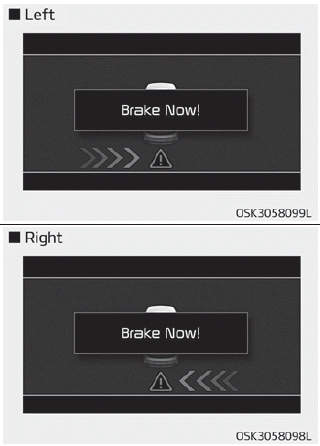
If a risk of collision is detected while the RCCW is operating, the brakes are automatically applied. The instrument cluster will notify the driver of the brake control. If the rear view monitor system is activated, a message will also appear on the audio or AVN screen. After brake control is applied, the driver must immediately press the brake pedal and check the surroundings.
- Brake activation by the system lasts only about 2 seconds. The driver should be aware that the brakes release after this time.
- Brake control by the system is canceled if the driver presses the pedal with sufficient force.
- Brake control is activated once for each approach from the right/left after the shift lever is moved to the R (Reverse) position.
Brake control may not operate properly depending on the ESC (Electronic Stability Control) status. The same warning message is displayed on the instrument cluster in this case as well.
- When the ESC (Electronic Stability Control) indicator light is on.
- When the ESC (Electronic Stability Control) is operating for another function.
CAUTION
- When the operating conditions of the Rear Cross-Traffic Collision Warning System are met, the warning will appear each time the vehicle approaches a stopped vehicle from the side/rear (vehicle speed 0 km/h).
- The warning system or brake may not operate properly if the left/right rear bumper of your vehicle is blocked by a vehicle or obstacle.
- The driver must always exercise extreme caution when driving the vehicle, whether or not the indicator light on the outside rearview mirror is illuminated or a warning alarm sounds.
- Playing the vehicle audio system at high volume may mask the warning sounds.
- The Rear Cross-Traffic Collision Warning System may not sound while the warning of another system is sounding.
WARNING
- Drive safely even if your vehicle is equipped with the Rear Cross-Traffic Collision Warning and Rear Cross-Traffic Collision-Avoidance Assist Systems. Do not rely solely on the systems; check your surroundings when backing up the vehicle.
- The driver is responsible for controlling the brake accurately.
- Always exercise extreme caution while driving. The Rear Cross-Traffic Collision Warning System and Rear Cross-Traffic Collision-Avoidance Assist System may not operate properly or may operate unnecessarily depending on driving conditions.
- The Rear Cross-Traffic Collision-Avoidance Assist System is not a substitute for safe driving; it is provided only for convenience. It is the driver's responsibility to always drive carefully and prevent unexpected and sudden situations. Always pay attention to road conditions.
Detection Sensor
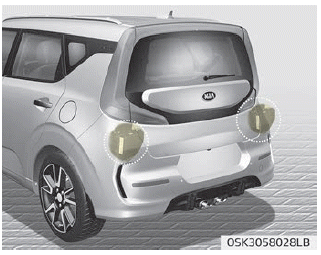
The rear radar sensors are located inside the rear bumper to detect the side/rear areas. Always keep the rear bumper clean for proper system operation.
CAUTION
- The system may not operate correctly if the bumper is damaged, or if the rear bumper has been replaced or repaired.
- The system may be deactivated due to strong electromagnetic waves.
- Always keep the sensors clean.
- NEVER disassemble the sensor component on your own or subject it to impact.
- Be careful not to apply excessive force to the radar sensor or sensor cover. If the sensor is forced out of proper alignment, the system may not operate properly. In this case, the warning message may not appear. Have the vehicle inspected by an authorized Kia dealer.
- Do not attach foreign objects, such as bumper stickers or bumper guards, near the radar sensor or paint the sensor area. This may adversely affect sensor operation.

Blind-Spot Collision Warning (BCW) system is turned off. Radar is blocked.
• This warning message may appear when:
- One or both sensors on the rear bumper are blocked by mud, snow, or foreign material.
- Driving in rural areas where the sensor does not detect another vehicle for a long period of time.
- In severe weather, such as heavy snow or rain.
If any of these conditions occur, the BCW button indicator and the system will turn off automatically.
When the BCW cancellation warning message appears in the cluster, check that there is no dirt or snow on the rear bumper at the sensor installation locations. Remove any dirt, snow, or foreign material that may interfere with the radar sensors. After removing any dirt or debris, the RCCA system should operate normally, usually after approximately 10 minutes of driving.
If the system still does not operate normally, have the vehicle checked by an authorized Kia dealer.
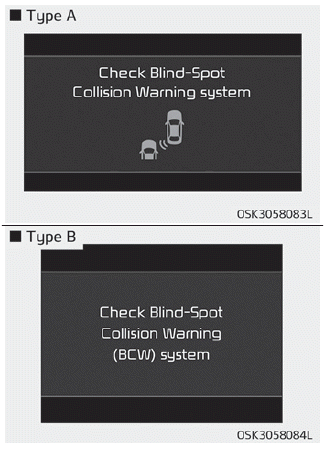
Inspect the Blind-Spot Collision Warning (BCW) system.
If there is a problem with the BCW system, a warning message will appear and the indicator on the switch will turn off. The system will turn off automatically.
RCCW and RCCA will also not operate if the BCW system is deactivated due to a malfunction. We recommend having your vehicle inspected by an authorized Kia dealer.
System Limitations
The driver should be careful in the following situations, as the system may not detect other vehicles or objects under certain circumstances.
- When a trailer or carrier is installed.
- The vehicle is driven in bad weather, such as heavy rain or snow.
- The sensor is contaminated with rain, snow, dirt, etc.
- The rear bumper where the sensor is located is covered with foreign objects such as a bumper sticker, bumper guard, bicycle carrier, etc.
- The rear bumper is damaged, or the sensor is not in its original default position.
- The vehicle height becomes lower or higher due to a heavy load in the cargo area, abnormal tire pressure, etc.
- When the temperature of the rear bumper is high.
- When the sensors are blocked by other vehicles, walls, or parking posts.
- The vehicle is driving on a curved road.
- The road surface (or surrounding ground) contains abnormal metallic components (for example, due to subway construction).
- A stationary object, such as a guardrail, is next to the vehicle.
- When driving down or up a steep road with different lane heights.
- Driving on a narrow road where there are trees, grass, or bushes.
- Driving in rural areas where the sensor does not detect another vehicle for a long period of time.
- Driving on a wet road.
- Driving on a road where the guardrail or wall has a double structure.
- A large vehicle, such as a bus or truck, is nearby.
- When another vehicle approaches very closely.
- When another vehicle passes at very high speed.
- When changing lanes.
- If your vehicle starts moving at the same time as a vehicle next to you and accelerates.
- When a vehicle in the adjacent lane moves two lanes away from you OR when a vehicle two lanes away moves into the lane next to you.
- A motorcycle or bicycle is nearby.
- A flat trailer is nearby.
- If small objects, such as a shopping cart or baby stroller, are in the detection zone.
- If there is a low-profile vehicle, such as a sports car.
- The brake pedal is depressed.
- ESC (Electronic Stability Control) is activated.
- ESC (Electronic Stability Control) is malfunctioning.
- Tire pressure is low or a tire is damaged.
- The brakes are worn.
- The vehicle stops abruptly.
- The temperature around the vehicle is very low.
- The vehicle vibrates strongly when driving on a bumpy road, uneven road surfaces, or concrete sections.
- The vehicle is driving on a slippery surface due to snow, puddles, or ice.
[A]: Structure
- Driving in areas where a vehicle or structure is nearby
The system may operate incorrectly when driving with a vehicle or structure nearby.
In some cases, the system may not detect an approaching vehicle from behind, and the warning or brake may not operate properly.
Always pay attention to your surroundings while driving.
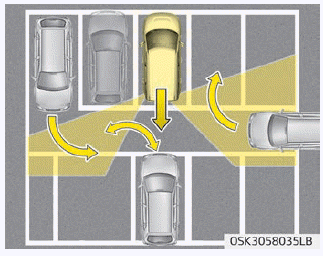
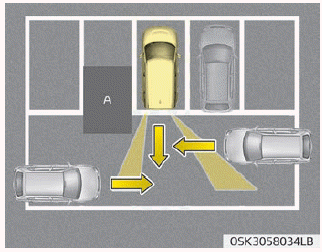
- When the vehicle is in a complex parking area
The system may operate incorrectly when the vehicle is in a complicated parking environment.
In some cases, the system may be unable to accurately determine the risk of collision with vehicles that are parking or leaving next to your vehicle (for example, a vehicle backing out next to your vehicle, a parked vehicle, or a vehicle leaving from behind, approaching your vehicle while turning, etc.).
In this case, the warning or brake may not operate properly.
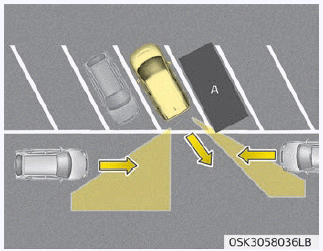
[Vehicle]
- When the vehicle is parked diagonally. The system may not operate properly when the vehicle is parked diagonally.
In some cases, when a diagonally parked vehicle is pulling out of a parking space, the system may not detect a vehicle approaching from behind the left/right side of your vehicle. In this case, the warning or brake may not operate properly.
Always pay attention to your surroundings while driving.
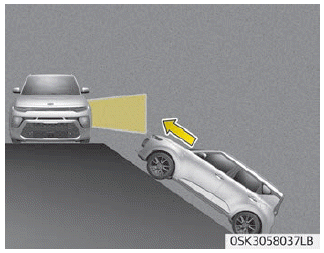
- When the vehicle is on or near a slope. The system may not operate properly when the vehicle is on or near a slope. In some cases, the system may not detect a vehicle approaching from behind the left/right side, and the warning or brake may not operate properly.
Always pay attention to your surroundings while driving.
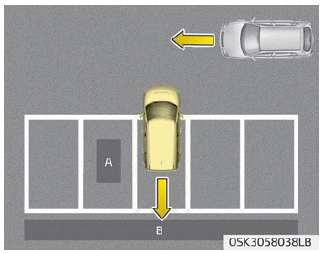
[A]: Structure, [B]: Wall
- Entering a parking space where there is a structure
The system may operate incorrectly when the vehicle enters a parking space where there is a structure behind or beside your vehicle.
In some cases, when reversing into a parking space, the system may not detect a vehicle moving in front of your vehicle. In this case, the warning or brake may not operate properly.
Always pay attention to the parking space while driving.

- When the vehicle is parked in reverse
If the vehicle is parked in reverse and the sensor detects another vehicle behind the parking space, the system may warn or control braking. Always pay attention to the parking space while driving.
Test yourself
A quick Kia Soul Owner's Manual quiz: every answer comes with an explanation and a link to the manual page.