Fuel Consumption Data
The exterior lighting chapter of the Lexus GS describes all lighting functions, from LED headlights and daytime running lights to fog lights. The automatic light control and adaptive high beam system in particular offer comfort and safety at the highest level. Tips on care and lamp replacement are also provided. By following these recommendations, you will get optimal visibility at night and in difficult weather conditions – an essential element of vehicle safety.
Fuel consumption data can be displayed on the Remote Touch screen.
Vehicles with 12.3-inch display: Fuel consumption data can be displayed and set on the side display.
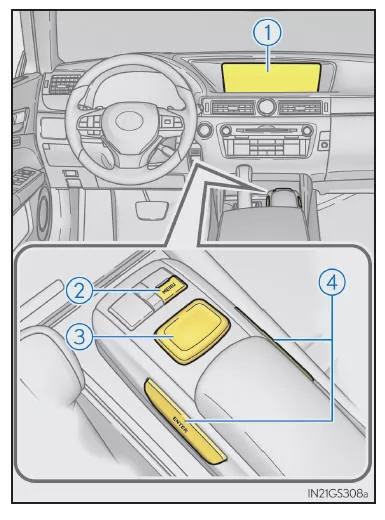
- Remote Touch Screen
- "MENU" Button
- Remote Touch Knob
- "ENTER" Buttons
Fuel Consumption
Press the "MENU" button on the Remote Touch, then select on the "Menu" screen.
Trip Information
When the "Previous Value" screen is displayed, select "Trip Information".
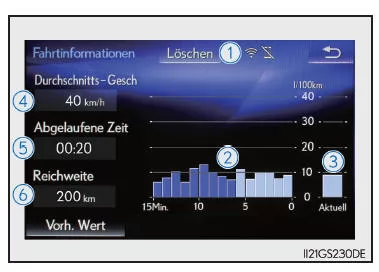
- Resetting the Consumption Data
- Fuel consumption in the last 15 minutes
- Instantaneous fuel consumption
- Average speed since engine start
- Elapsed time since engine start
- Range
The average fuel consumption over the last 15 minutes is color-coded to distinguish earlier averages from averages since the engine switch was last set to IGNITION ON. Use the displayed average fuel consumption as a guide.
The illustration is only an example and may differ from actual conditions.
Recorded Data
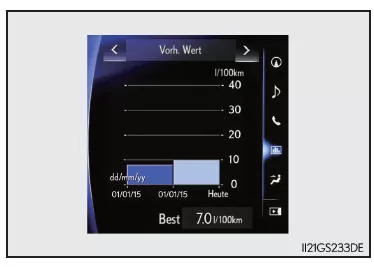
When the "Trip Information" screen is displayed, select "Previous Value".
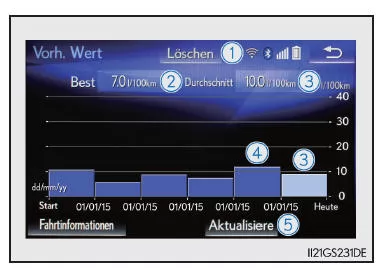
- Resetting the Recorded Data
- Best Recorded Fuel Consumption
- Average Fuel Consumption
- Recorded Fuel Consumption Values
- Updating the Average Fuel Consumption Data
The average fuel consumption values from earlier periods are color-coded into previous averages and the average consumption since the last reset. Use the displayed average fuel consumption as a guide.
The illustration is only an example and may differ from actual conditions.
Updating the Recorded Data
To update the average fuel consumption, select "Update" to measure the current fuel consumption again.
Resetting the Data
To delete the fuel consumption data, select "Clear."
Range
Shows the estimated maximum distance that can still be driven with the remaining amount of fuel.
This distance is calculated based on your average fuel consumption.
Therefore, the distance you can actually drive may differ from the displayed distance.
Using the Side Display (Vehicles with 12.3-inch Display)
You can view vehicle data on the side display and then use or
 to select the desired screen.
Fuel Consumption
Shows the average fuel consumption for the last 10 minutes at 1-minute intervals, along with the driving range.
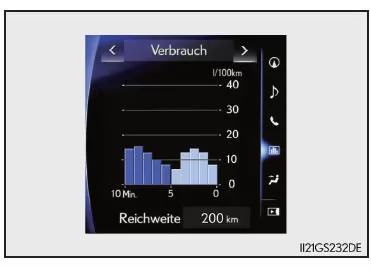
Recorded Data
Shows the average fuel consumption and the highest fuel consumption.
Trip Information
Shows the driving range, average consumption, and the time elapsed since the engine was started.
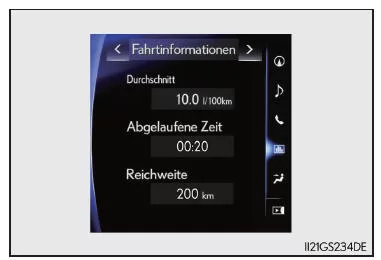
The illustration is only an example and may differ from actual conditions.
The fuel consumption data in the Lexus GS (GRL1 body, 4th generation, model years 2016–2020) gives the driver comprehensive information on vehicle efficiency. Whether instantaneous consumption or historical values, everything is clearly shown on the modern display. This supports an environmentally conscious driving style.
With precise data, drivers of the Lexus GS sports sedan can optimize their driving and use the driving range efficiently.
FAQHow do I reset the consumption data?
You can reset the data directly from the menu in the Remote Touch system or from the side display (with 12.3-inch display).
What does the driving range display show?
It shows the estimated remaining driving distance based on the current average fuel consumption.
Test yourself
A quick Lexus GS quiz: every answer comes with an explanation and a link to the manual page.