Multi-Information Display (GS F). "F" Content
The switch layout in the Lexus GS is ergonomically designed and tailored to the driver's needs. From light control and wipers to activating driver assistance systems, all controls are logically positioned. This chapter provides a complete overview of the arrangement and function of the switches in the cockpit and on the steering column. This design contributes significantly to the premium character and driving safety of the Lexus GS.
Lap Timer
Measures lap times and shows the current and previous lap times
● Reading the Display
The lap times measured since the timer was last reset are displayed as follows:
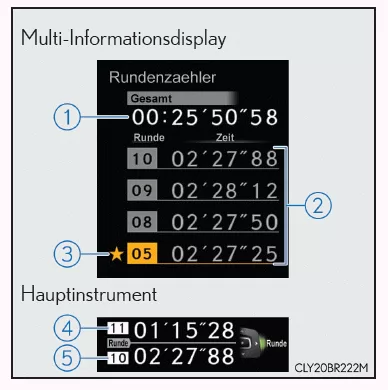
- Multi-Information Display
- Total lap time
- Previous lap times
- Fastest lap (marked with a star)
- Main gauge
- Current lap time
- Last lap time
Lap time for the last completed lap.
● Operating the Meter Switches

1. Press: Start/stop lap timer
Press and hold: Reset
2.  Switch to next lap

 Change display item
While a lap time is being measured, you can switch the display to show the following:
- Torque distribution (if equipped)
- G-force
- Tire pressure
● Resetting/Saving Measured Lap Times
Press and hold pressed after you stop the lap timer.
When a confirmation screen is displayed, select whether to reset or save the measured lap times.
When you save the lap time data, it is displayed on the history screen.
History (Lap Timer)
Shows the saved lap times
● Reading the Display

- History main screen
1. Total lap time
2. Fastest lap time
- Previous laps screen
3. Page
4. Previous lap times (the last 20 lap times)
Press to scroll the screen up or down.
● Switching the Display
To display the previous laps screen, press.
To return to the history main screen, press .
● Deleting the History
Press and holdPress and hold while the history main screen is displayed to show a confirmation screen. To delete the history, follow the instructions on the screen.
Torque distribution (if equipped)
Shows the distribution of drive torque between the left and right rear wheels
● Reading the Display
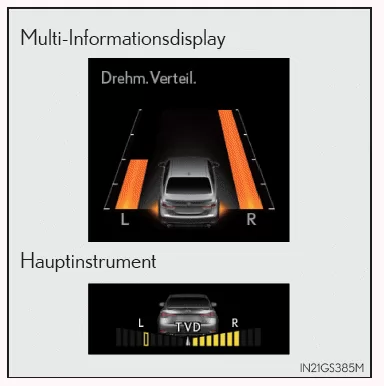
- Normal Display
Shows the proportion of drive torque transmitted to the left and right rear wheels using bars of variable length on the multi-information display
- Extended Display
In addition to the bar display, shows the difference in drive torque transmitted to the left and right rear wheels using segments on the main gauge.
The more segments are displayed, the greater the difference in drive torque.
● Switching the Display
To switch to the extended display, press .
To return to the normal display, press.
● Peak Hold Function (extended display only)
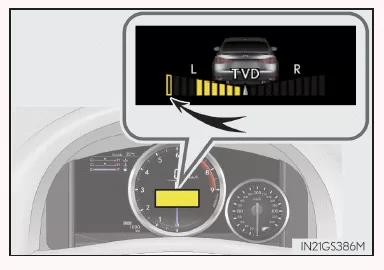
When the difference in drive torque transmitted to the left and right rear wheels exceeds 4 segments, the highest segment reached is highlighted in yellow for a set period of time.
G-force
Shows the lateral G-forces acting on the vehicle
Also shows steering angle to the right and left, accelerator pedal operation and brake fluid pressure at the edge of the G-force display
● Reading the Display
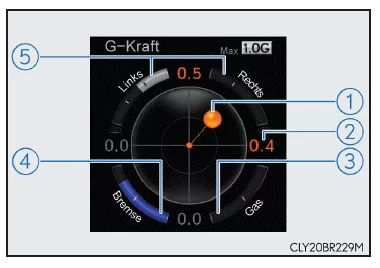
- Normal Display
Shows the following on the multi-information display
1. G-force acting on the vehicle (acceleration force)
2. G-force acting on the vehicle (acceleration force)
3. Accelerator pedal operation
4. Brake fluid pressure
5. Steering angle
- Extended Display
Shows the following on the main gauge and the multi-information display
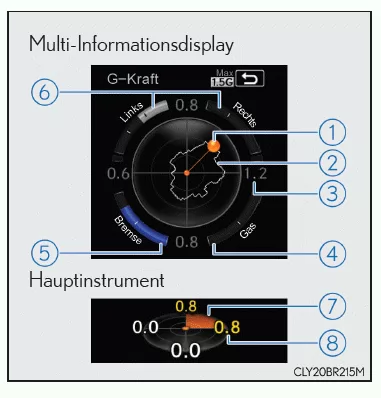
- G-force acting on the vehicle (acceleration force)
- Maximum G-force record
- Highest G-force value since the display was last reset (value calculated from the front/rear and left/right G-forces)
- Accelerator pedal operation
- Brake fluid pressure
- Steering input
- Direction of G-force
- Current G-force value (calculated from the front/rear and left/right G-forces)
Depending on road conditions, temperature, speed and other factors, actual vehicle conditions may differ from the information shown. Use this information as a guide only.
● Switching the Display
To switch to the extended display, press.
To return to the normal display, press.
● Resetting the maximum G-force record
Press and holdPress and hold while the highest G-force record is displayed to reset the display.
● Peak Hold Function (extended display only)
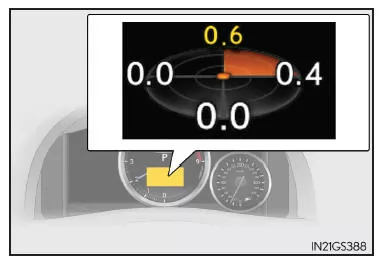
When lateral G-forces of 0.5 g or more are generated, the G-force value on the main gauge is displayed in yellow and held for 3 seconds.
Tire pressure
Unlike the tire pressure display in the trip data menu, the tire pressure display in the "F" content menu can be shown while a lap time is being measured.
Settings Display
For functions that can be turned on or off, the function switches between on and off each timeis pressed.
 (Lane Departure Alert with steering control) (if equipped)
 (Pre-Collision System) (if equipped)

Select this item to turn the speed warning on or off, or to change the speed at which the speed warning is displayed.
 (Road Sign Assist) (if equipped)
 (Lane Change Assist) (if equipped)

- You can choose whether the display is turned on or off.
- You can set the speed at which the display appears.
Selectable speed range:
Except United Kingdom: 50 km/h to 200 km/h*
United Kingdom: 50 km/h to 160 km/h*
*: When driving on public roads, always observe the legal speed limits.

TPMS (Tire Pressure Monitoring System)

● Language
Select this item to change the language shown on the display.
● Units
Select this item to change the units of measurement.
● Eco Driving Indicator light
Select this item to turn the Eco Driving Indicator light on or off.
● Switch
Shows how to save a desired screen foris saved.
You can save a quick access to 1 screen, which can then be called up by pressingis called up.
● Drive Info 1/2/3
Select this item to choose up to 2 items to be displayed on a driving data screen. You can set up a maximum of 3 driving data screens.
● Pop-up Display
Select this item to turn the following pop-up displays, which may appear in certain situations, on or off.
- Navigation system route guidance display (if equipped)
- Hands-free incoming call display
- Instrument panel brightness adjustment display
- TVD control mode change display (if equipped)
● Tachometer
Select this item to turn the tachometer display on or off.
When turned on, you must then set the engine speed at which the tachometer display will appear.
● Tachometer Maximum
Select this item to turn the maximum engine speed function on or off.
● SPORT Displays
You can select the "SPORT S" or "SPORT S+" mode instrument display and set it as the personalized display for "SPORT S" or "SPORT S+" mode.
● Default Settings
Stored or changed instrument settings are deleted or reset to their default settings.
Startup Display
When the engine is started, the vehicle name is shown on the multi-information display.
While the startup display is shown, the instrument display cannot be switched, even if the drive mode is changed. When the startup display turns off, the instrument display for the currently selected mode is shown.
Drive Torque Distribution Display (if equipped)
In some cases, such as when driving over road expansion joints, the drive torque distribution may not be displayed correctly.
G-Force Display
● The G-force may show a value other than zero even when the vehicle is parked, such as when the vehicle is parked on a slope.
● The steering angle, accelerator pedal operation and brake fluid pressure displays are disabled until the engine has warmed up (the variable red zone of the tachometer has retreated to 7300 rpm (min-1)).
Once the engine has warmed up, these displays are enabled.
● Depending on the vehicle's operating conditions, the brake fluid pressure display may not show the maximum value even when the brake pedal is fully depressed.
● If a battery terminal has been disconnected and reconnected, the steering angle display may be temporarily disabled. The display will be activated after driving for a while.
Setting Display Hiding
In the following cases, operation of the settings display is temporarily unavailable.
● When a warning message is displayed on the Multi-Information Display
● When the vehicle is being driven
Tire pressure
● After the engine switch is set to IGNITION ON mode, it may take a few minutes for the tire pressure to be displayed. After adjusting the tire pressure, it may also take a few minutes for the new values to be displayed.
● If the tire position information cannot be received due to poor radio conditions, "---" may be displayed.
● Tire pressure changes with temperature. The displayed values may also differ from those measured with a tire pressure gauge.
When the battery terminals are disconnected and reconnected
The following information data will be reset:
● Lap timer: measured lap times, history
● G-force: record of maximum G-forces
Using the Lap Timer
If the engine is turned off while a lap time is being measured, the lap timer stops and the lap time measured up to that point is saved.
WARNING
Precautions for Use While Driving
- Take extra care to ensure the safety of the area around the vehicle when operating the multi-information display while driving.
- Do not look at the multi-information display constantly while driving, as you may fail to notice pedestrians, objects on the road, etc. in front of your vehicle.
Precautions When Setting Up the Display
Because the engine must be running while setting up the display, the vehicle must be parked in a well-ventilated place. In enclosed spaces such as a garage, exhaust gases, including toxic carbon monoxide (CO), may accumulate and enter the vehicle. This may be fatal or cause serious health damage.
NOTEWhile Setting Up the Display
To prevent the battery from discharging, the engine must be running while display functions are being set up.
The "F" content in the multi-information display of the Lexus GS F (4th generation, body code GRL1) reflects the sporting heart of the model line. With functions such as the lap timer, the enhanced G-force display and torque distribution, the system optimally supports performance-minded drivers. Every drive becomes a high-tech experience.
The combination of precision and customizability makes the Lexus GS F display the benchmark among sport sedans in its class.
FAQWhat data does the enhanced G-force display provide?
It shows the current G-forces, steering angle, accelerator pedal operation and brake pressure, ideal for sporty driving.
Can the lap timer save results?
Yes, measured times can be saved and later retrieved through the history display.
Test yourself
A quick Lexus GS quiz: every answer comes with an explanation and a link to the manual page.