Multi-Information Display (GS350/GS200t). Display Indicators. Operating the Meter Control Switches. Driving Data
The Multi-Information Display in the Lexus GS (4th generation, L10, 2016–2020) is a high-tech feature that provides the driver with a wide range of data, from navigation and audio system information to driving assist and vehicle status indicators. F SPORT models in particular benefit from enhanced sport displays such as G-force and oil pressure gauges. Intuitive operation via the steering wheel switches allows safe use while driving. This section explains the display options, menu operation and setting options. It is an indispensable tool for anyone who wants to make full use of the potential of the Lexus GS.
Display Indicators
The Multi-Information Display shows the driver various vehicle data.
● Menu Icons
Except F SPORT models

F SPORT models

When an icon is selected, the following data is displayed.
Depending on the situation, certain data is displayed automatically.
 Driving Data
Select this icon to display various driving data.
 Navigation System Data Display (if equipped)
Select this icon to display the following navigation system data.
- Route Guidance
- Compass display ("North-Up" display/"Heading-Up" display)
 Audio System Data Display
Select this icon to select an audio source or track on the display using the meter control switches.
 Driving Assist System Information
Select this icon to display information for the Dynamic Radar Cruise Control with Full-Speed Range Following/Lane Tracing Assist (LTA) (if equipped), or the Lane Departure Alert with Steering Control (LDA) (if equipped), when the system is operating.
 Warning Message Display
Select this icon to display warning messages and the required actions in case of malfunctions.
 Settings Display
Select this icon to change the instrument display settings.
Operating the Meter Control Switches
The Multi-Information Display is operated using the meter control switches.
1.  Switching the menu
 Change the display indicator, scroll the screen up/down and move the cursor up/down
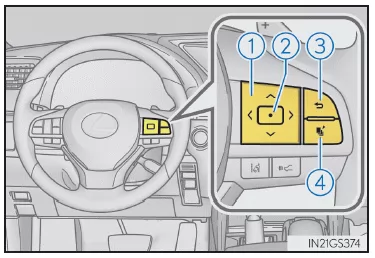
2. Press: Enter/confirm
Press and hold: Reset
3. Return to the previous screen
4. Press: The screen saved for is displayed
If no screen has been saved, the driving data screen is displayed.
Press and hold: The currently displayed screen is saved for
When the confirmation screen is displayed, select "Yes" to save the screen. If the selected screen cannot be saved, a message indicates that the save operation has failed.
Driving Data
You can switch between the displays by pressing or
 on the meter control switches to
 select, and then
 or
 press.
Instantaneous Fuel Consumption*1
Displays the instantaneous fuel consumption
Average Fuel Consumption (since last reset*2/since trip start/since last refueling)*1
Displays the average fuel consumption since the last reset of the function, since the engine was last started, or since the last refueling
Use the displayed average fuel consumption as a reference only.
Average speed (since last reset*2/since trip start)*1
Shows the average speed since the function was last reset or since the trip started
Elapsed time (since last reset*2/since trip start)*1
Shows the elapsed time since the function was last reset or since the trip started
Driving distance (range/since trip start)*1
Shows the estimated maximum distance that can be driven with the remaining fuel, or the distance driven since the trip started.
- This distance is calculated based on your average fuel consumption.
Therefore, the distance you can actually drive may differ from the displayed distance.
- If only a small amount of fuel is added, the display may not update.
Before refueling, turn the engine switch off. If the vehicle is refueled without turning off the engine switch, the display may not update.
Zone display of the Eco Driving Indicator
Boost gauge/Oil temperature gauge/Oil pressure gauge (GS200t)
Boost pressure, engine oil temperature and oil pressure can be displayed.
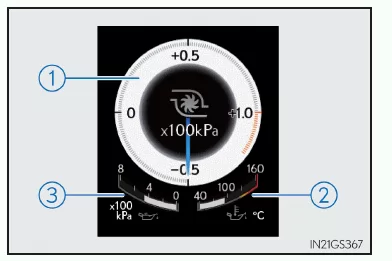
1. Boost gauge
When the boost pressure reaches 100 kPa or more, the color changes to orange.
2. Oil temperature gauge
When the engine oil temperature reaches 140°C or more, the display flashes.
3. Oil pressure gauge
If the oil pressure drops, the warning buzzer sounds and a warning message appears.
Depending on road conditions, temperature, speed and other factors, actual vehicle conditions may differ from the information displayed.
Use this information as a guide only.
G-force
Shows the lateral G-forces acting on the vehicle. Also shows steering input to the right and left, accelerator pedal operation and brake fluid pressure at the edge of the G-force display.
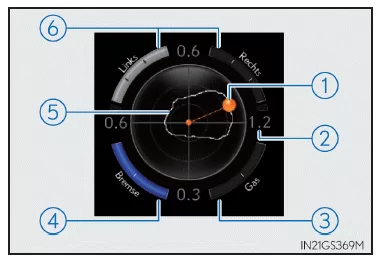
- G-force acting on the vehicle (acceleration force)
- Current G-force value (calculated from the front/rear and left/right G-forces)
- Accelerator pedal operation
- Brake fluid pressure
- Maximum G-force record
- Steering input
Depending on road conditions, temperature, speed and other factors, actual vehicle conditions may differ from the information displayed.
Use this information as a guide only.
● Resetting the maximum G-force record
Press and hold to reset the record.
● Peak hold function (F SPORT models)
When lateral G-forces of 0.5 G or more are generated, the G-force value is shown in orange and held for 2 seconds.
Tire pressure (vehicles with Tire Pressure Warning System)
Shows the air pressure of all tires.
The tire pressure of the spare tire is not displayed.
Vehicle Sway Warning of LDA system (Lane Departure Alert with steering control) (if equipped)
Vehicle Sway Warning of LKA system (Lane Keeping Assist) (if equipped)
Display off
Nothing is shown on the screen
*1: Displayed when "Drive Info 1", "Drive Info 2" or "Drive Info 3" is selected.
*2: You can reset the function bypressing and holding the meter control switches for more than 1 second while the item to be reset is displayed.
If more than one item can be reset, a selection screen is displayed.
The multi-information display in the Lexus GS 4th generation with body code GRL1 provides the driver with a wide range of useful information. Driving data, navigation guidance and driver assist system displays are shown clearly and clearly arranged. This makes the Lexus GS premium sedan ideally suited to the modern driver.
The display's customizability is especially impressive: whether G-forces, tire pressure or fuel consumption values, the Lexus GS (model years 2016–2020) provides all data in real time. This makes every trip not only safer but also more informative.
With its modern technology and well-designed layout, the multi-information display meets the highest demands and contributes to the premium character of the Lexus GS sport sedan.
Test yourself
A quick Lexus GS quiz: every answer comes with an explanation and a link to the manual page.