Multi-Information Display (GS F). Display Items. Operating the Instrument Panel Switches. Driving Data
The steering wheel controls of the Lexus GS (4th generation, L10, 2016–2020) offer an ideal combination of convenience and functionality. With integrated switches, audio, phone, Multi-Information Display and driver assistance systems can be operated intuitively without taking your hands off the steering wheel. This chapter explains the layout of the controls depending on equipment and model and provides useful tips for safe use while driving. This keeps your focus on the road while making optimal use of advanced technology.
Display Indicators
The Multi-Information Display shows the driver various vehicle data.
● Menu Icons
When an icon is selected, the following data is displayed.
Depending on the situation, certain data is displayed automatically.
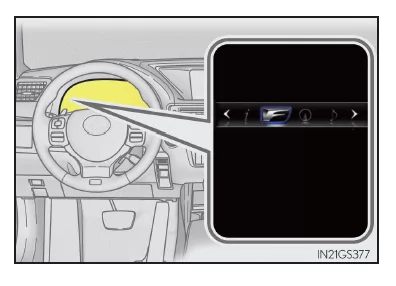
 Driving Data
Select this icon to display various driving data.
 "F" Content
Select this icon to display the lap timer, G-force, torque distribution (vehicles with TVD [Torque Vectoring Differential]), and other useful functions for sporty driving.
 Navigation System Data Display (if equipped)
Select this icon to display the following navigation system data.
- Route Guidance
- Compass display ("North-Up" display/"Heading-Up" display)
 Audio System Data Display
Select this icon to select an audio source or track on the display using the meter control switches.
 Driving Assist System Information
Select this icon to display cruise control or Dynamic Radar Cruise Control/LDA (Lane Departure Alert with Steering Control) (if equipped) information when the system is operating.
 Warning Message Display
Select this icon to display warning messages and the required actions in case of malfunctions.
 Settings Display
Select this icon to change the instrument display settings.
Operating the Meter Control Switches
The Multi-Information Display is operated using the meter control switches.
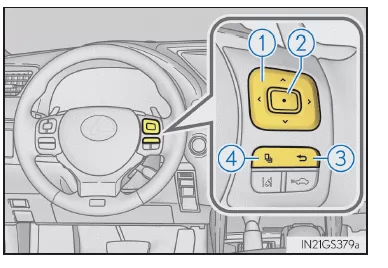
1.  Switching the menu
 Change the display indicator, scroll the screen up/down and move the cursor up/down
2. Press: Enter/confirm
Press and hold: Reset
3. Return to the previous screen
4. Press: The screen saved for is displayed
If no screen has been saved, the driving data screen is displayed.
Press and hold: The currently displayed screen is saved for
When the confirmation screen is displayed, select "Yes" to save the screen. If the selected screen cannot be saved, a message indicates that the save operation has failed.
Driving Data
You can switch between the displays by pressing or
 on the meter control switches to
 select, and then
 or
 press.
Instantaneous Fuel Consumption*1
Displays the instantaneous fuel consumption
Average Fuel Consumption (since last reset*2/since trip start/since last refueling)*1
Displays the average fuel consumption since the last reset of the function, since the engine was last started, or since the last refueling
Use the displayed average fuel consumption as a reference only.
Average speed (since last reset*2/since trip start)*1
Shows the average speed since the function was last reset or since the trip started
Elapsed time (since last reset*2/since trip start)*1
Shows the elapsed time since the function was last reset or since the trip started
Driving distance (range/since trip start)*1
Shows the estimated maximum distance that can be driven with the remaining fuel, or the distance driven since the trip started.
- This distance is calculated based on your average fuel consumption.
Therefore, the distance you can actually drive may differ from the displayed distance.
- If only a small amount of fuel is added, the display may not update.
Before refueling, turn the engine switch off. If the vehicle is refueled without turning off the engine switch, the display may not update.
Tire pressure
Shows the air pressure of all tires.
The spare tire pressure is not displayed.
Gear Positions
Shows the currently engaged gear when the shift lever is in "D" or "M".
Vehicle Sway Warning of LDA system (Lane Departure Alert with steering control) (if equipped)
Display off
Nothing is shown on the screen
*1: Displayed when "Drive Info 1", "Drive Info 2" or "Drive Info 3" is selected.
*2: You can reset the function by pressing and holding the meter control switches for more than 1 second while the item to be reset is displayed.
If more than one item can be reset, a selection screen is displayed.
The multi-information display in the Lexus GS F (body GRL1, model years 2016–2020) provides sport-oriented drivers with extensive data. Functions such as the lap timer, G-force display and torque distribution are tailored for dynamic driving. These features highlight the sporty character of the sedan.
Thanks to its clear layout, the focus stays on the road while all important data appears directly in view. This makes the Lexus GS F the ideal companion on and off the race track.
Test yourself
A quick Lexus GS quiz: every answer comes with an explanation and a link to the manual page.