DISTRONIC PLUS
DISTRONIC PLUS in the Mercedes E-Class (4th gen., W212, 2009–2016) provides more comfort and safety through automatic distance control and speed adjustment. The system uses radar technology to detect vehicles ahead and actively supports the driver in road traffic.
General Notes
DISTRONIC PLUS controls the speed and helps you automatically maintain the distance to a detected vehicle ahead. Vehicles are detected using radar sensors. To avoid exceeding the set speed, DISTRONIC PLUS brakes automatically.On long and steep downhill grades, shift to a lower gear early. Take this into account especially when the vehicle is loaded. This lets you use engine braking. This relieves the brake system and prevents the brakes from overheating and wearing out too quickly.
If DISTRONIC PLUS has detected a risk of rear-end collision, you will be warned visually and audibly. Without your intervention, DISTRONIC PLUS cannot prevent a collision. You will then hear an interval warning tone and the Distance Warning lamp in the instrument cluster will light up. Brake immediately to increase the distance to the vehicle ahead or steer around the obstacle, if this can be done safely.For DISTRONIC PLUS to assist you, the radar sensor system must be functional.
DISTRONIC PLUS operates in the speed range between 0 km/h and 200 km/h.Do not use DISTRONIC PLUS on roads with steep downhill or uphill grades.
Important Safety Notes
WARNINGHybrid vehicles: be sure to read the supplementary "HYBRID" manual. Otherwise you may not recognize hazards.
WARNING
DISTRONIC PLUS does not respond to- People or animals
- stationary obstacles on the roadway, e.g. stopped or parked vehicles
- oncoming vehicles and cross traffic
Always watch the traffic situation carefully and be ready to brake.
WARNING
DISTRONIC PLUS may not always clearly detect other road users or complex traffic situations.In these cases DISTRONIC PLUS may
- warn unnecessarily and then brake the vehicle
- fail to warn or intervene
- accelerate or brake unexpectedly.
Continue driving attentively and be ready to brake, especially when DISTRONIC PLUS warns you.
WARNING
DISTRONIC PLUS brakes your vehicle with up to 50% of the maximum possible deceleration. If this deceleration is not sufficient, DISTRONIC PLUS warns you visually and audibly. There is a risk of accident!In these cases, brake independently and try to steer around the obstacle.
NOTE

When DISTRONIC PLUS or the HOLD function is switched on, the vehicle brakes automatically in certain situations.
To avoid damage to the vehicle, switch off DISTRONIC PLUS and the HOLD function in the following or similar situations:- when towing
- in car washes
Do not use DISTRONIC PLUS
- in traffic situations that do not allow driving at constant speed, e.g. heavy traffic or winding roads
- on slippery or icy roads. The drive wheels can lose grip due to braking or accelerating, and the vehicle may skid
- in poor visibility, e.g. due to fog, heavy rain or snow.
Detection may be particularly limited in
- dirty or covered sensors
- snowfall or heavy rain
- interference from other radar sources
- with strong radar reflection, e.g. in parking garages.
This speed may be
- too high on a turn-off lane or exit ramp
- be in the right lane at a speed high enough to overtake vehicles in the left lane (countries with right-hand traffic)
- be in the left lane at a speed high enough to overtake vehicles in the right lane (countries with left-hand traffic).
Cruise control lever
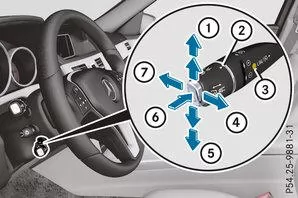
 |
Store current or higher speed |
 |
Set the desired distance |
 |
LIM indicator lamp |
 |
Store current speed or recall last stored speed |
 |
Store current or lower speed |
 |
Switch between DISTRONIC PLUS and variable SPEEDTRONIC |
 |
Switch off DISTRONIC PLUS |
The LIM indicator lamp on the CRUISE CONTROL lever shows which system you have selected:
- LIM indicator lamp off: DISTRONIC PLUS is selected.
- LIM indicator lamp on: variable SPEEDTRONIC is selected.
Select DISTRONIC PLUS
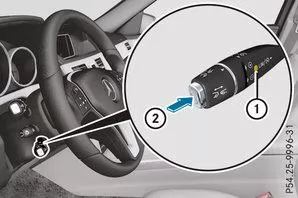
 Check whether the LIM indicator lampis off.
If so, DISTRONIC PLUS is already selected.
If it is not, move the CRUISE CONTROL lever in the direction of the arrowpress.
LIM indicator in the TEMPOMAT lever is off. DISTRONIC PLUS is selected.Switch on DISTRONIC PLUS
Activation conditions
To switch on DISTRONIC PLUS, all of the following conditions must be met:- The engine must be running. It may take up to two minutes after driving off before DISTRONIC PLUS is ready for use.
- The parking brake must be released.
- ESP must be switched on but must not be intervening.
- The active Park Assist must not be switched on.
- The transmission must be in position D.
- The driver's door must be closed when shifting the transmission from P to D, or you must be wearing your seat belt.
- The front passenger door and the rear doors must be closed.
- The vehicle must not be skidding.
- The DISTRONIC PLUS function must be selected using the TEMPOMAT lever.
Switching on
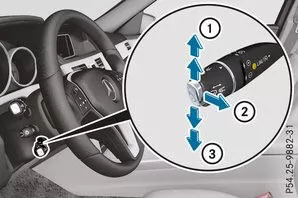
Briefly pull the CRUISE CONTROL lever toward youor upor downtap.
Press the TEMPOMAT lever upor downrepeatedly until the desired speed is set.
Take your foot off the accelerator pedal.If the vehicle ahead is stationary, you can only switch on DISTRONIC PLUS if your vehicle is also stationary.
Info

If you do not fully release the accelerator pedal, the message DISTRONIC PLUS passive appears in the multifunction display. The distance to a slower vehicle ahead is then not controlled. You drive at the speed set with the accelerator pedal.
You can also switch on DISTRONIC PLUS when stationary. The lowest adjustable speed is 30 km/h.
Briefly pull the CRUISE CONTROL lever toward you, upor downtap.Switch on with the current or last stored speed
WARNINGIf you resume the stored speed and it differs from the current speed, the vehicle accelerates or brakes. If you do not know the stored speed, the vehicle may accelerate or brake unexpectedly. There is a risk of an accident!
Consider the traffic situation before recalling the stored speed. If you do not know the stored speed, store the desired speed again.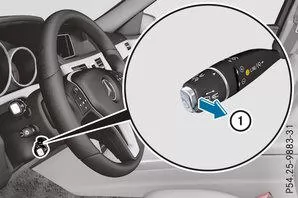
Briefly pull the CRUISE CONTROL lever toward you.
Take your foot off the accelerator pedal.
Driving with DISTRONIC PLUS
Starting off and driving
To start off with DISTRONIC PLUS: take your foot off the brake pedal.
Briefly pull the CRUISE CONTROL lever toward you
or
Briefly press the accelerator pedal.If no vehicle ahead is detected, your vehicle accelerates to the stored speed.
InfoIf no vehicle is driving ahead of you, DISTRONIC PLUS works like the TEMPOMAT.
If DISTRONIC PLUS detects that the vehicle ahead is driving more slowly, it brakes your vehicle. This maintains the distance you have selected.If DISTRONIC PLUS detects that the vehicle ahead is driving faster, it accelerates your vehicle. The vehicle accelerates up to the stored speed at most.
Select driving program
DISTRONIC PLUS supports a sporty driving style if you have selected drive program S or M (AMG vehicles: S, S+ or M). Acceleration behind a vehicle ahead or up to the stored speed is then noticeably more dynamic. If you have selected drive program E or E+ (AMG vehicles: C), the vehicle accelerates more gently. This setting is recommended for stop-and-go traffic.Select driving program
DISTRONIC PLUS supports a sporty driving style if you have selected drive program S or M (AMG vehicles: S, S+ or M). Acceleration behind a vehicle ahead or up to the stored speed is then noticeably more dynamic. If you have selected drive program E or E+ (AMG vehicles: C), the vehicle accelerates more gently. This setting is recommended for stop-and-go traffic.Lane change
When you change to the passing lane, DISTRONIC PLUS assists you if- you are driving faster than 70 km/h
- DISTRONIC PLUS maintains the distance to a vehicle ahead
- you switch on the corresponding turn signal
- DISTRONIC PLUS does not detect a risk of collision at this moment.
Info
When changing lanes, DISTRONIC PLUS monitors the left lane on left-hand drive vehicles and the right lane on right-hand drive vehicles.
Vehicles with COMAND Online
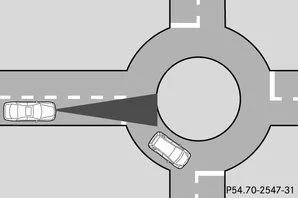
Roundabout (example)
Info
The following function is not operational in all countries.
DISTRONIC PLUS uses additional information from your navigation system and can thus respond in an adapted way to certain traffic situations. This is the case when you are following a vehicle with DISTRONIC PLUS
- approaching or driving through a roundabout
- approaching a T-junction
- driving onto a motorway exit.
The vehicle then accelerates again to the speed you have set.
The system takes into account that overtaking on the right is not permitted on motorways or motorway-like federal roads above a speed of 80 km/h. The speed you are driving is adjusted to the speed of the vehicle column in the lane to the left.Info
Preventing overtaking on the right applies to countries with right-hand traffic. In countries with left-hand traffic, overtaking on the left is prevented accordingly.
Stopping
WARNINGIf you leave the vehicle while it is being braked only by DISTRONIC PLUS, it may roll away if
- a fault occurs in the system or in the power supply
- DISTRONIC PLUS is switched off with the TEMPOMAT lever, e.g. by a vehicle occupant or from outside the vehicle
- the electrical system in the engine compartment, the battery or the fuses is tampered with
- the battery is disconnected
- the accelerator is pressed, e.g. by a vehicle occupant.
Always switch off DISTRONIC PLUS and secure the vehicle against rolling away before leaving it.
For more information on switching off DISTRONIC PLUS .
If DISTRONIC PLUS detects that the vehicle ahead is stopping, it brakes your vehicle to a standstill.When your vehicle is stationary, it remains stationary without you having to apply the brake.
Depending on the set distance, your vehicle comes to a standstill at an appropriate distance from the vehicle in front. The set distance is adjusted with the adjuster on the TEMPOMAT lever.The transmission is automatically placed in position P if, with DISTRONIC PLUS switched on,
- the driver's door is opened and the seat belt is unfastened
- the engine is switched off, unless it is switched off by the ECO start/stop function
- a system fault occurs
- the power supply is insufficient.
Setting the speed
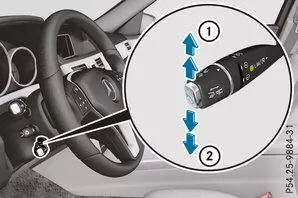
Push the CRUISE CONTROL lever upfor a higher speed, or downpress for a lower speed.
Hold the CRUISE CONTROL lever until the desired speed is reached.
Release the CRUISE CONTROL lever.
Adjusting in 1 km/h steps: briefly push the CRUISE CONTROL lever up to the pressure pointor briefly push it downtap.Adjusting in 10 km/h steps: briefly push the CRUISE CONTROL lever up past the pressure pointor briefly push it downpress.Set the desired distance
You can adjust the set distance for DISTRONIC PLUS by varying the time gap between one and two seconds. This determines the distance DISTRONIC PLUS maintains to the vehicle ahead, depending on the speed driven. You can read the distance in the multifunction display .Info
Make sure you maintain the legally required and sufficient minimum distance to the vehicle ahead. Adjust the distance to the vehicle ahead if necessary.
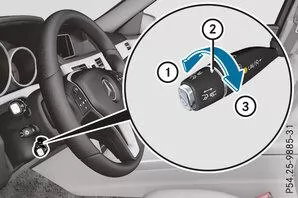
Increase: Move the controltowardturn.
Decrease: Move the controltowardturn.DISTRONIC PLUS displays in the speedometer
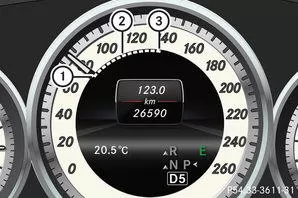
Vehicles with automatic transmission with DIRECT SELECT selector lever (example)
When you switch on DISTRONIC PLUS, one or two segments light upin the range of the stored speed.When DISTRONIC PLUS detects a vehicle ahead, the segments light upfrom the speed of the vehicle aheadup to the stored speed.
Info
For design reasons, the speed shown in the speedometer may differ from the speed stored in DISTRONIC PLUS.
DISTRONIC PLUS displays in the multifunction display
General Notes
You can select the assistance graphic in the Assist menu of the on-board computer.Display with DISTRONIC PLUS switched off
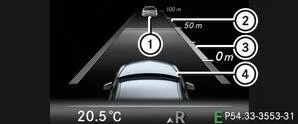
|
Vehicle ahead, when detected |
|
Distance scale: current distance to the vehicle ahead |
|
Set distance to the vehicle ahead, adjustable |
|
Own vehicle |
Use the on-board computer to select the Assistance graphic function .Display with DISTRONIC PLUS switched on
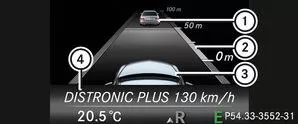
|
Vehicle ahead, when detected |
|
Set distance to the vehicle ahead, adjustable |
|
Own vehicle |
|
DISTRONIC PLUS active (text appears only when the TEMPOMAT lever is operated) |
Use the on-board computer to select the Assistance graphic function .Info
When DISTRONIC PLUS is switched on, you see the stored speed for approx. five seconds.
Switch off DISTRONIC PLUS
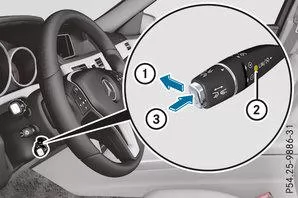
There are several ways to switch off DISTRONIC PLUS:
Briefly push the CRUISE CONTROL lever forwardtap.or
Braking, except when the vehicle is stationary.
or
Briefly move the CRUISE CONTROL lever in the direction of the arrowpress.the TEMPOMAT lever is on.When you switch off DISTRONIC PLUS, the message DISTRONIC PLUS Off appears in the multifunction display for approx. five seconds.
Info
The last stored speed remains stored until you switch off the engine.
Pressing the accelerator does not switch off DISTRONIC PLUS.
DISTRONIC PLUS switches off automatically if
- you apply the parking brake
- ESP regulates or you switch off ESP
- the transmission is in position P, R or N
- you pull the cruise control lever towards you to start off and the front passenger door or one of the rear doors is open
- the vehicle has started to skid
- you activate Active Parking Assist.
Tips for driving with DISTRONIC PLUS
General Notes
In the following traffic situations, you must be especially attentive:- Curves, entering and exiting curves
- Offset driving
- Other vehicles changing lanes
- Narrow vehicles
- Obstacles and stationary vehicles
- Crossing vehicles
Curves, entering and exiting curves
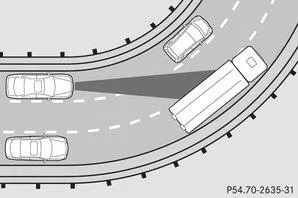
DISTRONIC PLUS may detect vehicles only to a limited extent in curves. Your vehicle may then brake unexpectedly or late.
Offset driving
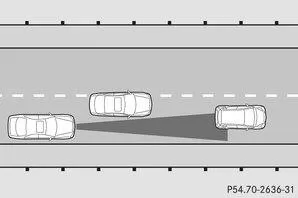
DISTRONIC PLUS may not detect vehicles driving offset. The distance to the vehicle ahead becomes too small.
Other vehicles changing lanes
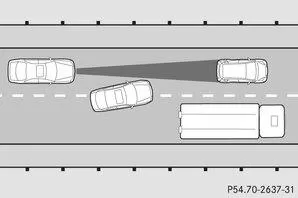
DISTRONIC PLUS does not yet detect the vehicle cutting in. The distance to the vehicle cutting in becomes too small.
Narrow vehicles
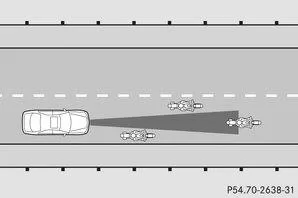
DISTRONIC PLUS does not detect the vehicle ahead at the edge of the road because of its narrower width. The distance to the vehicle ahead becomes too small.
Obstacles and stationary vehicles
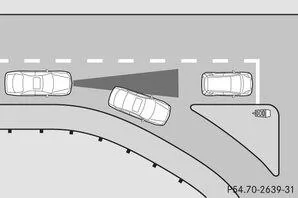
DISTRONIC PLUS does not brake for obstacles or stationary vehicles. For example, if the detected vehicle turns off and there is an obstacle or stationary vehicle behind it, DISTRONIC PLUS does not brake.
Crossing vehicles
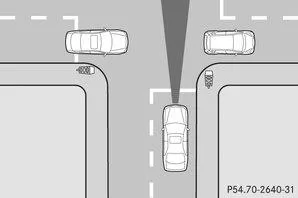
DISTRONIC PLUS may falsely detect crossing vehicles. For example, if you activate DISTRONIC PLUS at a traffic light with cross traffic, the vehicle may start moving unintentionally.
DISTRONIC PLUS with Steering Assist and Stop&Go Pilot
General Notes
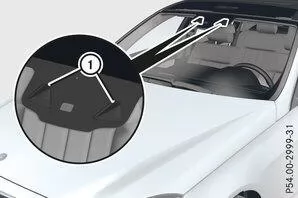
DISTRONIC PLUS with Steering Assist and Stop&Go Pilot helps you stay in the center of the lane with moderate steering interventions in the speed range of 0 - 200 km/h.
It monitors the area in front of your vehicle with a multifunction camera, which is mounted at the top of the windshield.In the speed range of 0 - 60 km/h, Stop&Go Pilot follows the vehicle ahead while taking lane markings into account, e.g. when following in stop-and-go traffic.
Above 60 km/h, Steering Assist follows detected lane markings (left and right) and only uses the vehicle ahead as a substitute.If these conditions are not met, Steering Assist and Stop&Go Pilot do not provide any assistance.
For the function to be available, DISTRONIC PLUS must be active.Important Safety Notes
DISTRONIC PLUS with Steering Assist and Stop&Go Pilot cannot reduce the accident risk of inappropriate driving, nor override physical limits. It cannot take road and weather conditions or the traffic situation into account. DISTRONIC PLUS with Steering Assist and Stop&Go Pilot is only an aid. You remain responsible for safe distance, speed, timely braking and keeping in your lane.DISTRONIC PLUS with Steering Assist and Stop&Go Pilot does not recognize all traffic situations or all road users. If the vehicle ahead moves toward the edge of the road, your vehicle may come into contact with curbs or other road boundaries while following. Pay particular attention to other road users, such as cyclists, who are directly beside your vehicle.
Obstacles such as construction site barrels standing in the lane or protruding into the lane are not detected.You can correct an unsuitable steering intervention at any time by steering lightly in the opposite direction, e.g. when you intentionally cross a lane boundary line.
DISTRONIC PLUS with Steering Assist and Stop&Go Pilot cannot keep your vehicle in the lane permanently. The steering intervention may not be sufficient to return the vehicle to the lane. To prevent leaving the lane, you must then steer yourself.System assistance may be impaired
- in poor visibility, e.g. with insufficient road lighting or due to snow, rain, fog or heavy spray
- in glare, e.g. from oncoming traffic, direct sunlight or reflections (e.g. on wet roads)
- if the windshield in the area of the camera is dirty, fogged, damaged or obstructed, e.g. by a sticker
- if there are no lane boundary markings or several unclear lane boundary markings for a lane, e.g. in construction zones
- if the lane boundary markings are worn, faded or covered, e.g. by dirt or snow
- if the distance to the vehicle ahead is too small and the lane boundary markings are therefore not detected
- if lane boundary markings change quickly, e.g. lanes branch off, cross or merge
- on narrow and winding roads
- in strongly changing shadow conditions on the road.
- you actively change lanes
- you switch on the turn signal
- you do not steer yourself for an extended period or take your hands off the steering wheel.
Steering Assist of DISTRONIC PLUS does not provide assistance
- in very tight curves
- when towing a trailer
- a loss of tire pressure or a defective tire has been detected and displayed.
Steering interventions are made with limited steering torque. The system requires the driver to keep both hands on the steering wheel and steer themselves.
If you do not steer yourself or keep your hands off the steering wheel for an extended period, the system first warns you visually. A steering wheel symbol appears in the multifunction display. If you still do not steer yourself and do not return your hands to the steering wheel, a warning tone sounds after five seconds at the latest as a takeover request. Steering Assist and Stop&Go Pilot then switch to passive. DISTRONIC PLUS remains active.Activating Steering Assist and Stop&Go Pilot
Use the on-board computer to switch on the DISTRONIC PLUS with Steering Assist and Stop&Go Pilot function .Display in the multifunction display
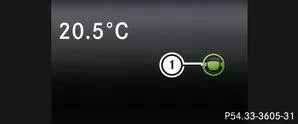
If Steering Assist and Stop&Go Pilot are switched on but not ready for a steering intervention, the steering wheel symbol appearsin grey. If the system supports you with steering interventions, the symbol is shownin green.
Deactivating Steering Assist and Stop&Go Pilot
Use the on-board computer to switch off the DISTRONIC PLUS with Steering Assist and Stop&Go Pilot function.If DISTRONIC PLUS is switched off or not available, Steering Assist and Stop&Go Pilot are automatically deactivated.
DISTRONIC PLUS in the Mercedes E-Class W212 (model years 2009–2016) provides state-of-the-art assistance technology for distance and speed control. It helps the driver maintain the safety distance and reduces workload in many traffic situations.
Especially in combination with other systems such as Steering Assist, the E-Class sets the standard for safety and comfort.
Test yourself
A quick Mercedes-Benz E-Class quiz: every answer comes with an explanation and a link to the manual page.