Lane Package
The Lane Package in the Mercedes E-Class (4th generation, W212, 2009–2016) combines Blind Spot Assist and Active Lane Keeping Assist to increase driving safety. Both systems monitor the area around the vehicle and warn the driver of possible hazards. Information on the sensors and the limits of the systems supports safe use.
General Notes
The Lane Package consists of the Blind Spot Assist and the Active Lane Keeping Assist.Blind Spot Assist
General Notes
Blind Spot Assist monitors an area on both sides of your vehicle using radar sensors. It supports you from a speed of approximately 30 km/h. A warning indicator in the exterior mirrors alerts you to a detected vehicle in the monitored area. If you then switch on the turn signal to change lanes, you also receive an optical and audible collision warning. Blind Spot Assist uses sensors in the rear bumper for monitoring.Important Safety Notes
WARNINGBlind Spot Assist does not react to vehicles
- that you pass at a small lateral distance and that are then in the blind spot area
- that approach with a large speed difference and overtake you.
Always observe the traffic situation carefully and keep a sufficient lateral safety distance.
The blind spot assist is only an aid. It may not detect all vehicles and cannot replace your attention. Always keep sufficient lateral distance from other road users and obstacles.
Monitoring range of the sensors
Detection may be particularly limited in- dirty or covered sensors
- poor visibility, e.g. due to fog, heavy rain, snow or spray
- narrow vehicles, e.g. motorcycles or bicycles
- very wide lanes
- narrow lanes
- driving with a pronounced lateral offset
- guardrails or similar road boundaries.
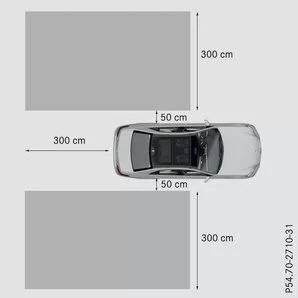
Sedan (example)
Blind Spot Assist monitors the area shown in the illustration up to 3.0 m behind and directly beside your vehicle.On narrow lanes, especially when driving with a pronounced lateral offset, vehicles in the lane two lanes over may be displayed. This can occur when vehicles drive on the inner edge of their lane.
Due to system design, it can- unjustified warnings may occur at guardrails or similar structural boundaries
- during longer drives alongside long vehicles, e.g. trucks, the warning may be interrupted.
Indicator and warning display
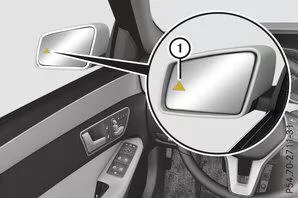
 |
Indicator light yellow |
| Warning light red |
When the blind spot assist is switched on, the indicator lightin the exterior mirrors illuminates yellow up to a vehicle speed of 30 km/h. Above a speed of 30 km/h the indicator light goes out and the blind spot assist is ready for operation.
on the corresponding side lights up red. The warning is given whenever a vehicle enters the blind spot monitoring area from behind or from the side. When you overtake a vehicle, the warning is only given if the relative speed is lower than 12 km/h.When you engage reverse gear, the yellow indicator light goes out. The blind spot assist is then not active.
The brightness of the indicator or warning lamp is controlled automatically depending on the ambient brightness.Collision warning
If a vehicle is detected in the blind spot monitoring area and you switch on the corresponding turn signal, you will hear a double warning tone once. The red warning lampflashes. If the turn signal remains switched on, detected vehicles are indicated by the red warning lamp flashing. No further audible warning is given.Switching on blind spot assist
 Make sure Blind Spot Assist is switched on in the on-board computer.Turn the key in the ignition lock to position 2.in the exterior mirrors light up red for approx. 1.5 seconds, then yellow.
Towing a trailer
When you couple a trailer, make sure the electrical connection is correctly established. This can be checked by inspecting the trailer lights. The blind spot assist is then switched off. The indicator light in the exterior mirrors illuminates yellow and the message Blind spot assist not available when towing a trailer, see Owner's Manual, appears in the multifunction display.Info

The indicator light in the exterior mirrors can be switched off.
To do so, switch off the blind spot assist when- the key is in position 2 in the ignition lock
- the engine is not running
- the electrical connection to the trailer is established.
Lane keeping assist
General Notes
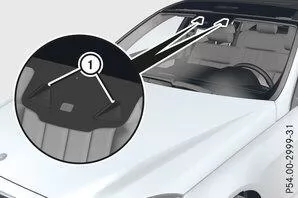
The lane keeping assist monitors the area in front of your vehicle with a camera, which is mounted at the top behind the windshield. When the lane keeping assist detects lane markings on the road, it can warn you if you leave your lane unintentionally.
If a front wheel crosses the lane marking, a warning may be issued. You will then be warned by an intermittent vibration in the steering wheel for up to 1.5 seconds.
Important Safety Notes
WARNINGThe lane keeping assist cannot always clearly detect lane markings.
In these cases, the lane keeping assist- warn unnecessarily
- not warn.
Always pay close attention to the traffic situation and keep your lane, especially when the lane keeping assist warns you.
WARNING
The lane keeping assist warning does not return the vehicle to the original lane. There is a risk of accident!Always steer, brake or accelerate yourself, especially when the lane keeping assist warns you.
The lane keeping assist can neither reduce the accident risk of unadapted driving nor override physical limits. The lane keeping assist cannot take road and weather conditions or the traffic situation into account. The lane keeping assist is only an aid. You are responsible for safe distance, speed, timely braking and staying in your lane.
The lane keeping assist does not keep the vehicle in the lane.The system may be impaired or inoperative
- in poor visibility, e.g. with insufficient road lighting or due to snow, rain, fog or heavy spray
- in glare, e.g. from oncoming traffic, direct sunlight or reflections (e.g. on wet roads)
- if the windshield in the area of the camera is dirty, fogged, damaged or obstructed, e.g. by a sticker
- when no or unclear lane markings are present for a lane, e.g. in construction areas
- when the lane markings are worn, faded or covered, e.g. by dirt or snow
- when the distance to the vehicle ahead is too small and the lane markings are therefore not detected
- when lane markings change quickly, e.g. lanes branch off, cross or merge
- on very narrow and winding roads
- in strongly changing shadow conditions on the road.
Switching on lane keeping assist
Switch on lane keeping assist via the on-board computer, selecting Standard or Adaptive.Standard
With Standard selected, no vibration warning is given when- you have switched on the turn signal. The warnings are then suppressed for a certain period
- a driving safety system intervenes, e.g. ABS, BAS or ESP.
Adaptive
With Adaptive selected, no vibration warning is given when- you have switched on the turn signal. The warnings are then suppressed for a certain period
- a driving safety system intervenes, e.g. ABS, BAS or ESP
- you accelerate strongly, e.g. kickdown
- you brake hard
- you steer actively, e.g. during an evasive maneuver or a quick lane change
- you cut a tight corner.
The vibration warning is given earlier when
- you approach the outer lane marking in bends
- you drive on very wide lanes, e.g. on motorways
- the system detects solid lane markings.
- driving on narrow lanes
- cut a tight corner.
The Lane Package of the Mercedes E-Class W212 (model years 2009–2016) combines Blind Spot Assist and Lane Keeping Assist into a comprehensive safety concept. It warns of hazardous situations when changing lanes and when the vehicle unintentionally leaves its lane.
These systems significantly increase safety on motorways and country roads and underline the premium standard of Mercedes-Benz.
Test yourself
A quick Mercedes-Benz E-Class quiz: every answer comes with an explanation and a link to the manual page.