Rear view camera
The reversing camera of the Mercedes E-Class (4th generation, W212, 2009–2016) provides a clear view of the area behind the vehicle and makes maneuvering and parking easier. Dynamic guide lines help with orientation, while additional notes draw attention to limitations in darkness or unfavorable weather conditions.
General Notes
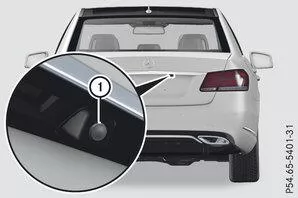
Sedan (example)
The reversing camera is an optical parking and maneuvering aid. It shows the area behind the vehicle with guide lines on the display of Audio 20 or COMAND Online.
The area behind the vehicle is shown mirror-inverted, as in the interior mirror.
Info

The text display on the Audio 20 or COMAND Online display depends on the language setting. The following reversing camera displays on the COMAND Online display are examples.
Important Safety Notes
The reversing camera is only an aid. It cannot replace your attention to the immediate surroundings. You are always responsible for safe maneuvering and parking. Make sure that there are no people, animals or objects in the maneuvering area when reversing or parking.The reversing camera does not work or works only with limitations when
- the trunk lid or tailgate is open
- it is raining heavily, snowing or foggy
- it is night or you are in a very dark place with your vehicle
- the camera is exposed to very strong bright light
- the surroundings are illuminated by fluorescent or LED lighting (flickering may appear on the display)
- there is a rapid temperature change, e.g. when you drive from cold into a heated garage in winter
- the camera lens is dirty or covered. Observe the cleaning instructions
- the rear of your vehicle is damaged. In this case, have the position and adjustment of the camera checked at a qualified specialist workshop.
On vehicles with height-adjustable suspension, due to technical reasons, the guide lines may be inaccurate when the vehicle is not at standard height.
Info
The reversing camera is protected from raindrops and dust by a flap. When the reversing camera is switched on, this flap opens.
The flap closes again when- you have finished the maneuvering process
- you switch off the engine
- you open the trunk.
For technical reasons, the flap may remain open for a short time after the reversing camera is switched off.
Switching the reversing camera on and off
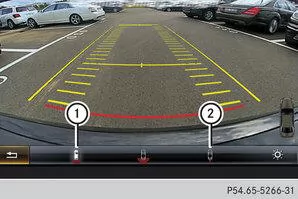
 Switching on: Make sure the key is in position 2 in the ignition lock.
Make sure that the function Automatic on in reverse gear is selected in Audio 20 or COMAND Online, see Digital Operator's Manual.
Engage reverse gear.
Switching the function mode on vehicles with a trailer hitch: Use the controller to select the symbolfor the function "Reverse parking" or the symbol for "Hitching up trailer".
Switching off: The reversing camera switches off when you shift the transmission to position P or after a short distance driven forward.
Displays on the Audio 20 / COMAND Online display
The reversing camera may display obstacles distorted in perspective, incorrectly, or not at all. The reversing camera does not display obstacles at the following locations:- very close to the rear bumper
- under the rear bumper
- in the close range above the tailgate grip recess
Objects that are not at ground level appear farther away than they actually are, e.g.
- the bumper of a parked vehicle
- the drawbar of a trailer
- the ball neck of a trailer hitch
- the rear of a truck
- an inclined post
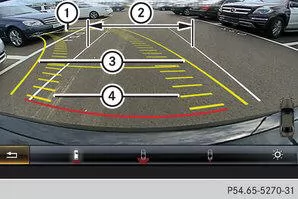
|
Yellow guide line at approx. 4.0 m distance from the rear area |
|
White guide line without steering wheel lock, vehicle width across the exterior mirrors (static) |
 |
Yellow guide line of the vehicle width across the exterior mirrors, at current steering wheel lock (dynamic) |
 |
Yellow tire track at current steering wheel lock (dynamic) |
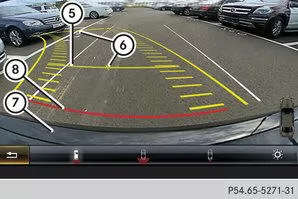
 |
Yellow guide line at approx. 1.0 m distance from the rear area |
 |
Vehicle centerline (sighting aid) |
 |
Bumper |
 |
Red guide line at approx. 0.30 m distance from the rear area |
The distance values apply only to objects located at ground level.
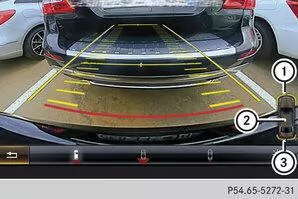
|
Front warning indicators |
|
Additional PARKTRONIC measurement readiness indicator |
|
Rear warning indicators |
. When the PARKTRONIC warning indicators are active or illuminated, the warning indicatorsandon the display of Audio 20 or COMAND Online are also active or illuminated accordingly."Reverse parking" function
Reverse parking straight back without steering wheel lock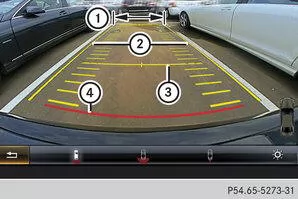
|
White guide line without steering wheel lock, vehicle width across the exterior mirrors (static) |
|
Yellow guide line of the vehicle width across the exterior mirrors, at current steering wheel lock (dynamic) |
|
Yellow guide line at approx. 1.0 m distance from the rear area |
|
Red guide line at approx. 0.30 m distance from the rear area |
Make sure the reversing camera is switched on.Use the white guide lineto check whether the vehicle fits into the parking space.
Continue reversing carefully while orienting yourself on the white guide lineuntil the end position is reached.is then located at the end of the parking space. The vehicle is almost straight in the parking space.Reverse parking across with steering wheel lock
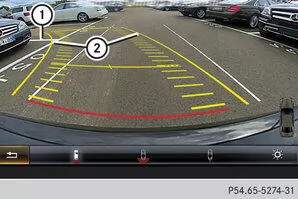
|
Parking space marking |
|
Yellow guide line of the vehicle width across the exterior mirrors, at current steering wheel lock (dynamic) |
Bring the vehicle to a standstill after driving past the parking space.Make sure the reversing camera is switched on.With the vehicle stationary, turn the steering wheel toward the parking space until the yellow guide linethe parking space markingis reached.
Maintain the steering wheel lock and reverse carefully.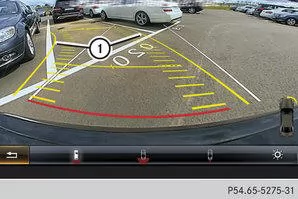
|
Yellow guide line of the vehicle width across the exterior mirrors, at current steering wheel lock (dynamic) |
When the vehicle is approximately straight in front of the parking space, stop.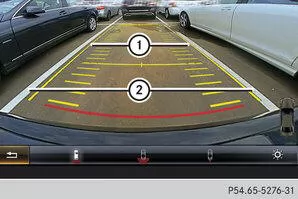
|
White guide line at current steering wheel lock |
|
Parking space marking |
With the vehicle stationary, turn the steering wheel back to the straight-ahead position.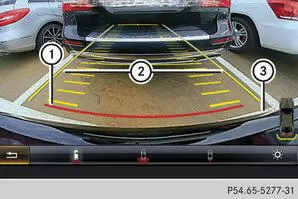
|
Red guide line at approx. 0.30 m distance from the rear area |
|
White guide line without steering wheel lock |
|
Parking space end |
Continue reversing carefully until the end position is reached.is then located at the end of the parking space. The vehicle is almost straight in the parking space."Hitching up trailer" function
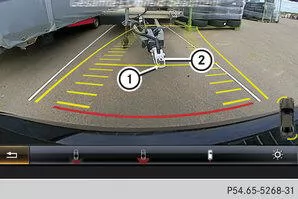
|
Vehicle center point at the yellow guide line at approx. 1.0 m distance from the rear area |
|
Drawbar |
The drawbarBefore hitching up the trailer, adjust the height so that it is slightly higher than the ball head.
Position the vehicle centrally in front of the drawbar.
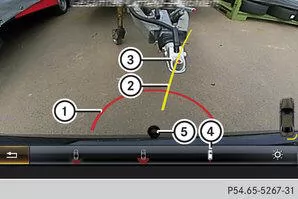
|
Red guide line approx. 0.30 m from the tow ball |
|
Drawbar alignment aid |
|
Drawbar |
|
Symbol for the "Trailer hitching" function |
|
tow ball |
Use the controller to select the symbol.
Reverse carefully. The drawbar alignment aid must point approximately at the drawbarapproximately at the drawbar.
Reverse slowly until the drawbarreaches the red guide line.Trailer hitching.
Wide-angle function
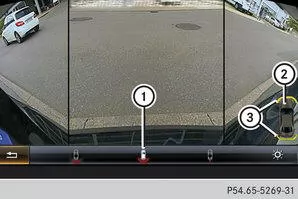
|
Symbol for the wide-angle view function |
|
Own vehicle |
|
PARKTRONIC warning displays |
When PARKTRONIC is ready to measure, the symbol of your vehicle appears in the display of Audio 20 or COMAND Online. When the PARKTRONIC warning displays are active, the warning displaysin the display of Audio 20 or COMAND Online light up yellow or red, as applicable.
The reversing camera of the Mercedes E-Class W212 (model years 2009–2016) makes reversing and parking considerably easier. Guide lines and a clear image make the area behind the vehicle visible, so obstacles can be detected early.
This is how Mercedes provides additional safety and precision when maneuvering – ideal for city traffic and narrow parking garages.
Test yourself
A quick Mercedes-Benz E-Class quiz: every answer comes with an explanation and a link to the manual page.