SPEEDTRONIC
SPEEDTRONIC in the Mercedes E-Class (4th gen., W212, 2009–2016) helps the driver maintain a set maximum speed. The system helps reduce fuel consumption and improve safety in changing driving conditions. Tips on optimal use supplement this information.
Important Safety Notes
SPEEDTRONIC brakes automatically to prevent you from exceeding a set speed. On long and steep downhill gradients, shift to a lower gear early. This is especially important when the vehicle is loaded. This uses engine braking, which relieves the brake system and prevents the brakes from overheating and wearing out too quickly. If you also need to brake, do not apply the brake pedal continuously, but in intervals.SPEEDTRONIC cannot reduce the accident risk of unadapted driving or override physical limits. SPEEDTRONIC cannot take road and weather conditions or traffic situations into account. SPEEDTRONIC is only an aid. You are responsible for safe following distance, speed, timely braking and keeping in your lane.
When changing drivers, make the driver aware of the stored speed.You can limit the speed variably or permanently:
- Variable for speed restrictions, e.g. in built-up areas
- Permanent for long-term speed restrictions, e.g. when operating on winter tires

Variable SPEEDTRONIC
General Notes
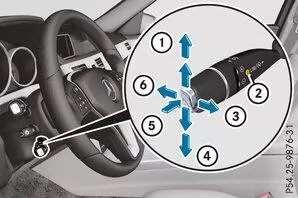
 |
Store current or higher speed |
 |
LIM indicator lamp |
 |
Store current speed or recall last stored speed |
 |
Store current or lower speed |
 |
Switch between CRUISE CONTROL or DISTRONIC PLUS and variable SPEEDTRONIC |
 |
Switch off variable SPEEDTRONIC |
The LIM indicator lamp on the CRUISE CONTROL lever shows which system you have selected:
- LIM indicator lamp off: CRUISE CONTROL or DISTRONIC PLUS is selected.
- LIM indicator lamp on: variable SPEEDTRONIC is selected.
Select variable SPEEDTRONIC
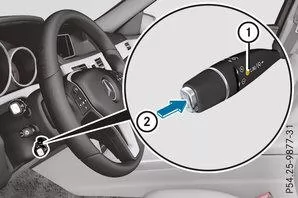
When the driver changes, point out the stored speed limit.
 Check whether the LIM indicator lampis on.
If yes, variable SPEEDTRONIC is already selected.
If it is not, move the CRUISE CONTROL lever in the direction of the arrowpress.
in the CRUISE CONTROL lever is on. Variable SPEEDTRONIC is selected.Store current speed
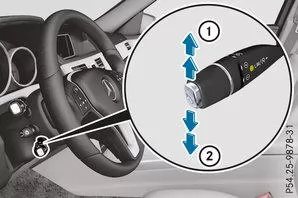
Briefly push the CRUISE CONTROL lever upor briefly push it downtap.
Store current speed or recall last stored speed
WARNINGIf you recall the stored speed and it is lower than the current speed, the vehicle will brake. If you do not know the stored speed, the vehicle may brake unexpectedly. Risk of accident!
Consider the traffic situation before recalling the stored speed. If you do not know the stored speed, store the desired speed again.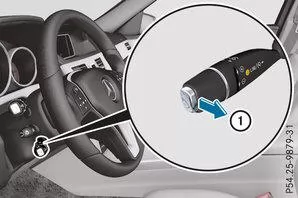
Briefly pull the CRUISE CONTROL lever toward you.
Setting the speed
Adjusting in 10 km/h steps: briefly push the CRUISE CONTROL lever up past the pressure pointfor a higher speed or briefly downpress for a lower speed.
or
Push the CRUISE CONTROL lever past the pressure point and hold it until the desired speed is set. Upfor a higher speed, or downfor a lower speed.Adjusting in 1 km/h steps: briefly push the CRUISE CONTROL lever up to the pressure pointfor a higher speed or briefly downfor a lower speed, tap.
Press and hold the CRUISE CONTROL lever up to the pressure point until the desired speed is set. Upfor a higher speed, or downfor a lower speed.
Set SPEEDTRONIC to passive
If you press the accelerator past the pressure point (kickdown), SPEEDTRONIC is switched to passive. The message SPEEDTRONIC passive appears in the multifunction display.This allows you to exceed the stored speed. SPEEDTRONIC is reactivated when you
- drive slower than the stored speed without kickdown
- set a new speed or
- recall the last stored speed.
Switch off variable SPEEDTRONIC
You cannot switch off variable SPEEDTRONIC by braking.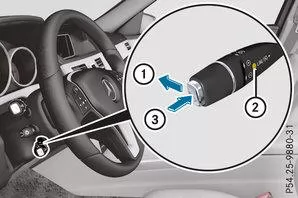
You have four options for switching off variable SPEEDTRONIC:
Briefly push the CRUISE CONTROL lever forwardtap.or
Briefly move the CRUISE CONTROL lever in the direction of the arrowpress.
in the CRUISE CONTROL lever goes out. Variable SPEEDTRONIC is switched off. CRUISE CONTROL or DISTRONIC PLUS is selected.Info
If you switch off the engine, the last stored speed is deleted.
Permanent SPEEDTRONIC
Use the on-board computer to permanently limit the speed to a value between 160 km/h and the maximum speed.Shortly before you reach the stored speed, it is shown in the multifunction display.
Permanent SPEEDTRONIC remains active even when variable SPEEDTRONIC is switched off.You cannot exceed the stored speed limit even if you press the accelerator pedal beyond the pressure point (kickdown).
SPEEDTRONIC in the Mercedes E-Class W212 (model years 2009–2016) helps the driver observe speed limits and thus increases safety in road traffic. The variable and permanent settings allow flexible adaptation to different driving conditions.
This technology reflects Mercedes' aim of actively supporting the driver in safe vehicle operation.
Question: When is permanent SPEEDTRONIC useful?
Answer: For example, when driving on winter tires, to limit the speed permanently.
Question: Can SPEEDTRONIC overcome physical limits?
Answer: No, it is only an aid and does not replace the driver's responsibility.
Test yourself
A quick Mercedes-Benz E-Class quiz: every answer comes with an explanation and a link to the manual page.