Security Control System with intelligent key system

B26E8 clutch interlock switch

In this manual: Security Control System with intelligent key system
Foreword — 1General information — 45Engine Mechanical MR16DDT — 61Engine Mechanical HR16DE — 52Engine Mechanical K9K — 46Engine Lubrication System MR16DDT — 18Engine Lubrication System HR16DE — 14Engine Lubrication System K9K — 11Engine Cooling System MR16DDT — 28Engine Cooling System HR16DE — 29Engine Cooling System K9K — 24Engine Control System MR16DDT — 163Engine Control System HR16DE — 115Engine Control System K9K — 129Fuel System MR16DDT — 13Fuel system HR16DE — 11Fuel system K9K — 12Exhaust system MR16DDT — 7Exhaust system HR16DE — 10Exhaust system K9K — 7Starting system — 24Accelerator control system — 6Clutch — 25Driveline transfer: TY21B — 77Driveline rear propeller Shaft: 3Fφ16-ETJ75 — 12Driveline rear final drive: RTVS — 31Transaxle & transmission 5MT: RS5F92R — 31Transaxle & transmission 6MT: RS6F94R — 30Transaxle & transmission CVT: RE0F10B — 93Transaxle & transmissioN CVT: RE0F11A — 103Front Axle MR16DDT — 18Front Axle HR16DE — 17Front Axle K9K — 17Rear Axle 2WD — 6Rear Axle 4WD — 13Front Suspension — 21Rear Suspension 2WD — 13Rear Suspension 4WD — 17Road Wheels & Tires — 6Brake System LHD — 24Brake System RHD — 24Parking Brake System — 8Brake Control System without ESP — 44Brake Control System with ESP — 63Steering System — 14Steering Control System — 27Seat Belt — 8SRS Airbag — 24SRS Airbag Control System — 93Ventilation System — 11Heater & Air Conditioning System HR16DE — 28Heater & Air Conditioning System MR16DDT — 28Heater & Air Conditioning Control System Type 1 — 49Heater & Air Conditioning Control System Type 2 — 51Heater & Air Conditioning Control System Type 3 — 32Heater & Air Conditioning Control System Type 4 — 40Heater & Air Conditioning Control System Type 5 — 21Interior — 16Instrument Panel — 10Seat — 18Door & Lock Type 1 — 83Door & Lock type 2 — 80Door & Lock type 3 — 65Door & Lock type 4 — 60Security Control System with intelligent key system — 82Security Control System without intelligent key system — 41Glass & Window System — 15Power Window Control System — 28Body Repair — 13Exterior — 20Mirrors — 26Exterior Lighting System Halogen type — 51Interior Lighting System — 24Wiper & Washer — 45Defogger — 31Horn — 4Power Outlet — 4Body Control System With intelligent key system — 21Body Control System Without intelligent key system — 23LAN system can fundamental — 6LAN system can — 31LAN System can system (type 1) — 1LAN System can system (type 2) — 1LAN System can system (type 3) — 1LAN System can system (type 4) — 1LAN System can system (type 5) — 1LAN System can system (type 6) — 1LAN System can system (type 7) — 2LAN System can system (type 8) — 1LAN System can system (type 9) — 1LAN System can system (type 10) — 1LAN System can system (type 11) — 1Power Control System IPDM E/R (with I-key) — 14Power Control System IPDM E/R (without I-key) — 14Power Control System Power distribution system — 25Charging System — 22Power Supply, Ground & Circuit Elements — 20Meter, Warning Lamp & Indicator — 33Warning Chime System — 22Audio, Visual & Navigation System Audio without navigation — 30Audio, Visual & Navigation System Audio with navigation — 33Audio, Visual & Navigation System NISSAN dynamic control system — 22Cruise Control System — 1Drive Mode System — 10Maintenance — 14
~3min read

DTC Logic

NOTE:
• If DTC B26E8 is displayed with DTC B210F, first perform the trouble diagnosis for DTC B210F. Refer to BCS-83, "DTC Logic".

• If DTC B26E8 is displayed with DTC B2110, first perform the trouble diagnosis for DTC B2110. Refer to BCS-84, "DTC Logic".

DTC DETECTION LOGIC
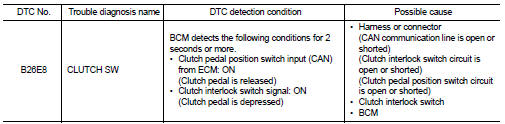
DTC CONFIRMATION PROCEDURE

DTC CONFIRMATION PROCEDURE

1.PERFORM DTC CONFIRMATION PROCEDURE 1 1. Turn ignition switch ON and wait 2 seconds or more under the following conditions. - Shift lever: In the neutral position.

- Clutch pedal: Depressed 2. Check DTC in “Self Diagnostic Result” mode of “BCM” using CONSULT-III.

Is DTC detected? YES >> Go to SEC-113, "Diagnosis Procedure".

NO >> GO TO 2.

2.PERFORM DTC CONFIRMATION PROCEDURE 2 1. Release clutch pedal and wait 2 seconds or more.

2. Check DTC in “Self Diagnostic Result” mode of “BCM” using CONSULT-III.

Is DTC detected? YES >> Go to SEC-113, "Diagnosis Procedure".

NO >> INSPECTION END

Diagnosis Procedure

1.INSPECTION START

Perform inspection in accordance with procedure that confirms DTC.

Which procedure confirms DTC? DTC confirmation procedure 1>>GO TO 2.

DTC confirmation procedure 2>>GO TO 3.

2.CHECK CLUTCH PEDAL POSITION SWITCH CIERCUIT

Refer to EC-427, "Component Function Check" (MR16DDT), EC-771, "Component Function Check" (HR16DE), or EC-980, "DTC Logic" (K9K).

Is the inspection result normal? YES >> GO TO 8.

NO >> Repair or replace the malfunctioning parts.

3.CHECK CLUTCH INTERLOCK SWITCH POWER SUPPLY 1. Turn ignition switch OFF.

2. Disconnect clutch interlock switch connector 3. Check voltage between clutch interlock switch harness connector and ground.

Is the inspection result normal?

Is the inspection result normal? YES >> GO TO 4.

NO-1 >> Check 10 A fuse [No. 13, located in the fuse block (J/B)] NO-2 >> Check harness for open or short between clutch interlock switch and fuse.

4.CHECK CLUTCH INTERLOCK SWITCH SIGNAL 1. Connect clutch interlock switch connector.

2. Check voltage between BCM harness connector and ground.

Is the inspection result normal?

Is the inspection result normal? YES >> GO TO 8.

NO >> GO TO 5.

5.CHECK CLUTCH INTERLOCK SWITCH SIGNAL CIRCUIT 1. Disconnect clutch interlock switch connector. 2. Disconnect BCM connector.

3. Check continuity between clutch interlock switch harness connector and BCM harness connector.

4. Check continuity between clutch interlock switch harness connector and

4. Check continuity between clutch interlock switch harness connector and ground.

Is the inspection result normal?

Is the inspection result normal? YES >> GO TO 6.

NO >> Repair or replace harness.

6.CHECK CLUTCH INTERLOCK SWITCH

Refer to SEC-115, "Component Inspection".

Is the inspection result normal? YES >> GO TO 7.

NO >> Replace clutch interlock switch. Refer to CL-16, "LHD : Removal and Installation" (LHD) or CL-18, "RHD : Removal and Installation" (RHD).

7.CHECK INTERMITTENT INCIDENT

Refer to GI-42, "Intermittent Incident".

>> INSPECTION END

8.REPLACE BCM 1. Replace BCM. Refer to BCS-93, "Removal and Installation".

2. Perform initialization of BCM and reregistration of all Intelligent Key using CONSULT-III.

For initialization and reregistration procedures, refer to CONSULT-III Operation Manual NATS-IVIS/NVIS.

>> INSPECTION END

Component Inspection

1.CHECK CLUTCH INTERLOCK SWITCH 1. Turn ignition switch OFF. 2. Disconnect clutch interlock switch connector.

3. Check continuity between clutch interlock switch terminals.

Is the inspection result normal?

Is the inspection result normal? YES >> INSPECTION END

NO >> Replace clutch interlock switch. Refer to CL-16, "LHD : Removal and Installation" (LHD) or CL-18, "RHD : Removal and Installation" (RHD).