B26EF steering lock relay
DTC Logic
DTC DETECTION LOGIC
NOTE:• If DTC B26EF is displayed with DTC U1000, first perform the trouble diagnosis for DTC U1000. Refer to BCS-83, "DTC Logic". • If DTC B26EF is displayed with DTC U1010, first perform the trouble diagnosis for DTC U1010. Refer to BCS-84, "DTC Logic".
• If DTC B26EF is displayed with DTC B2612, first perform the trouble diagnosis for DTC B2612. Refer to SEC-102, "DTC Logic".

DTC CONFIRMATION PROCEDURE
1.PERFORM DTC CONFIRMATION PROCEDURE 1. Press push-button ignition switch under the following conditions, and wait 2 seconds or more. - Selector lever: In the P position. - Brake pedal: Not depressed 2. Turn ignition switch OFF. 3. Press driver side door switch to lock steering and wait 2 seconds or more.4. Check DTC in “Self Diagnostic Result” mode of “BCM” using CONSULT-III.
Is DTC detected? YES >> Go to SEC-117, "Diagnosis Procedure".
NO >> INSPECTION END
Diagnosis Procedure
1.CHECK DTC OF IPDM E/RCheck DTC in “Self Diagnostic Result” mode of “IPDM E/R” using CONSULT-III.
Is DTC detected? YES >> Perform the diagnosis procedure related to the detected DTC. Refer to PCS-25, "DTC Index".
NO >> GO TO 2.
2.CHECK STEERING LOCK UNIT POWER SUPPLYCheck voltage between steering lock unit harness connector and ground.
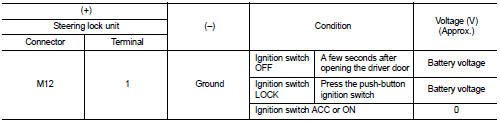
NOTE:

Is the inspection normal? YES >> GO TO 3.
NO >> GO TO 4.
3.REPLACE STEERING LOCK UNIT 1. Replace steering lock unit.2. Perform the service procedure for steering lock unit replacement. Refer to CONSULT-III Operation Manual NATS-IVIS/NVIS.
>> INSPECTION END
4.CHECK STEERING LOCK RELAY CIRCUIT 1. Disconnect IPDM E/R connector and steering lock unit connector.2. Check continuity between IPDM E/R harness connector and steering lock unit harness connector.

3. Check continuity between IPDM E/R harness connector and ground.

Is the inspection result normal? YES >> Replace IPDM E/R. Refer to PCS-34, "Removal and Installation".
NO >> Repair or replace harness.