Diagnosis System. Diagnostic Trouble Code Chart. Dtc Check / Clear
Diagnosis System
DIAGNOSIS SYSTEM
DESCRIPTION
(a) When troubleshooting On-Board Diagnostic (OBD II) vehicles, an OBD II scan tool (complying with SAE J1987) must be connected to the vehicle. Various data output from the vehicle ECM can then be read.
(b) OBD II regulations require that the vehicle on-board computer illuminate the Malfunction Indicator Lamp (MIL) on the instrument panel when the computer detects a malfunction in:

- The emission control system/components
- The powertrain control components which affect vehicle emissions
- The computer
In addition, the applicable Diagnostic Trouble Codes (DTCs) prescribed by SAE J2012 are recorded in the ECM memory.
If a malfunction does not recur, the MIL remains illuminated until the engine switch is turned off, and the MIL turns off when the engine is started. However, the DTCs will remain recorded in the ECM memory.
(c) To check DTCs, connect the Techstream to the Data Link Connector 3 (DLC3) of the vehicle. The Techstream displays DTCs, freeze frame data and a variety of engine data.
The DTCs and freeze frame data can be cleared with the Techstream.
Click here 
NORMAL MODE AND CHECK MODE
(a) The diagnosis system operates in normal mode during normal vehicle use. In normal mode, 2 trip detection logic is used to ensure accurate detection of malfunctions. Check mode is also available as an option for technicians. In check mode, 1 trip detection logic is used to increase the system's ability to detect malfunctions, including intermittent problems, when simulating malfunction symptoms (Techstream only).
2 TRIP DETECTION LOGIC
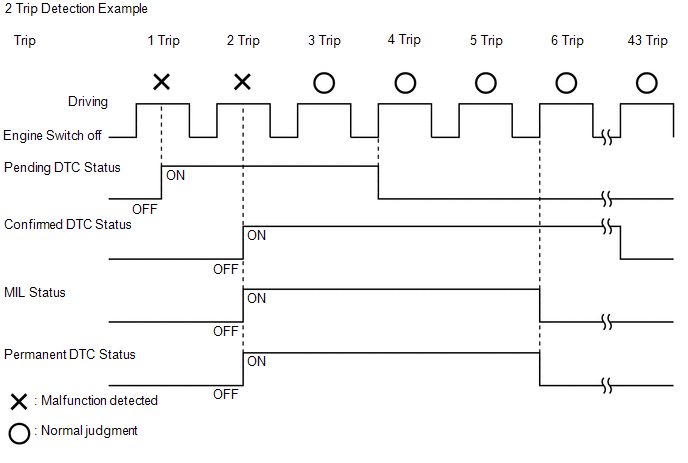
(a) When a malfunction is first detected, the malfunction is temporarily stored in the ECM memory (1st trip). If the same malfunction is detected during the next driving cycle, the MIL is illuminated (2nd trip).
FREEZE FRAME DATA
(a) The ECM records vehicle and driving condition information as freeze frame data the moment a DTC is stored. When troubleshooting, freeze frame data can be helpful in determining whether the vehicle was running or stopped, whether the engine was warmed up or not, whether the air/fuel ratio was lean or rich, as well as other data recorded at the time of a malfunction.
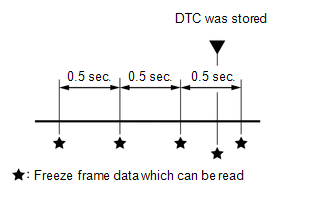
(b) The Techstream records freeze frame data in 5 different instances: 1) 3 times before a DTC is stored, 2) once when a DTC is stored, and 3) once after a DTC is stored. These sets of data can be used to simulate the vehicle condition around the time when the malfunction occurred. The data may help in diagnosing the malfunction, or in judging if the DTC was stored due to a temporary malfunction.
CHECK DATA LINK CONNECTOR 3 (DLC3)
(a) Check the DLC3.
Click here
CHECK BATTERY VOLTAGE
Standard Voltage:
11 to 14 V
If the voltage is below 11 V, recharge or replace the battery.
CHECK MIL
(a) Check that the MIL illuminates when the engine switch is turned on (IG) (engine not started).
(b) The MIL should turn off when the engine is started. If the MIL remains illuminated, the diagnosis system has detected a malfunction in the system.
HINT:
If the MIL is not illuminated when the engine switch is turned on (IG), check the MIL circuit.
Click here
Diagnostic Trouble Code Chart
DIAGNOSTIC TROUBLE CODE CHART
Automatic Transaxle SystemDTC No. | Detection Item | MIL | Memory | Note | Link |
|---|---|---|---|---|---|
P050031 |
Vehicle Speed Sensor "A" No Signal |
Comes on |
DTC stored |
SAE Code: P0500 |
 |
P056014 |
System Voltage Circuit Short to Ground or Open |
Comes on |
DTC stored |
SAE Code: P0562 |
|
P061512 |
Starter Relay Circuit Short to Battery |
Comes on |
DTC stored |
SAE Code: P0617 |
|
P062F44 |
Internal Control Module EEPROM Data Memory Failure |
Comes on |
DTC stored |
SAE Code: P062F |
|
P070312 |
Brake Switch "B" Circuit Short to Battery |
Comes on |
DTC stored |
SAE Code: P0724 |
|
P070513 |
Transmission Range Sensor "A" Circuit Open |
Comes on |
DTC stored |
SAE Code: P0705 |
|
P070562 |
Transmission Range Sensor "A" Signal Compare Failure |
Comes on |
DTC stored |
SAE Code: P0705 |
|
P071000 |
Transmission Fluid Temperature Sensor "A" Circuit Range/Performance |
Comes on |
DTC stored |
SAE Code: P0711 |
|
P071011 |
Transmission Fluid Temperature Sensor "A" Circuit Short To Ground |
Comes on |
DTC stored |
SAE Code: P0712 |
|
P071015 |
Transmission Fluid Temperature Sensor "A" Circuit Short to Battery or Open |
Comes on |
DTC stored |
SAE Code: P0713 |
|
P071512 |
Input/Turbine Speed Sensor "A" Circuit Short to Battery |
Comes on |
DTC stored |
SAE Code: P07C0 |
|
P071514 |
Input/Turbine Speed Sensor "A" Circuit Short to Ground or Open |
Comes on |
DTC stored |
SAE Code: P07BF |
|
P071531 |
Input/Turbine Speed Sensor "A" No Signal |
Comes on |
DTC stored |
SAE Code: P0717 |
|
P074011 |
Torque Converter Clutch Circuit Short to Ground |
Comes on |
DTC stored |
SAE Code: P2769 |
|
P074015 |
Torque Converter Clutch Circuit Short to Battery or Open |
Comes on |
DTC stored |
SAE Code: P2770 |
|
P07407E |
Torque Converter Clutch Actuator Stuck On |
Comes on |
DTC stored |
SAE Code: P0741 |
|
P074512 |
Pressure Control Solenoid "A" Circuit Short to Battery |
Comes on |
DTC stored |
SAE Code: P0963 |
|
P074514 |
Pressure Control Solenoid "A" Circuit Short to Ground or Open |
Comes on |
DTC stored |
SAE Code: P0962 |
|
P07457F |
Pressure Control Solenoid "A" Actuator Stuck Off |
Comes on |
DTC stored |
SAE Code: P0746 |
|
P077512 |
Pressure Control Solenoid "B" Circuit Short to Battery |
Comes on |
DTC stored |
SAE Code: P0967 |
|
P077514 |
Pressure Control Solenoid "B" Circuit Short to Ground or Open |
Comes on |
DTC stored |
SAE Code: P0966 |
|
P07757F |
Pressure Control Solenoid "B" Actuator Stuck Off |
Comes on |
DTC stored |
SAE Code: P0776 |
|
P079112 |
Intermediate Shaft Speed Sensor "A" Circuit Short to Battery |
Comes on |
DTC stored |
SAE Code: P07C6 |
|
P079114 |
Intermediate Shaft Speed Sensor "A" Circuit Short to Ground or Open |
Comes on |
DTC stored |
SAE Code: P07C5 |
|
P079131 |
Intermediate Shaft Speed Sensor "A" No Signal |
Comes on |
DTC stored |
SAE Code: P0793 |
|
P079512 |
Pressure Control Solenoid "C" Circuit Short to Battery |
Comes on |
DTC stored |
SAE Code: P0971 |
|
P079514 |
Pressure Control Solenoid "C" Circuit Short to Ground or Open |
Comes on |
DTC stored |
SAE Code: P0970 |
|
P07957F |
Pressure Control Solenoid "C" Actuator Stuck Off |
Comes on |
DTC stored |
SAE Code: P0796 |
|
P08BA12 |
Pressure Control Solenoid "L" Circuit Short to Battery |
Comes on |
DTC stored |
SAE Code: P08C2 |
|
P08BA14 |
Pressure Control Solenoid "L" Circuit Short to Ground or Open |
Comes on |
DTC stored |
SAE Code: P08C1 |
|
P08BA7F |
Pressure Control Solenoid "L" Actuator Stuck Off |
Comes on |
DTC stored |
SAE Code: P08BB |
|
P271312 |
Pressure Control Solenoid "D" Circuit Short to Battery |
Comes on |
DTC stored |
SAE Code: P2721 |
|
P271314 |
Pressure Control Solenoid "D" Circuit Short to Ground or Open |
Comes on |
DTC stored |
SAE Code: P2720 |
|
P27137F |
Pressure Control Solenoid "D" Actuator Stuck Off |
Comes on |
DTC stored |
SAE Code: P2714 |
|
P275612 |
Torque Converter Clutch Pressure Control Solenoid Control Circuit Short to Battery |
Comes on |
DTC stored |
SAE Code: P2763 |
|
P275614 |
Torque Converter Clutch Pressure Control Solenoid Control Circuit Short to Ground or Open |
Comes on |
DTC stored |
SAE Code: P2764 |
|
P27567F |
Torque Converter Clutch Pressure Control Solenoid Control Actuator Stuck Off |
Comes on |
DTC stored |
SAE Code: P2757 |
|
P280712 |
Pressure Control Solenoid "G" Circuit Short to Battery |
Comes on |
DTC stored |
SAE Code: P2815 |
|
P280714 |
Pressure Control Solenoid "G" Circuit Short to Ground or Open |
Comes on |
DTC stored |
SAE Code: P2814 |
|
P28077F |
Pressure Control Solenoid "G" Actuator Stuck Off |
Comes on |
DTC stored |
SAE Code: P2808 |
|
P281612 |
Pressure Control Solenoid "H" Circuit Short to Battery |
Comes on |
DTC stored |
SAE Code: P281E |
|
P281614 |
Pressure Control Solenoid "H" Circuit Short to Ground or Open |
Comes on |
DTC stored |
SAE Code: P281D |
|
P28167F |
Pressure Control Solenoid "H" Actuator Stuck Off |
Comes on |
DTC stored |
SAE Code: P2817 |
|
U010087 |
Lost Communication with ECM/PCM "A" Missing Message |
Comes on |
DTC stored |
SAE Code: U0100 |
|
Dtc Check / Clear
DTC CHECK / CLEAR
NOTICE:
When the diagnosis system is changed from normal mode to check mode or vice versa, all DTCs and freeze frame data recorded in normal mode are cleared. Before changing modes, always check and make a note of DTCs and freeze frame data.
HINT:
- DTCs which are stored in the ECM can be displayed on the Techstream. The Techstream can display confirmed, pending and permanent DTCs.
- If a malfunction is detected during the current driving cycle, confirmed and permanent DTCs are stored.
- Some DTCs are not stored if the ECM does not detect the same malfunction again during a second consecutive driving cycle. However, such malfunctions, detected during only one driving cycle, are stored as pending DTCs.
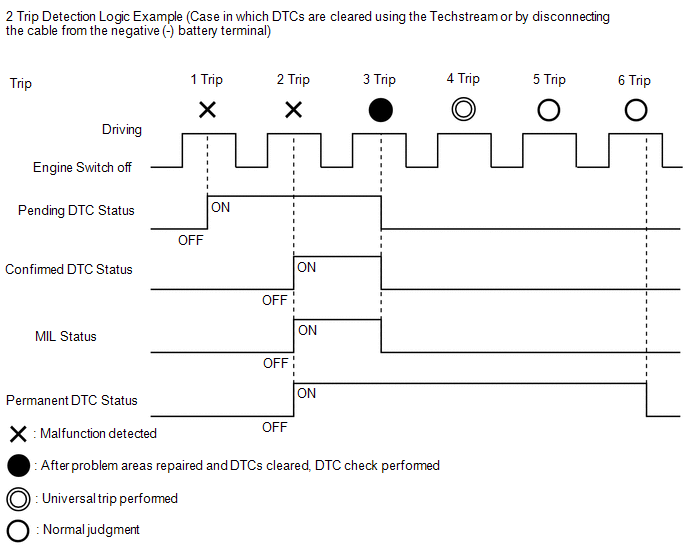
- Confirmed and pending DTCs can be cleared by using the Techstream or by disconnecting the cable from the negative (-) battery terminal. However, permanent DTCs cannot be cleared using either of these two methods.
- After clearing confirmed DTCs using the Techstream (or by disconnecting the cable from the negative (-) battery terminal), permanent DTCs can be cleared when the universal trip is performed and then the system is determined to be normal for the relevant DTCs. The driving pattern to obtain a normal judgment is described under the "Confirmation Driving Pattern" for the respective DTC.
To clear permanent DTCs, all of the following conditions must be are met:
- A universal trip has been performed.
- The vehicle has been judged as normal for 2 trips. (Normal judgment does not have to be performed in 2 consecutive trips, but normal judgment should have occurred in the latest trip.)
- No malfunctions are detected.
Pending DTC |
Store condition |
Malfunction detected |
Clear condition |
System determined to be normal or DTCs cleared using Techstream or Cable disconnected from negative (-) battery terminal |
|
Confirmed DTC |
Store condition |
Malfunction detected (2nd trip) |
Clear condition |
No malfunctions in 40 driving cycles or DTCs cleared using Techstream or Cable disconnected from negative (-) battery terminal |
|
Permanent DTC |
Store condition |
Malfunction detected (2nd trip) |
Clear condition |
Engine switch turned on (IG) after no malfunction is detected in 3 consecutive driving cycles or After DTCs cleared using Techstream or cable disconnected from negative (-) battery terminal, universal trip performed and normal judgment obtained for 2 trips |
|
MIL |
ON |
Malfunction detected (2nd trip) |
OFF |
Engine switch turned on (IG) after no malfunction is detected in 3 consecutive driving cycles or DTCs cleared using Techstream or Cable disconnected from negative (-) battery terminal |
CHECK DTC
(a) Connect the Techstream to the DLC3.
(b) Turn the engine switch on (IG).
(c) Turn the Techstream on.
(d) Enter the following menus: Powertrain / Transmission / Trouble Codes.
Powertrain > Transmission > Trouble Codes(e) Check for DTC(s) and freeze frame data, and write them down.
Techstream Display | Description |
|---|---|
Test Failed |
Shows the malfunction judgment results during the current trip. |
Pending |
Shows the malfunction judgment results up to now. (Indicates the possibility of a malfunction when no DTC is confirmed.) |
Confirmed |
Shows the DTCs confirmed up to now. (The number of current trips differs for each DTC.) |
(f) Check the details of the DTC(s).
Click here 
CLEAR DTC (Pending and Confirmed DTC)
(a) Connect the Techstream to the DLC3.
(b) Turn the engine switch on (IG).
(c) Turn the Techstream on.
(d) Enter the following menus: Powertrain / Transmission / Trouble Codes.
Powertrain > Transmission > Clear DTCs(e) Clear the DTCs.
CLEAR DTC (Pending and Confirmed DTC without using Techstream)
(a) Perform either of the following operations:
NOTICE:
After turning the engine switch off, waiting time may be required before disconnecting the cable from the negative (-) battery terminal. Therefore, make sure to read the disconnecting the cable from the negative (-) battery terminal notices before proceeding with work.
Click here
- Disconnect the cable from the negative (-) battery terminal for more than 1 minute.
- Remove the EFI-MAIN NO. 1 fuse and ETCS fuse from the No. 1 engine room relay block and No. 1 junction block assembly located inside the engine compartment for more than 1 minute.
CLEAR PERMANENT DTC
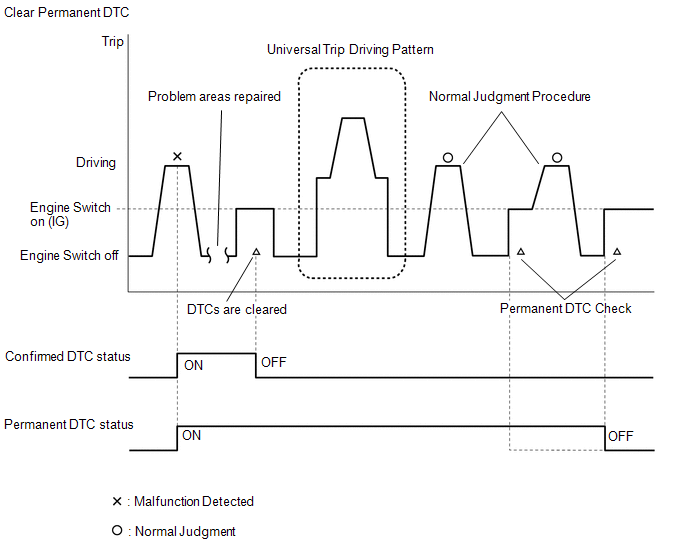
OUTLINE- After clearing confirmed DTCs using the Techstream (or by disconnecting the cable from the negative (-) battery terminal), permanent DTCs can be cleared when the universal trip is performed and then the system is determined to be normal for the relevant DTCs. The driving pattern to obtain a normal judgment is described under Confirmation Driving Pattern for the respective DTC.
- To clear permanent DTCs, all of the following conditions must be met:
- A universal trip has been performed.
- The vehicle has been judged as normal for 2 trips. (Normal judgment does not have to be performed in 2 consecutive trips, but normal judgment should have occurred in the latest trip.)
- No malfunctions are detected.
(a) Connect the Techstream to the DLC3.
(b) Turn the engine switch on (IG).
(c) Turn the Techstream on.
(d) Enter the following menus: Powertrain / Transmission / Trouble Codes.
Powertrain > Transmission > Trouble CodesHINT:
If "YES" is displayed for the value of "PERMANENT" at the top right of the Techstream screen, permanent DTCs are stored.
(e) Select the "Generic" tab.
(f) Check if permanent DTCs are stored.
HINT:
If permanent DTCs are not output, it is not necessary to continue this procedure.
(g) Clear the DTCs (even if no DTCs are stored, perform the clear DTC procedure).
Powertrain > Transmission > Clear DTCsNOTICE:
Do not clear the DTCs or disconnect the cable from the negative (-) battery terminal after performing this step.
(h) Perform the universal trip.
HINT:
The universal trip driving pattern and normal judgment procedure can be performed consecutively in the same driving cycle.
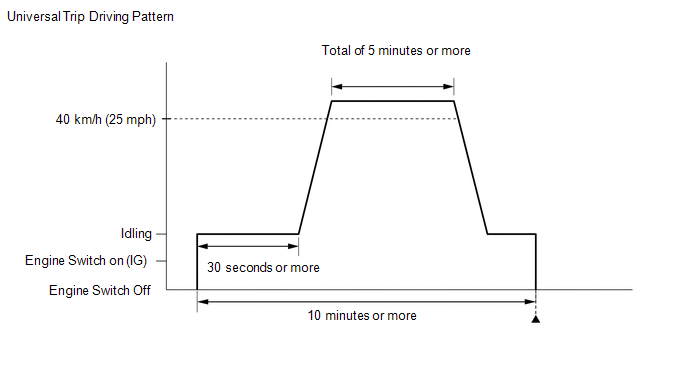
(1) Start the engine and wait for 30 seconds or more.
(2) Drive the vehicle at 40 km/h or more for a total of 5 minutes or more.
CAUTION:
When performing a driving pattern, obey all speed limits and traffic laws.
HINT:
It is possible to complete the drive pattern even if the vehicle decelerates to less than 40 km/h during the driving cycle provided that the vehicle is driven at 40 km/h or more for a total of 5 minutes.
(3) Allow 10 minutes or more to elapse from the time the engine started.
(i) Turn the engine switch off and wait for 2 minutes or more.
(j) Perform the normal judgment procedure in the respective confirmation driving pattern of each output DTC.
HINT:
Do not turn the engine switch off by mistake during this step.
(k) With the engine switch on (IG), wait for 5 seconds or more.
(l) Turn the engine switch off and wait for 2 minutes or more.
(m) Turn the engine switch on (IG).
(n) Enter the following menus: Powertrain / Transmission / Trouble Codes.
Powertrain > Transmission > Trouble Codes(o) Check that the permanent DTCs have been cleared.
HINT:
If permanent DTCs are not output, it is not necessary to continue this procedure.
(p) Perform the normal judgment procedure in the respective confirmation driving pattern of each output DTC.
HINT:
Do not turn the engine switch off by mistake during this step.
(q) With the engine switch on (IG), wait for 5 seconds or more.
(r) Turn the engine switch off and wait for 2 minutes or more.
(s) Turn the engine switch on (IG).
(t) Enter the following menus: Powertrain / Transmission / Trouble Codes.
Powertrain > Transmission > Trouble Codes(u) Check that the permanent DTCs have been cleared.
HINT:
Permanent DTCs will be cleared if a normal judgment is obtained during 3 consecutive driving cycles with the MIL illuminated.