Interior features
Screen for general settings
In this manual: Interior features
13steps
~78min
3/5difficulty
Done 0 of 13
- Press the “setup” button.
- Select “general” on the “setup” screen.
- “English”, “français” or “español” can be selected.
- On/off can be selected to sound beeps.
- Select to change the screen color.
- Select to change the keyboard layout.
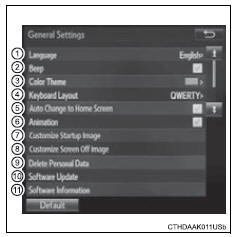
- Select to set automatic screen changes from the audio control screen to the home screen on/off. When set to on, the screen will automatically return to the home screen from the audio control screen after 20 seconds.
- The animation effect for the screen can be set to on/off.
- Select to customize the startup images.
- Select to customize the screen off images.
- Select to delete personal data
- Select to update program versions. For details, contact your toyota dealer.
- Select to display the software information. Notices related to third party software used in this product are enlisted. (This includes instructions for obtaining such software, where applicable.)
Select “default”, and then “yes”.
Test yourself
A quick Toyota RAV4 quiz: every answer comes with an explanation and a link to the manual page.
Was this page helpful?