Park Assist ayuda con las líneas de trayectoria de la cámara
Opción/accesorio.
The Park Assist Cameras (PAC1) use trajectory lines and fields on the screen to indicate the vehicle's position in relation to its immediate surroundings.

Ejemplo de líneas de trayectoria
The trajectory lines show the anticipated trajectory for the vehicle's outermost dimensions based on the current position of the steering wheel and can help simplify parallel parking, backing into tight spaces or attaching a trailer.
The lines on the screen are projected as if they were painted lines on the ground behind the vehicle and are directly affected by the way in which the steering wheel is turned. This makes it possible for the driver to see path the vehicle will take, even if he/she turns the steering wheel.
These lines also indicate the outermost limits that any object (towbar, rearview mirrors, corners of the body, etc.) extends out from the vehicle.
- Al marcha atrás con un remolque que no esté conectado eléctricamente al vehículo, las líneas guía de la pantalla muestran la trayectoria que seguirá el vehículo, no el remolque.
- The screen does not show guide lines when a trailer is electrically connected to the vehicle's electrical system.
- La guía no se muestra al hacer zoom.
- Bear in mind that when the rearward camera view is selected, the screen only shows the area behind the vehicle – pay attention to the sides and front of the vehicle when steering while reversing.
- The same applies to the reverse – pay attention to what is happening with the rear parts of the vehicle when the front camera view is selected.
- Note that the guide lines show the shortest path – pay extra attention to ensure that the vehicle sides do not come in contact with/travel over anything when steering while driving forward or that the vehicle front moves toward/over anything when steering while reversing.
Líneas de trayectoria en la vista 360° *

Vista 360° con líneas de trayectoria
In the 360° view, trajectory lines are shown behind, in front of, or to the sides of the vehicle, depending on the direction of travel.
- Al avanzar: líneas delanteras
- Al retroceder: líneas laterales y líneas traseras
When the front or rear camera is selected, the trajectory lines will be shown regardless of the vehicle's direction of travel.
With a side camera selected, the trajectory lines will only be shown if the vehicle is backing up.
Línea de trayectoria para remolque*
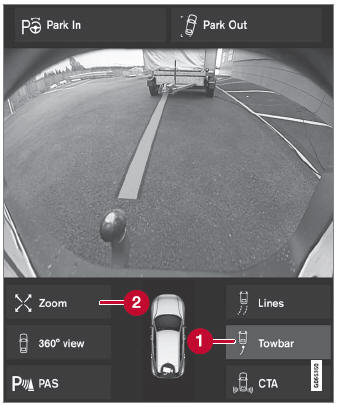
Remolque con línea de trayectoria
 Remolque - activa las líneas de trayectoria para el enganche de remolque.
 Zoom - acercar/alejar.
Para usar la cámara al enganchar un remolque:
- Pulse Remolque (1).
- The trajectory line for the towbar's anticipated path toward the vehicle will appear and the vehicle's trajectory lines will disappear.
Trajectory lines cannot be displayed for both the vehicle and the towbar at the same time.
- The trajectory line for the towbar's anticipated path toward the vehicle will appear and the vehicle's trajectory lines will disappear.
- Pulse Zoom (2) para obtener una vista detallada y maniobrar con mayor precisión.
- La cámara se acercará.
1 Asistencia de estacionamiento con cámara
* Opción/accesorio.
Pon a prueba tus conocimientos
Un test rápido sobre el Volvo XC90: cada respuesta trae una explicación y un enlace a la página del manual.