Uso de Park Assist Pilot
(Opción/accesorio.)
Park Assist Pilot (PAP1) helps the driver park using three different steps. The function can also help the driver pull out of a parking space.
La función mide el espacio y controla el vehículo. La función del conductor es:
- Mantener una vigilancia atenta del área alrededor del vehículo
- Seguir las instrucciones de la pantalla central
- change gears (reverse/forward) – an audible signal indicates when the driver needs to change gears
- Regular y mantener una velocidad segura
- Aplicar los frenos y detener el vehículo.
Information about the actions required by the driver are provided in the center display using symbols, graphics and/or text.
The function can be activated if the following criteria have been met after the engine is started:
- El remolque no está conectado al vehículo
- La velocidad de su vehículo es inferior a 30 km/h.
Estacionamiento con Park Assist Pilot
La función ayuda a estacionar el vehículo siguiendo estos pasos:
- El sistema busca y mide las posibles plazas de estacionamiento.
- El vehículo es dirigido mientras se mantiene en la plaza de estacionamiento.
- The vehicle is positioned in the parking space (the driver may be prompted to shift gears and apply the brakes).
Búsqueda y medición de posibles plazas de estacionamiento
 The function can be activated in the center display's Function view.
También se puede acceder a ella desde las vistas de cámara.
- Indicador de botón verde: la función está activada.
- Indicador de botón gris: la función está desactivada.
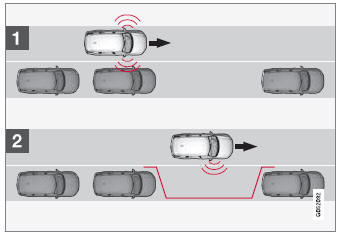
Vista de búsqueda de plaza de estacionamiento en paralelo.
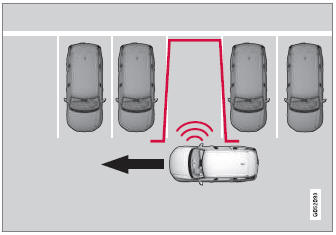
Vista de búsqueda de plaza de estacionamiento en batería.
The vehicle's speed may not exceed 30 km/h when parallel parking or 20 km/h when perpendicular parking.
- Pulse Estacionar en la vista de funciones o en la vista de cámara.
- The function will search for a potential parking space and measure it to determine if it is big enough.
- Be prepared to stop the vehicle when a graphic and message in the center display indicate that a suitable parking space has been found.
- Aparecerá una ventana emergente.
- Seleccione Estacionamiento en paralelo o Estacionamiento en batería y engrane la marcha atrás.
Posicionamiento en la plaza de estacionamiento
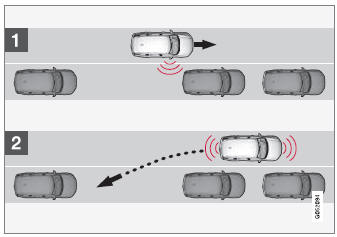
Vista de posicionamiento para estacionamiento en paralelo.
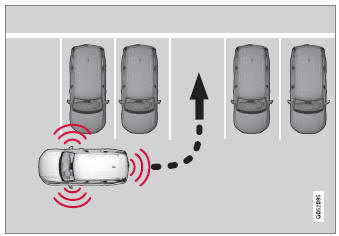
Asistencia para estacionamiento en batería.
- Asegúrese de que la trayectoria detrás del vehículo esté despejada y engrane la marcha atrás.
- Back up slowly and carefully without touching the steering wheel and do not exceed a speed of 7 km/h.
- Be prepared to stop the vehicle when instructed to do so by a graphic and message in the center display.
- Keep your hands away from the steering wheel when the function is activated.
- Make sure that the steering wheel is not hindered in any way and can rotate freely.
- To achieve the best results – wait until the steering wheel is finished turning before beginning to drive forward/in reverse.
Posicionamiento del vehículo en la plaza de estacionamiento
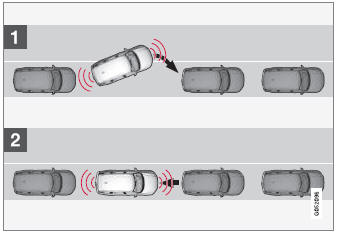
Vista de posicionamiento para estacionamiento en paralelo.
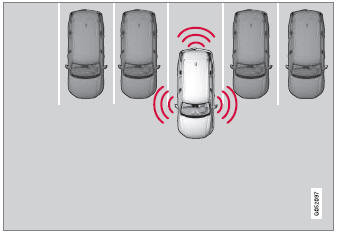
Vista de posicionamiento para estacionamiento en batería.
- Mueva el selector de marchas a la posición indicada por el sistema. Espere hasta que el volante gire y, a continuación, avance lentamente.
- Be prepared to stop the vehicle when instructed to do so by a graphic and message in the center display.
- Engrane la marcha atrás y retroceda lentamente.
- Be prepared to apply the brakes when instructed to do so by a graphic and message in the center display.
La función se desactivará automáticamente y aparecerán un gráfico y un mensaje para indicar que el aparcamiento ha finalizado. El conductor siempre puede realizar ajustes posteriormente. Solo el conductor puede determinar cuándo el vehículo está correctamente aparcado.
Freno automático durante la secuencia de aparcamiento
If, while parking, the parking sensors detect a vehicle or pedestrian in the vehicle's intended direction of travel behind or in front of the vehicle, the auto-brake function will bring the vehicle to a standstill.
A continuación aparecerá un mensaje emergente en el cuadro de instrumentos y el conductor puede pulsar Cancelar para cancelar la secuencia de aparcamiento o Reanudar para continuar la secuencia de aparcamiento.
Tras seleccionar Reanudar:
- Check that the area around the vehicle is free of obstructions and follow the instructions on the center display, such as:
To continue – Gently accelerate away from object.
1 Park Assist Pilot
Pon a prueba tus conocimientos
Un test rápido sobre el Volvo XC90: cada respuesta trae una explicación y un enlace a la página del manual.