Overview. Display. Wrong-way warning. Selection lists
This section covers several functions for display and driver information systems in the BMW 5 G30. The focus is on Speed Limit Info, overtaking ban recognition, wrong-way warning, and selection lists on the steering wheel. All recorded data, such as speed limits or prohibited driving directions, is shown in the instrument cluster or on the Head-Up Display. The wrong-way warning uses navigation data and traffic signs to detect incorrect driving, such as entering the wrong way. Despite high technical precision, the chapter points out system limits, e.g. in fog or with non-standard signs. The intuitive menu system for controlling music or phone calls via the steering wheel is also clearly explained, for greater safety with full control.
Overview
Camera
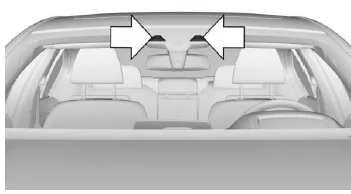
The camera is located in the area of the interior rearview mirror.
Keep the windshield in the area in front of the interior rearview mirror clean and free of obstructions.
Display
General
Speed Limit Info is shown in the instrument cluster and, if applicable, on the Head-Up Display.
Supplementary signs are displayed together with Speed Limit Info when it is switched on.
Overtaking bans are displayed together with Speed Limit Info when it is switched on.
Depending on equipment, outside built-up areas, an additional symbol with distance indication may signal
an upcoming change in the speed limit.
Adjusting the display
The Speed Limit Info displays and, if applicable, supplementary signs are shown or hidden via the operating mode of the instrument cluster.
In the following operating modes, Speed Limit Info and, if applicable, supplementary signs are displayed: "STANDARD" or "INDIVIDUAL". In the following operating mode, Speed Limit Info and, if applicable, supplementary signs are not displayed: "CALM". Set the operating mode of the instrument cluster.
Speed Limit Info
 Current speed limit.
For German autobahns: speed limit lifted.
 Speed Limit Info not available.
No Overtaking Indication
 Overtaking ban.
 Overtaking ban lifted.
Wrong-way warning
Depending on equipment, the system uses navigation data and traffic signs, e.g. no-entry signs, roundabout signs or mandatory passing direction signs, to detect driving the wrong way on freeways, roundabouts and one-way streets.
A warning is shown in the instrument cluster and, if applicable, on the Head-Up Display, and a warning tone sounds as soon as a road is driven against the prescribed direction of travel.
System limitations
The function may be limited, for example, in the following situations, and may display incorrect information or, depending on equipment, give an incorrect wrong-way warning or none at all:
- In heavy fog, rain or snowfall.
- If signs are fully or partially covered by objects, stickers or paint.
- When driving closely behind a vehicle ahead.
- In strong backlight or strong reflections.
- If the windshield in front of the interior rearview mirror is fogged, dirty or covered by stickers, etc.
- Due to possible misrecognition by the camera.
- If the speed limits or road data stored in the navigation system are incorrect.
- For speed limits that depend on time of day and day of the week.
- In areas not covered by the navigation system.
- For deviations from the navigation, e.g.
Selection lists
General
Depending on equipment, the following can be displayed or operated using the buttons and the thumbwheel on the steering wheel, the displays in the instrument cluster and the Head-Up Display:
- Current audio source.
- Phone redial.
- Activating the voice control system.
Activate list and make setting
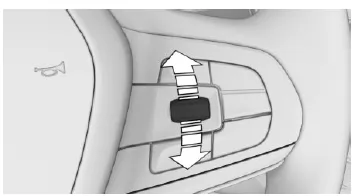
Turn the knurled wheel on the right side of the steering wheel to activate the corresponding list.
- Turn the knurled wheel and select the desired setting.
- Press the knurled wheel.
Display
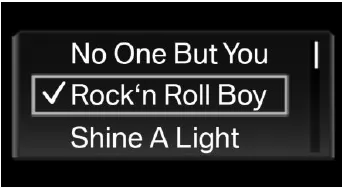
Depending on equipment, the list in the instrument cluster may differ from the display shown here.
The driver assistance system of the BMW 5 G30/G31 provides the driver with precise information on speed limits, no-passing zones and wrong-way warnings. The intelligent combination of camera data and navigation information helps to avoid driving errors and to increase safety in road traffic.
The wrong-way warning is particularly valuable, as it alerts the driver early when driving on a road in the wrong direction. In critical situations, the acoustic signal can be life-saving. In this way, the BMW 5 G30/G31 offers a high level of active safety that goes well beyond standard solutions.
Thanks to the selection lists on the steering wheel, drivers can also quickly and safely operate important functions such as phone or audio source without taking their hands off the steering wheel, a further contribution to driving safety.
Test yourself
A quick BMW 5 quiz: every answer comes with an explanation and a link to the manual page.