Vehicle equipment. Instrument cluster
The electronic gear selector in the BMW 5 Series 7th generation makes shifting easier thanks to modern technologies such as shift-by-wire. This section describes in detail the design and operating logic of the electronic selector lever, from the individual positions to emergency release. Safety functions such as gear locking when a door is open are also explained.
Vehicle equipment
This chapter describes all standard, country-specific and optional equipment offered in the model series. It therefore also describes equipment that is not available in a given vehicle, for example due to the selected optional equipment or country variant. This also applies to safety-related functions and systems. When using the corresponding functions and systems, observe the applicable laws and regulations.
Instrument cluster
General
The display change can be deactivated via iDrive.
The displays in the instrument cluster may differ in some cases from the illustrations in this owner's manual.
Overview
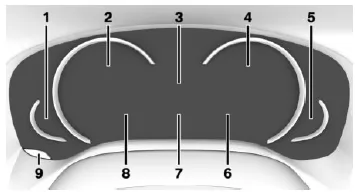
- Fuel gauge
Instrument cluster with extended scope: range - Speedometer
- Time
Outside temperature
Driver assistance system displays
Service requirements - Instrument cluster with extended displays:
Tachometer
Instrument cluster with extended displays: ECO PRO displays - Engine temperature
- Navigation display
Gear indicator
Driving Experience control status - Messages, e.g. Check-Control on-board computer
- Driver assistance displays Speed Limit Info
Instrument cluster without extended displays: Range - Reset trip odometer
Set view
Principle
Depending on equipment, the instrument cluster can be set to three different operating modes in addition to the driving modes.
Settings
Via iDrive:
- "My Vehicle"
- "iDrive settings"
- "Displays"
- "Instrument cluster"
- Select the desired setting.
- "STANDARD": All displays in the instrument cluster are active.
- "RELAXED": The displays in the instrument cluster are reduced to the essentials.
- "INDIVIDUAL": All displays in the instrument cluster are active. Individual displays can be configured separately.
Set INDIVIDUAL
- "Driving mode display": When the driving mode is changed to ECO PRO or SPORT, the instrument cluster automatically switches to the corresponding display.
- "Speed Limit Info supplementary signs": The situation-dependent supplementary signs detected by Speed Limit Info, see page 133, are displayed.
- "Speed limit exceeded": If the speed detected by Speed Limit Info is exceeded, the exceeded range is marked with a red band on the speedometer.
- Instrument cluster with extended displays: "Magnifier function": The current speed is shown enlarged on the speedometer.
The instrument cluster of the BMW 5 Series G30/G31 provides a clear and modern display of all important driving information. It can be configured individually so that each driver can tailor the displays to their needs.
Through its integration with the driving modes and the option of individual display settings, the driver always stays well informed and can concentrate fully on the road. The BMW 5 Series G30/G31 thus underlines its premium character in the cockpit as well.
FAQQuestion 1: Can I adjust the instrument cluster?
Answer: Yes, various views and display options can be selected using iDrive.
Question 2: What does the magnifier function do?
Answer: It enlarges the current speed on the speedometer for better readability.
Test yourself
A quick BMW 5 quiz: every answer comes with an explanation and a link to the manual page.